 This article explores the key indicators of insider threats and shadow IT hidden within firewall logs, the behavioral patterns security teams should monitor, and how advanced firewall analytics can help IT and security teams detect abnormal activity, improve application visibility, and identify emerging security risks before they impact business operations.
Key topics:
- Why insider threats and shadow IT are hard to detect
- Key indicators of insider threats and shadow IT in firewall traffic and session data
- How SaaS adoption and unmanaged applications expand the enterprise attack surface
- Best practices for identifying abnormal user, application, and outbound traffic behavior
- How firewall log analysis helps uncover hidden security and compliance risks
- Using ManageEngine Firewall Analyzer to improve visibility, detect anomalies, and strengthen network security monitoring
- Summary
Related Articles:
- 7 Essential Firewall Management Strategies for Maximum Security
- Achieving Modern Compliance: Navigate PCI DSS v4.0 with Firewall Analyzer
- Challenges & Solutions to Managing Firewall Rules in Complex Network Environments
- Dealing with Security Audit Challenges: Discovering vulnerabilities, unauthorized access, optimize network security & reporting
- Discover the Ultimate Firewall Management Tool: 7 Essential Features for Unleashing Unrivaled Network Security!
- Ensuring Compliance and Business Continuity in a Hybrid Work Environment
- Master Your Firewall: 6 Expert-Backed Steps to Boost Security, Performance, and Compliance
Firewall Analyzer simplifies firewall auditing, helps identify vulnerabilities and compliance risks before they impact your network.
Why Insider Threats and Shadow IT Are Hard to Detect
Insider threats and shadow IT present a significant detection challenge because they rarely resemble conventional malicious activity. In most cases, there is no obvious exploit attempt, malware signature, or unauthorized access event to trigger immediate concern. Instead, the activity originates from authenticated users, trusted devices, approved applications, and legitimate communication channels already permitted within the organization’s security policies. From the perspective of traditional firewalls and perimeter-based controls, the traffic often appears fully compliant with expected operational behavior.
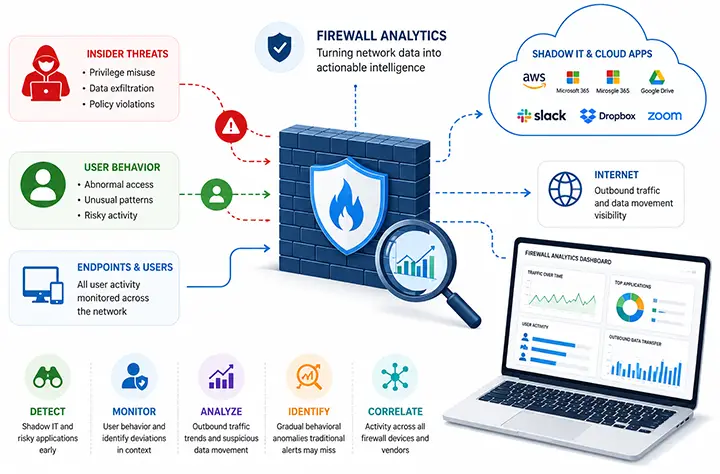
Modern enterprise environments have further complicated this challenge. Organizations now operate across hybrid infrastructures consisting of on-premises systems, cloud platforms, remote users, SaaS applications, and third-party services generating massive volumes of encrypted network traffic. At the same time, departments and individual users can rapidly adopt external applications without formal IT onboarding or security review, creating extensive shadow IT exposure. These unmanaged services frequently bypass centralized visibility and introduce uncontrolled data movement across the network.
The problem is compounded by the fact that insider threats and shadow IT typically develop gradually rather than through sudden disruptive activity. A user may begin transferring larger volumes of outbound data over time, accessing additional internal resources, or consistently communicating with newly introduced cloud services. Individually, these actions may appear harmless or operationally justified. However, when correlated across firewall logs, session data, and user behavior patterns, they can reveal indicators of data exfiltration, policy violations, compromised accounts, or unmanaged applications operating outside organizational governance.
Traditional monitoring approaches often struggle in these scenarios because they focus primarily on isolated alerts and signature-based detection. Detecting insider threats and shadow IT requires continuous behavioral analysis capable of identifying subtle deviations in traffic patterns, application usage, session behavior, and access distribution over extended periods of time. This makes firewall traffic analysis and long-term log correlation critical components of modern enterprise security monitoring.
Key Indicators of Insider Threats and Shadow IT in Firewall Traffic and Session Data
Once insider threats or shadow IT begin developing within an environment, the problem is rarely related to unauthorized access itself. In most cases, the access already exists and appears legitimate. The real change occurs in how users, applications, and systems interact across the network over time. These behavioral shifts are often subtle initially, but they leave measurable indicators within firewall traffic, session logs, and application activity:
1. Traffic direction and volume
One of the earliest indicators is a change in traffic flow patterns, particularly involving outbound traffic volumes. Users or systems that typically generate low outbound activity may begin transferring increasing amounts of data externally over extended periods. Unlike traditional exfiltration attempts that create sudden spikes in traffic, insider-driven activity often develops gradually to avoid detection thresholds and bandwidth anomalies.
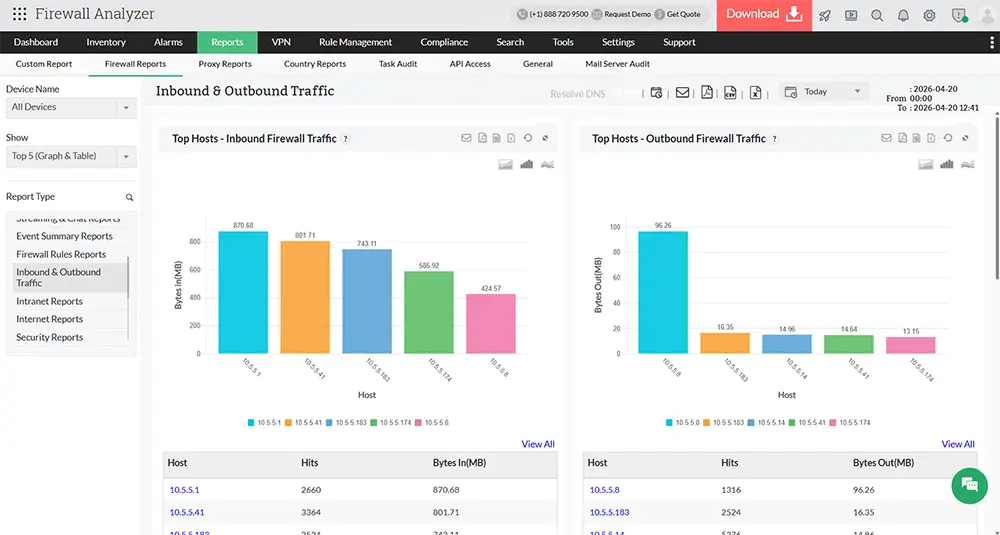
These outbound connections may target cloud storage platforms, collaboration tools, personal SaaS applications, or newly introduced external services outside standard business workflows. Security teams should pay particular attention to sustained upload activity, changes in upload-to-download ratios, abnormal encrypted outbound sessions, and recurring communication with previously unseen destinations. Firewall logs and NetFlow data provide critical visibility into these directional traffic changes when analyzed over time.
2. Application usage
Shadow IT frequently becomes visible through evolving application usage patterns across the network. New SaaS platforms, external APIs, file-sharing services, AI tools, or collaboration applications may begin appearing in firewall traffic without having undergone formal IT approval or security assessment. In many cases, these services are adopted to improve productivity, but they introduce unmanaged risk, data governance concerns, and reduced visibility for security teams.
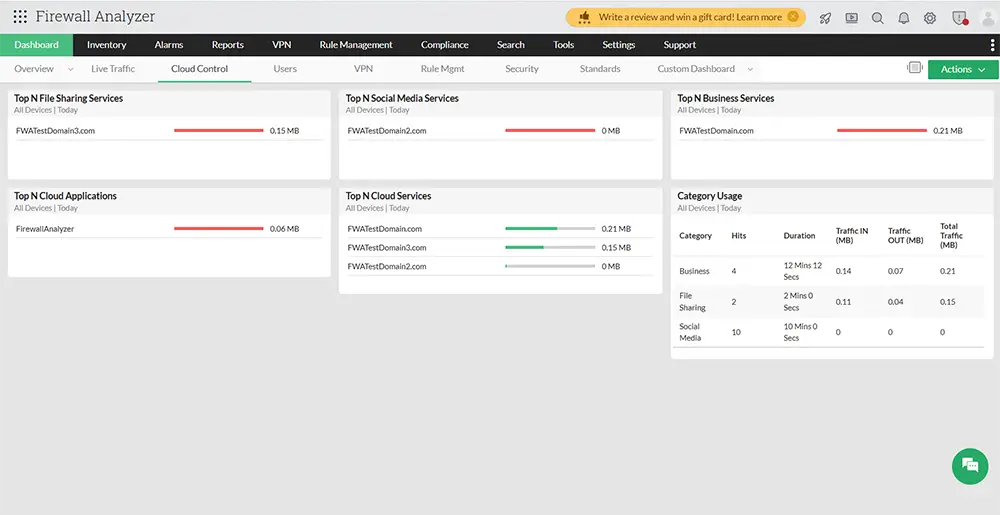
From a monitoring perspective, the challenge is that these applications often operate over legitimate HTTPS traffic and standard ports, making them difficult to distinguish from approved enterprise applications. Over time, repeated communication with unrecognized cloud services, abnormal application growth across departments, or concentrated usage by specific users or teams may indicate unmanaged application adoption or risky data handling practices. Advanced firewall analytics capable of performing application-layer identification and behavioral correlation become essential for detecting these trends early.
3. Access distribution
Another important indicator involves changes in access distribution and resource interaction patterns. Most users operate within relatively predictable access boundaries, regularly communicating with a defined set of internal systems, applications, and external services relevant to their role. Insider threats and compromised accounts often begin deviating from these established patterns by gradually expanding the range of systems and services they access.
This may include increased lateral movement between internal segments, access to previously unused servers, expanded communication with external resources, or abnormal interaction across departments and business units. These changes are often incremental enough to remain within existing access permissions, avoiding immediate detection by traditional access-control mechanisms. However, when correlated over time, firewall logs and session analysis can reveal expanding behavioral footprints that indicate elevated exposure or suspicious activity.
4. Session behavior
Session-level anomalies also provide valuable indicators of insider threats and shadow IT activity. Changes in connection duration, session frequency, communication timing, and persistent connections can all signal evolving behavior within the environment. For example, sessions may begin occurring outside standard operational hours, remain active for unusually long periods, or establish repetitive communication patterns with external services.
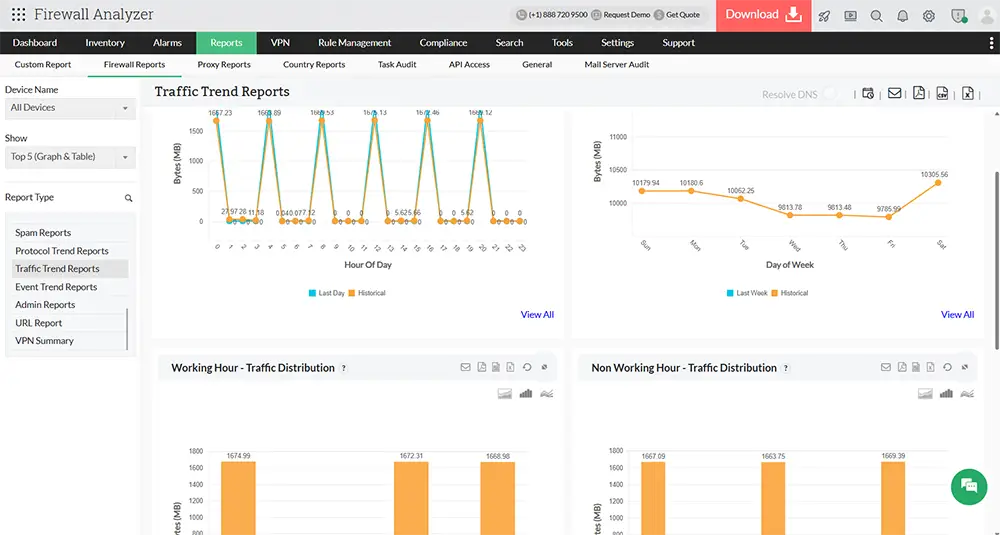
Individually, these session anomalies may not appear significant enough to generate alerts. However, when viewed collectively, they alter the normal behavioral baseline of users, systems, or applications. Long-lived encrypted sessions, repeated outbound communication intervals, abnormal authentication persistence, and increased session concurrency often indicate changes in operational behavior that warrant investigation.
The challenge for many organizations is that these indicators rarely appear as isolated high-severity events. Traditional security monitoring platforms often prioritize signature-based detection and individual alert generation rather than long-term behavioral analysis. As a result, gradual deviations in traffic patterns, application usage, access behavior, and session activity can remain undetected until they escalate into operational, compliance, or security incidents.
How SaaS Adoption and Unmanaged Applications Expand the Enterprise Attack Surface
The rapid adoption of SaaS platforms and cloud-based applications has fundamentally changed how enterprise networks operate. Business units can now deploy collaboration platforms, file-sharing services, AI tools, and productivity applications within minutes, often without direct involvement from IT or security teams. While this improves operational agility and accelerates digital transformation, it also introduces significant visibility and governance challenges. Every unmanaged application added to the environment creates additional external communication paths, new data storage locations, third-party integrations, and expanded user access requirements, all of which increase the organization’s overall attack surface.
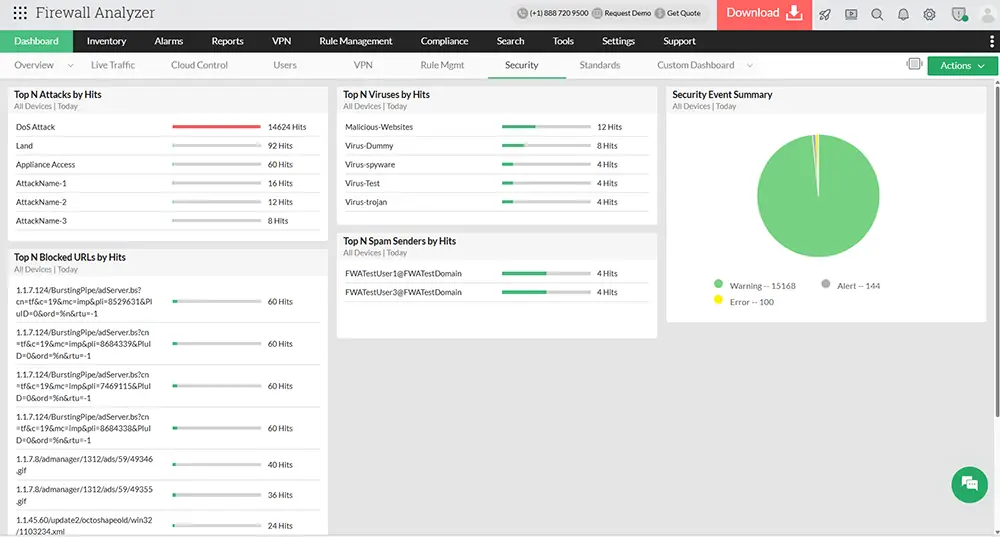
The security challenge is further amplified because most SaaS applications communicate using encrypted HTTPS traffic over standard ports, allowing them to blend seamlessly into normal network activity. Traditional firewalls and perimeter-based controls may permit this traffic without fully identifying the applications, users, or data flows involved. As SaaS usage expands across distributed workforces and hybrid environments, organizations often lose centralized visibility into where sensitive data is stored, how it is shared, and which external services users are interacting with. This lack of application visibility not only increases the risk of shadow IT and data exposure, but also makes it more difficult for security teams to detect abnormal behavior, enforce compliance policies, and identify compromised accounts operating through legitimate cloud services.
Best Practices for Identifying Abnormal User, Application, and Outbound Traffic Behavior
Detecting insider threats and shadow IT requires more than traditional alert-based monitoring. Security teams must continuously analyze how users, applications, and systems behave across the network over time.
The following best practices help organizations improve visibility, identify abnormal activity earlier, and reduce the risk of unmanaged or malicious behavior remaining undetected within enterprise environments.
- Track outbound data movement trends: Monitor how data flows out of the network, not just whether it is allowed. Gradual increases in outbound traffic or shifts toward upload-heavy activity often indicate emerging risk.
- Identify and review new applications: Regularly analyze traffic to detect previously unseen external services. Consistent communication with new domains should be validated against approved business applications.
- Monitor changes in user access patterns: Track how users interact with systems over time. Expanding access to additional resources or deviations from normal usage patterns should be investigated.
- Analyze session behavior and frequency: Look for changes in session duration, frequency, and timing. Longer or more frequent sessions can indicate shifts in usage behavior.
- Correlate activity across time, not events: Avoid relying only on isolated alerts. Patterns that develop gradually are often missed without continuous correlation.
- Monitor encrypted HTTPS traffic at the application layer: Most SaaS and cloud applications operate over encrypted HTTPS traffic using standard ports. Application-aware firewall analysis helps identify which services users are actually communicating with beyond basic port and protocol visibility.
- Establish behavioral baselines for users and systems: Build normal activity profiles for users, devices, and applications. Behavioral baselining helps security teams identify anomalies such as unusual access times, abnormal bandwidth consumption, or unexpected communication patterns.
- Monitor east-west traffic and lateral movement: Insider threats and compromised accounts often expand beyond initial systems. Monitoring internal traffic between servers, VLANs, and network segments helps identify suspicious lateral movement activity.
- Review persistent and long-duration sessions: Extended session durations, recurring outbound connections, or persistent encrypted communications may indicate unauthorized data transfers or unmanaged application usage.
- Track communication with high-risk or unsanctioned cloud services: File-sharing platforms, remote access tools, AI applications, and external collaboration services can introduce unmanaged risk if deployed outside IT governance processes.
- Centralize visibility across hybrid environments: Modern enterprises operate across on-premises infrastructure, cloud platforms, branch offices, and remote work environments. Consolidated firewall visibility is essential for identifying patterns that span multiple locations and systems.
Use automated anomaly detection where possible: Manual log review does not scale effectively across large enterprise environments. Automated analytics and anomaly detection help identify abnormal traffic behavior earlier and reduce the likelihood of missed indicators.
Changes in traffic direction, the appearance of new external services, and shifts in access behavior can all be observed directly within firewall data. These indicators help identify both insider-driven activity and the presence of unapproved applications operating within the environment.
How Firewall Log Analysis Helps Uncover Hidden Security and Compliance Risks
Firewall logs provide far more than operational network visibility. When analyzed continuously, they help organizations uncover hidden security, compliance, and governance risks that are often missed by traditional monitoring approaches. Unauthorized SaaS usage, unmanaged cloud applications, abnormal outbound communication, and policy violations frequently leave measurable indicators within firewall traffic long before they are formally identified by security teams.
For organizations operating under regulatory and compliance frameworks, firewall log analysis also plays a critical role in maintaining visibility over sensitive data movement and user activity. Unexpected communication with external services, unsanctioned file-sharing platforms, or abnormal access behavior may indicate violations of internal security policies, data handling requirements, or industry regulations. By correlating firewall traffic, application usage, and user behavior over time, organizations can strengthen both security monitoring and compliance oversight while reducing the operational risks associated with shadow IT and unmanaged network activity.
Using ManageEngine Firewall Analyzer to Improve Visibility, Detect Anomalies, and Strengthen Network Security Monitoring
Firewall logs already contain valuable security intelligence capable of revealing insider threats, shadow IT activity, abnormal user behavior, and suspicious outbound communication. The challenge for most organizations is not data collection, but transforming large volumes of firewall telemetry into actionable visibility that reflects how activity evolves across the network over time.
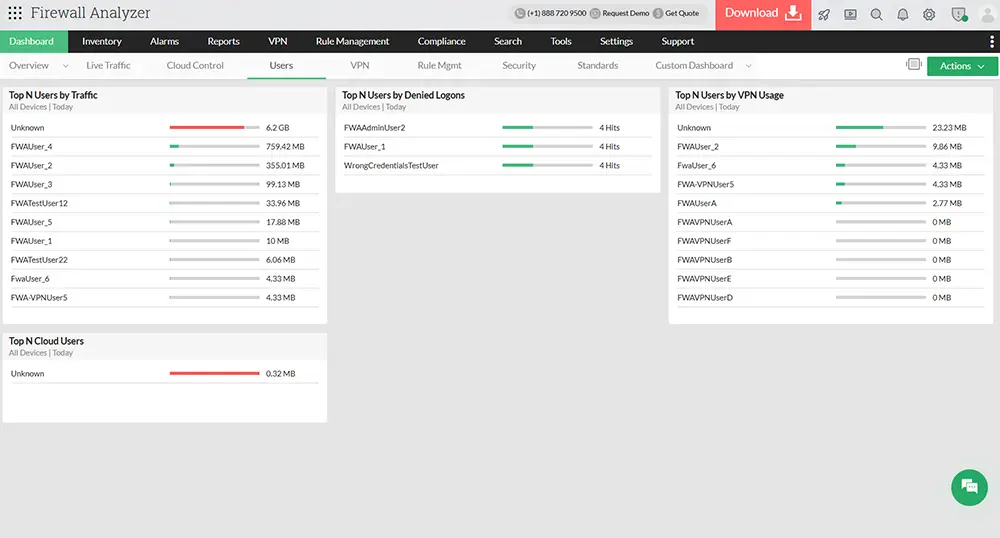
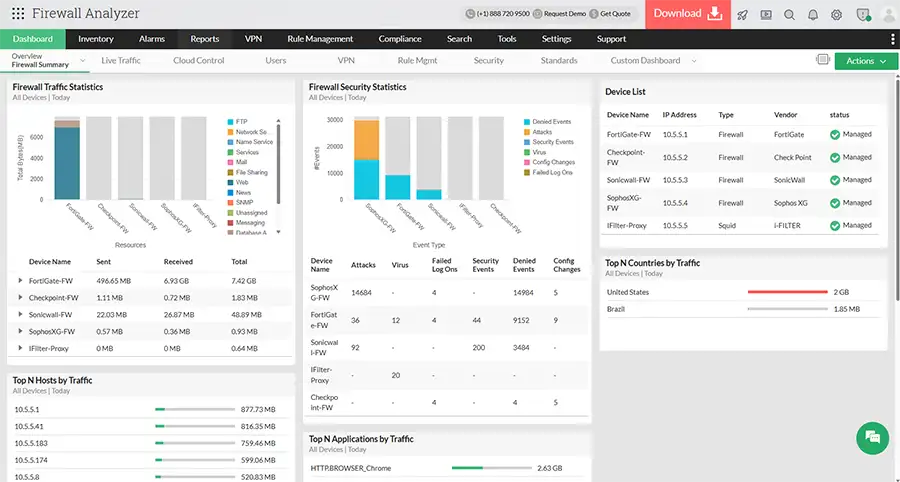
ManageEngine Firewall Analyzer helps address this challenge by organizing firewall data around users, applications, traffic patterns, and session behavior. Instead of reviewing logs as isolated events, security teams gain continuous visibility into how network activity changes across the environment, allowing them to detect subtle behavioral anomalies before they escalate into operational or security incidents.
With Firewall Analyzer, organizations can:
- Detect shadow IT and risky cloud applications: Identify unmanaged, newly introduced, or consistently used external services operating outside approved enterprise policies and security visibility.
- Monitor user behavior and abnormal access activity: Track how users interact with systems, applications, and network resources over time to identify deviations from expected behavioral patterns.
- Analyze outbound traffic and suspicious data movement: Monitor traffic direction, data transfer trends, and unusual external destinations to identify potential data exfiltration or unmanaged communication channels.
- Identify long-term behavioral anomalies: Analyze evolving trends in traffic, sessions, and access activity to uncover gradual risks that traditional event-based alerts often fail to detect.
- Correlate firewall activity across multi-vendor environments: Centralize and correlate firewall data across all devices and vendors to eliminate fragmented visibility and improve threat detection accuracy.
Rather than reacting to isolated security events after an incident occurs, teams can proactively monitor how users, applications, and traffic behaviors evolve across the network. By combining firewall log analysis, behavioral monitoring, and centralized visibility, Firewall Analyzer helps organizations strengthen security monitoring, improve application visibility, and identify emerging threats earlier within increasingly complex enterprise environments.
Summary
As SaaS adoption, hybrid work, and decentralized applications continue expanding the enterprise attack surface, insider threats and shadow IT have become increasingly difficult to detect using traditional security approaches alone. Continuous firewall traffic analysis, behavioral monitoring, and long-term correlation of user, application, and session activity are now essential for identifying abnormal behavior early. By transforming firewall logs into actionable security intelligence, organizations can improve visibility, reduce unmanaged risk, and strengthen their ability to detect emerging threats before they impact business operations.
Can Your EDR Spot the Attack?

Enterprise-Class Cloud & Network Monitoring

Threat Traffic Analysis

Wi-Fi Key Generator
IT Infrastructure Monitoring

Follow Firewall.cx
Recommended Downloads
Cisco Password Crack
Decrypt Cisco Type-7 Passwords on the fly!
Automated Patching Solution

Firewall Analyzer