TLS certificates are a critical part of modern network security, protecting firewalls, SSL-VPN gateways, load balancers, reverse proxies, management interfaces and internet-facing applications. Yet certificate management remains surprisingly manual, with renewals often tracked through spreadsheets, calendars and processes spread across network, security and application teams.
That approach is becoming increasingly difficult to manage. Publicly trusted TLS certificate validity is being reduced from 398 days to 200 days, then 100 days and ultimately just 47 days by 2029. At the 47-day maximum, the same certificate could require replacement roughly eight times every year.
For network administrators, renewal is only part of the challenge. Certificates must also be deployed to the correct device and service, activated where necessary, and verified to ensure the endpoint is presenting the new certificate. As certificate lifetimes shrink, organizations need a repeatable, automated lifecycle that reduces manual intervention and prevents predictable certificate-expiry outages.
Key Topics
- How TLS Certificate Validity Is Changing: 398 → 200 → 100 → 47 Days
- Why shorter certificate lifetimes create new challenges for firewalls, VPN gateways, load balancers and other network devices
- Why certificate renewal alone isn't enough and deployment, activation and verification also matter
- How to discover, renew, deploy, verify and monitor certificates through an automated lifecycle
- How to identify expiry risks, failed renewals, deployment failures and manually managed exceptions
- How ManageEngine Key Manager Plus can help automate certificate lifecycle management across network infrastructure
- Network Device Certificate Automation Checklist
- Summary - Preparing for the 47-Day Certificate Era
Ready to simplify certificate management? Download Key Manager Plus for free and start automating your certificate lifecycle today.
How TLS Certificate Validity Is Changing: 398 → 200 → 100 → 47 Days
The certificate lifecycle is already getting shorter. Following the CA/Browser Forum's SC-081v3 decisionSC-081v3CA/Browser Forum's SC-081v3 decision, the maximum validity period for publicly trusted TLS certificates is being progressively reduced from the previous 398-day limit.
The first major change took effect on 15 March 2026, reducing maximum certificate validity to 200 days. This will fall again to 100 days from 15 March 2027, before reaching just 47 days from 15 March 2029.
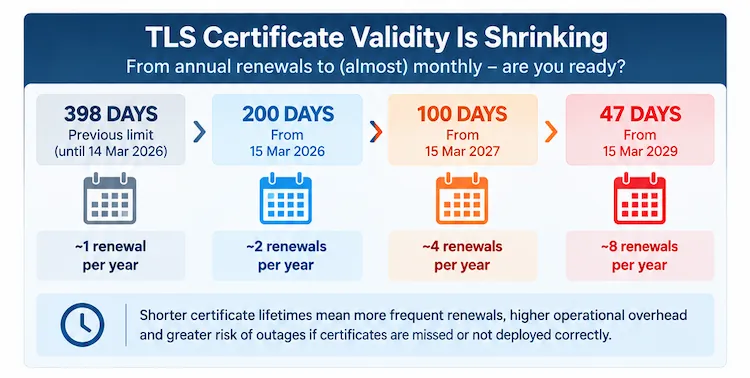 Publicly trusted TLS certificate maximum validity is being progressively reduced from 398 days to just 47 days by March 2029.
Importantly, this isn't a change organizations can leave until 2029. The 200-day limit is already in effect, and the first maximum-length certificates issued under the new limit will begin expiring around late September and early October 2026.
The direction is clear: publicly trusted TLS certificates are moving towards shorter validity periods and much more frequent renewal. For network and security teams, now is the time to review how certificates are discovered, renewed and deployed before the renewal cycle becomes even shorter.
Why Shorter Certificate Lifetimes Create New Challenges for Firewalls, VPNs Gateways, Load Balancers and other Network Devices
Under the previous 398-day limit, a publicly trusted TLS certificate typically required replacement about once a year. As certificate validity falls, that workload increases dramatically. At the eventual 47-day maximum, the same certificate may need replacing roughly eight times every year.
Consider a relatively small environment consisting of a pair of firewalls, a load balancer and a VPN concentrator carrying just 12 publicly trusted certificates. Under a 47-day lifecycle, those certificates could generate close to 100 certificate replacements every year. Scale that across multiple firewalls, VPN gateways, application delivery controllers, reverse proxies and other network infrastructure, and manual certificate management quickly becomes difficult to sustain.
Network devices present an additional challenge because certificate automation is not always as straightforward as it is on web servers. Many web servers can use an ACME client to automate certificate issuance and renewal from end to end. Firewalls, VPN gateways and load balancers vary considerably in their automation capabilities, and some still require administrators to manually request or import certificates, apply the correct format, associate them with the appropriate service or listener, and activate the change.
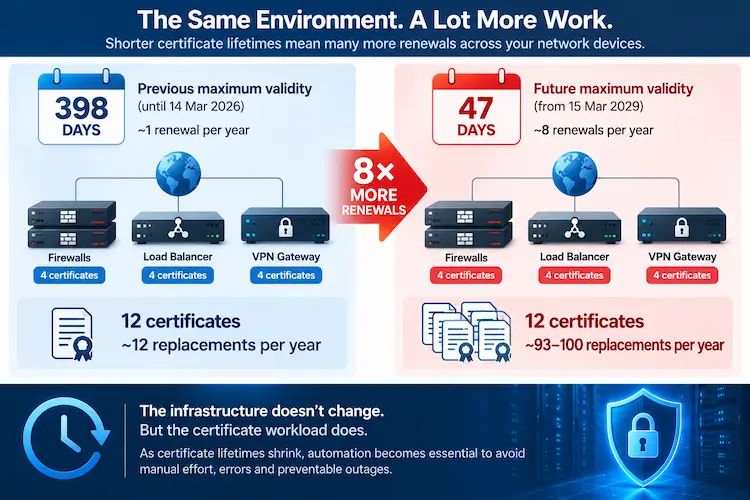 Shorter TLS certificate lifetimes can increase certificate renewal workloads by almost eight times.
None of these tasks is particularly difficult when performed occasionally. The risk comes from having to repeat them across many devices, many certificates and increasingly short renewal cycles. A process that was manageable once a year can become a significant operational burden when it must be repeated every few weeks.
Why Certificate Renewal Alone Isn't Enough and Deployment, Activation and Verification Also Matter
Renewing a TLS certificate is only one part of keeping a network service secure and available. Once a new certificate has been issued, it still needs to reach the correct device and service, be installed in the required format, associated with the appropriate VPN portal, virtual server, listener or management interface, and activated successfully.
This is particularly important on network appliances. A renewal process may report success because a new certificate was issued or imported, while the firewall, VPN gateway or load balancer continues presenting the old certificate to clients. Depending on the platform, additional actions such as updating a binding, changing an SSL profile, reloading a service or restarting a process may be required before the replacement certificate actually goes into use.
Effective certificate automation therefore needs to cover the entire lifecycle, not simply renewal:
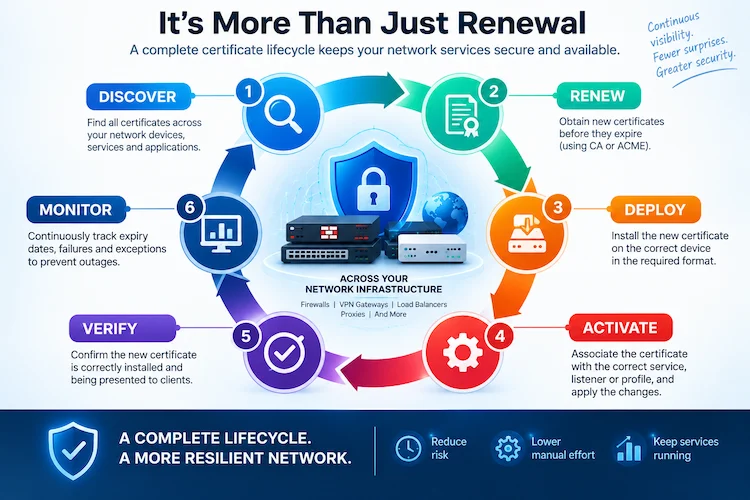
Each stage closes a potential gap. Discovery identifies certificates that need managing; renewal obtains the replacement; deployment and activation put it into service; verification confirms the correct certificate is being presented; and continuous monitoring identifies expiry risks, failures and exceptions before they become outages.
How to Discover, Renew, Deploy, Verify and Monitor Certificates Through an Automated Lifecycle
Once certificates have been identified, the next step is to establish a repeatable automation workflow that covers the entire lifecycle. The objective isn't simply to renew certificates before they expire, but to ensure each certificate is correctly discovered, renewed, deployed and verified with as little manual intervention as possible.
Step 1 – Discover and Classify Certificates
You can't manage a certificate you don't know exists. Start by building a complete inventory across IP ranges, subnets, ports, servers, firewalls, load balancers and DMZ hosts.
For each certificate, record its location, service, listening port, issuing CA, expiry date and owner, along with whether it is publicly trusted, privately issued or self-signed. It's equally important to identify the virtual server, VPN portal, listener or management service using the certificate so there is a clear deployment target when renewal occurs.
Centralised discovery can also expose certificates on non-standard ports and forgotten services, as well as identify security concerns such as SHA-1 certificates and weak 1024-bit-or-less keys. ManageEngine Key Manager Plus supports certificate discovery across standard hosts as well as supported network platforms including F5 BIG-IP, Citrix and FortiGate devices, helping bring certificates that might otherwise sit outside the central inventory into the same management process.
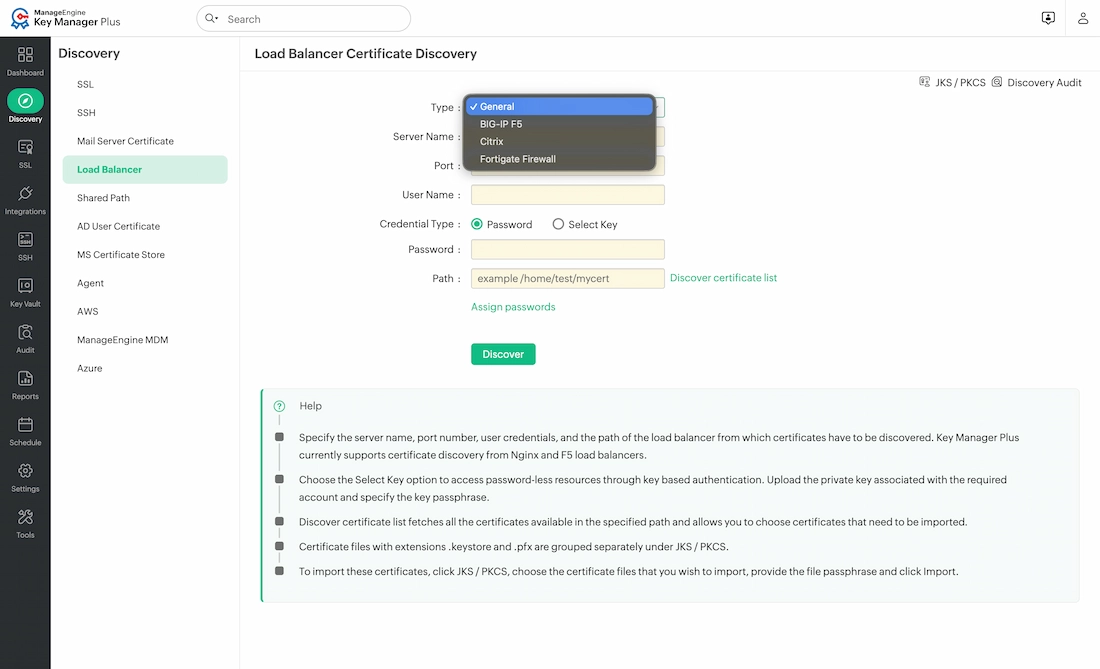 Key Manager Plus discovers certificates from supported network devices and load balancers, helping build a centralised certificate inventory.
Step 2 – Automate Certificate Issuance and Renewal
Once the inventory is established, each certificate should be associated with a defined issuance and renewal process. This includes identifying the issuing CA or ACME provider, domain-validation ownership, renewal threshold, approval requirements, certificate profile and key parameters.
Just as importantly, define what happens when automation fails. A failed validation or renewal should have a clear owner and escalation path rather than being discovered when the existing certificate is close to expiry.
Certificate lifecycle platforms can automate renewal through supported public CA, private CA and ACME integrations, removing the need for administrators to manually track individual renewal dates and initiate each request.
Step 3 – Automate Deployment and Activation
A successfully renewed certificate still needs to reach the correct endpoint. For each certificate, document the target device and service or binding, required certificate or keystore format, deployment credentials, and any reload or restart required to activate it.
Where supported, deployment can be automated so the renewed certificate is installed directly onto the destination system. For devices that cannot be fully automated, the remaining installation step should be treated as a clearly assigned exception rather than an informal manual task.
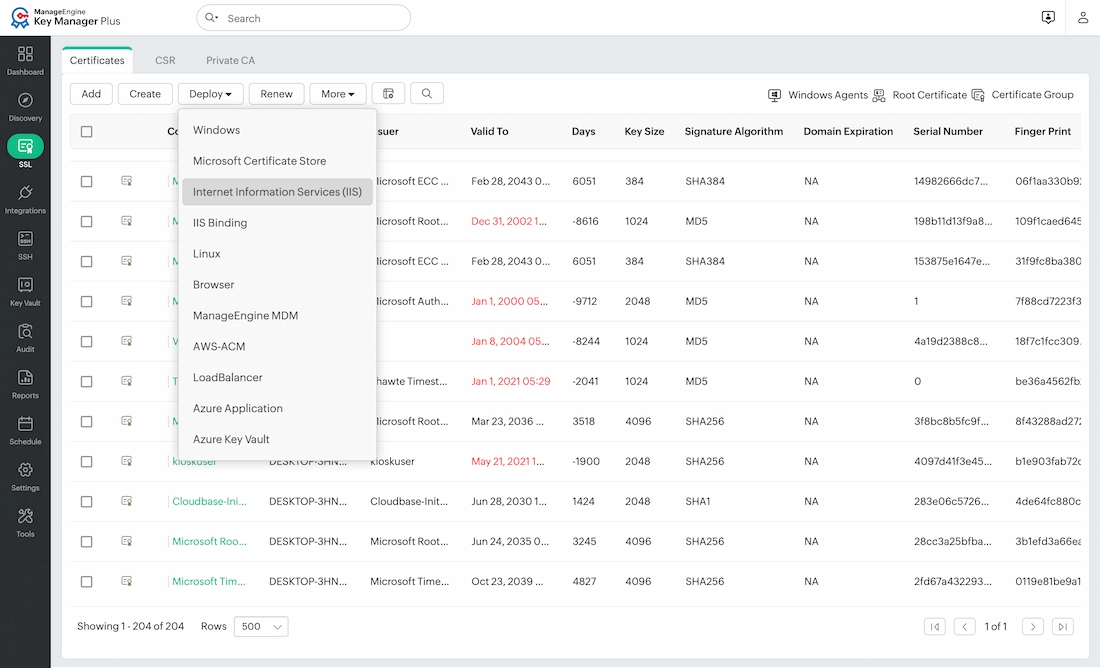 Key Manager Plus provides automated certificate deployment options across supported servers, services, cloud platforms and network infrastructure.
Step 4 – Verify the Certificate Actually Being Served
Automation shouldn't stop when a deployment reports success. The final check is to confirm that the endpoint is actually presenting the newly issued certificate to clients.
After deployment, compare the certificate being served by the endpoint with the renewed certificate in the repository, checking details such as its serial number, issuer, fingerprint and validity dates. A re-scan or synchronization check can identify cases where a certificate was renewed or deployed but the appliance continues serving an older certificate.
This verification step closes an important gap between a certificate being issued, being installed, and actually being in use.
How to Identify Expiry Risks, Failed Renewals, Deployment Failures and Manually Managed Exceptions
Automating certificate renewal and deployment significantly reduces manual effort, but automation still needs to be monitored. Renewals can fail, deployments can be incomplete, and certificates can remain out of sync with the versions actually being presented by network devices.
Monitoring should therefore extend beyond simply tracking the number of days until expiry. Network and security teams should maintain visibility across the certificate environment, including:
- Certificates approaching their expiry or defined safety threshold
- Failed certificate renewals and deployments
- Certificates that are out of synchronization
- Certificates still requiring manual intervention
- The percentage of certificates covered by automated renewal and deployment
Alerts for expiry and failed operations should be routed through existing operational channels such as email, syslog, SIEM platforms or the service desk, ensuring certificate problems are visible to the teams responsible for resolving them. Reports covering certificate inventory, renewals, deployments and weak certificates can also provide useful evidence for audits and internal security reviews.
The goal is to identify exceptions before they become outages. As certificate validity periods continue to shrink, monitoring becomes the final safeguard that confirms the automated lifecycle is operating as expected.
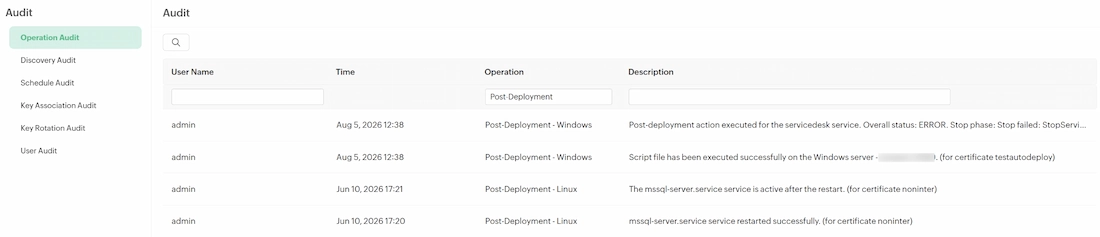
How ManageEngine Key Manager Plus Automates Certificate Lifecycle Management
The certificate lifecycle we've covered—discovery, renewal, deployment, verification and monitoring—becomes increasingly difficult to manage when each stage relies on separate tools or manual processes. ManageEngine Key Manager Plus brings these activities into a centralised platform, providing network and security teams with greater visibility and control over certificates distributed across their infrastructure.
Key Manager Plus supports certificate discovery across servers, load balancers, firewalls, mail servers, cloud environments and DMZ hosts, using IP ranges, subnets and ports to identify certificates that need to be brought under management. For supported network platforms, this includes devices such as F5 BIG-IP, Citrix and FortiGate.
Certificate renewal can be automated through supported public CA, private CA and ACME integrations, including DigiCert, GlobalSign, Sectigo, Entrust, GoDaddy, Let's Encrypt and ZeroSSL. This allows renewal policies and thresholds to be centrally managed rather than relying on administrators to individually track certificate expiry dates.
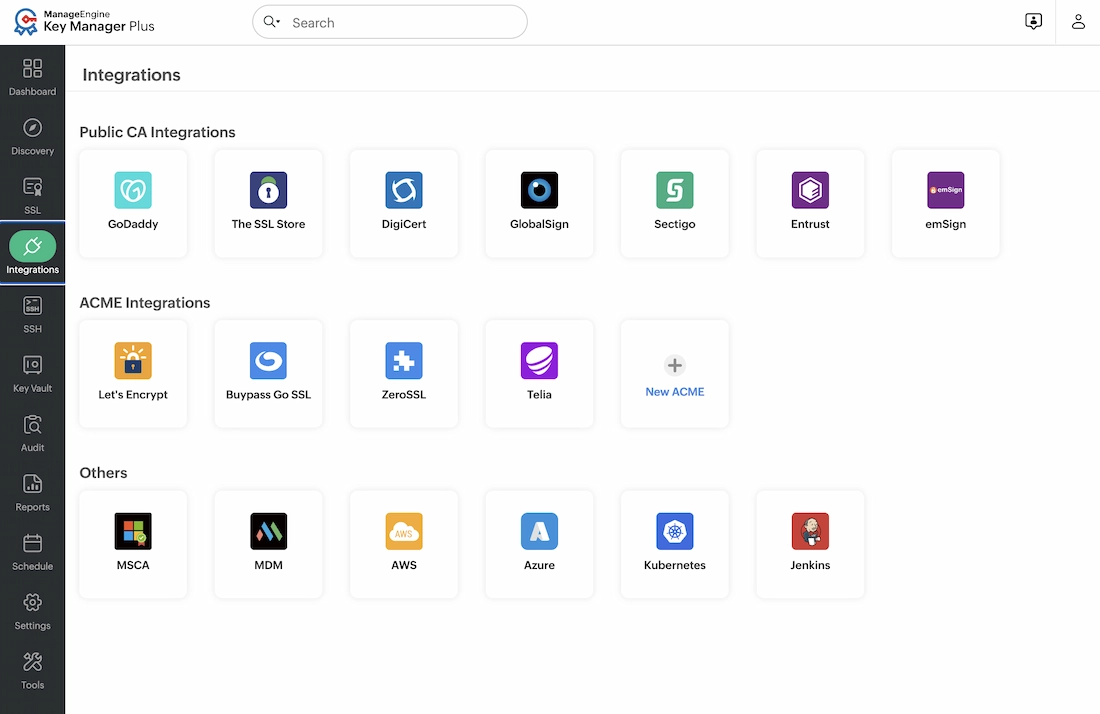 Key Manager Plus integrates with supported certificate authorities and services to help centralise and automate certificate lifecycle management.
Once renewed, certificates can be deployed to supported endpoints including load balancers, IIS bindings, Windows and Linux hosts, AWS ACM and Azure Key Vault. Key Manager Plus also provides synchronization checks and deployment reporting to help identify mismatches between certificates in the repository and those deployed across the environment.
Finally, expiry dashboards, email and syslog alerts, audit reports and weak-certificate detection provide ongoing visibility into the certificate environment. Together, these capabilities allow organizations to move away from fragmented manual processes towards a more automated certificate lifecycle—an increasingly important requirement as publicly trusted TLS certificate validity continues towards 100 and eventually 47 days.
Network Device Certificate Automation Checklist
Before enabling automated certificate renewal and deployment across your network, use the following checklist to ensure the complete certificate lifecycle is covered:
- Discover and classify certificates across IP ranges, subnets, ports, servers, network appliances and DMZ hosts.
- Assign an owner to each certificate and document the service, listener, virtual server, VPN portal or binding where it is used.
- Configure public CA, private CA and ACME integrations where supported, including renewal thresholds, validation ownership and approval requirements.
- Map certificate deployment and activation for supported endpoints, including any required bindings, service reloads or restarts.
- Document manual exceptions for devices or services where deployment cannot be fully automated, and assign responsibility for completing those tasks.
- Verify certificates after deployment to confirm that the endpoint is actually presenting the newly issued certificate to clients.
- Configure expiry and operation alerts through email, syslog, SIEM or service desk platforms so failures are identified quickly.
- Monitor synchronization and deployment status to identify certificates that are renewed but not correctly deployed or activated.
- Review certificate security for weak keys, outdated algorithms and certificates that no longer meet organisational standards.
Test the complete workflow on a controlled endpoint before expanding automation across production infrastructure.
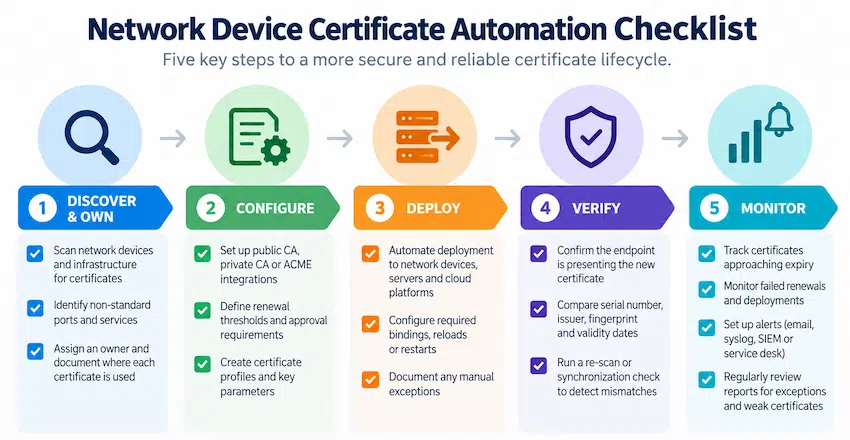 Five key steps for automating the certificate lifecycle across network infrastructure.
As certificate validity periods continue to decrease, this checklist can also be used periodically to identify gaps in automation and devices that still depend on manual certificate management.
Summary – Preparing for the 47-Day Certificate Era
The move from 398-day TLS certificates to 200 days today, 100 days in 2027 and ultimately 47 days in 2029 fundamentally changes how organizations need to approach certificate management. Processes that were manageable when certificates required attention roughly once a year will become increasingly difficult to maintain as renewal cycles shorten.
For network teams, the challenge extends well beyond renewal. Certificates must be discovered, renewed, deployed, activated, verified and continuously monitored across firewalls, VPN gateways, load balancers and other infrastructure. Establishing this automated lifecycle now can reduce manual effort, identify failures earlier and help prevent certificate expiry from becoming a predictable network or application outage.
ManageEngine Key Manager Plus provides a centralised approach to certificate lifecycle management, bringing together certificate discovery, supported CA and ACME integrations, automated renewal and deployment, synchronization checks, expiry monitoring and reporting. With shorter certificate lifetimes already in effect, organizations can begin automating these processes today rather than waiting for the 47-day limit to arrive.
Learn more about ManageEngine Key Manager Plus and how it can help automate certificate lifecycle management across your network infrastructure.
Can Your EDR Spot the Attack?

Enterprise-Class Cloud & Network Monitoring

Threat Traffic Analysis

Wi-Fi Key Generator
IT Infrastructure Monitoring

Follow Firewall.cx
Recommended Downloads
Cisco Password Crack
Decrypt Cisco Type-7 Passwords on the fly!
Automated Patching Solution

Firewall Analyzer