




Latest Articles
Endpoint Central EDR Earns AV Comparatives 2026 Certification
 A spear-phishing link, Kerberoasting, lateral movement and a DCSync attack against Active Directory: these were among the techniques in the 14-stage attack chain used by AV-Comparatives to evaluate enterprise detection capabilities in 2026. For IT administrators and security analysts, the test offers a practical look at how endpoint security platforms expose an intrusion as it moves from a workstation towards domain-level compromise.
ManageEngine Endpoint Central with EDR was one of nine products to earn certification in that test round, alongside Bitdefender GravityZone Business Security Enterprise, ESET PROTECT Elite, Fortinet FortiEDR, G Data 365 | MXDR, Genian Insights E, Kaspersky EDR Expert (on-premises), Palo Alto Networks Cortex XDR Pro and Sangfor Athena AI-Native EPP. Each was assessed under AV-Comparatives’ detection-validation methodology, giving security teams a shared reference point for examining attack visibility and investigation capabilities.
The 2026 scenario was designed to resemble a realistic red-team engagement and drew on tactics, techniques and procedures associated with advanced threat actors such as APT29, APT41, APT27, APT10 and FIN7. Vendors were not told in advance which techniques would be used, helping the assessment reflect the uncertainty security teams face during real-world attacks.
Endpoint Central delivered telemetry coverage across 13 of the 14 attack stages and successfully validated all five dedicated Signal-to-Noise scenarios. Its detailed report walks through the attack techniques and the evidence available to analysts at each step, making it useful reading for anyone exploring EDR or reviewing an existing endpoint security deployment.
Download the Endpoint Central EDR AV-Comparatives report
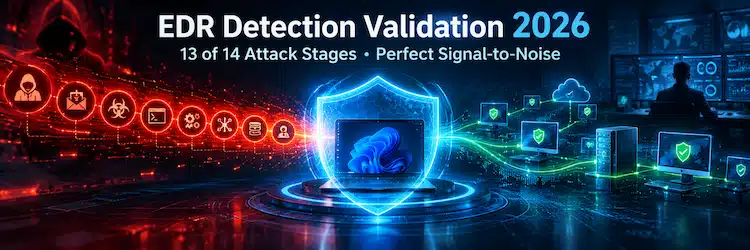
Endpoint Central’s Signal-to-Noise result applies to the five dedicated validation scenarios in this assessment.
Inside the 14 Stage Enterprise Attack Chain
TLS Certificates Are Getting Shorter: How to Automate Certificate Management on Network Devices
TLS certificates are a critical part of modern network security, protecting firewalls, SSL-VPN gateways, load balancers, reverse proxies, management interfaces and internet-facing applications. Yet certificate management remains surprisingly manual, with renewals often tracked through spreadsheets, calendars and processes spread across network, security and application teams.
That approach is becoming increasingly difficult to manage. Publicly trusted TLS certificate validity is being reduced from 398 days to 200 days, then 100 days and ultimately just 47 days by 2029. At the 47-day maximum, the same certificate could require replacement roughly eight times every year.
For network administrators, renewal is only part of the challenge. Certificates must also be deployed to the correct device and service, activated where necessary, and verified to ensure the endpoint is presenting the new certificate. As certificate lifetimes shrink, organizations need a repeatable, automated lifecycle that reduces manual intervention and prevents predictable certificate-expiry outages.
Key Topics
- How TLS Certificate Validity Is Changing: 398 → 200 → 100 → 47 Days
- Why shorter certificate lifetimes create new challenges for firewalls, VPN gateways, load balancers and other network devices
- Why certificate renewal alone isn't enough and deployment, activation and verification also matter
- How to discover, renew, deploy, verify and monitor certificates through an automated lifecycle
- How to identify expiry risks, failed renewals, deployment failures and manually managed exceptions
- How ManageEngine Key Manager Plus can help automate certificate lifecycle management across network infrastructure
- Network Device Certificate Automation Checklist
- Summary - Preparing for the 47-Day Certificate Era
Ready to simplify certificate management? Download Key Manager Plus for free and start automating your certificate lifecycle today.
How TLS Certificate Validity Is Changing: 398 → 200 → 100 → 47 Days
The certificate lifecycle is already getting shorter. Following the CA/Browser Forum's SC-081v3 decisionSC-081v3CA/Browser Forum's SC-081v3 decision, the maximum validity period for publicly trusted TLS certificates is being progressively reduced from the previous 398-day limit.
The first major change took effect on 15 March 2026, reducing maximum certificate validity to 200 days. This will fall again to 100 days from 15 March 2027, before reaching just 47 days from 15 March 2029.
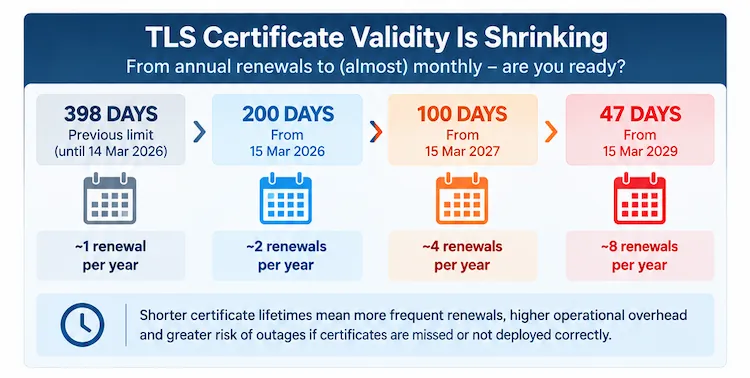 Publicly trusted TLS certificate maximum validity is being progressively reduced from 398 days to just 47 days by March 2029.
Importantly, this isn't a change organizations can leave until 2029. The 200-day limit is already in effect, and the first maximum-length certificates issued under the new limit will begin expiring around late September and early October 2026.
The direction is clear: publicly trusted TLS certificates are moving towards shorter validity periods and much more frequent renewal. For network and security teams, now is the time to review how certificates are discovered, renewed and deployed before the renewal cycle becomes even shorter.
Why Shorter Certificate Lifetimes Create New Challenges for Firewalls, VPNs Gateways, Load Balancers and other Network Devices
Under the previous 398-day limit, a publicly trusted TLS certificate typically required replacement about once a year. As certificate validity falls, that workload increases dramatically. At the eventual 47-day maximum, the same certificate may need replacing roughly eight times every year.
ML-Based Security Analytics in NetFlow Analyzer: Detecting Advanced Network Threats Through Behavioral Analysis
This article explores how machine learning (ML) and network flow telemetry can be used to establish behavioral baselines, detect anomalous asset activity, and map suspicious network behavior to the MITRE ATT&CK framework. We'll also walk through a realistic security investigation showing how reconnaissance, unusual internal communication, and low-and-slow data exfiltration can be identified through changes in an endpoint's normal traffic behavior.
Modern cyberattacks don't always trigger immediate firewall or IDS/IPS alerts. Once an attacker compromises a legitimate endpoint, reconnaissance, lateral movement, and data exfiltration can occur quietly through network traffic that may appear legitimate when examined in isolation.
This raises an important question for network and security teams:
How do you identify potentially malicious activity when the individual network connections don't immediately look malicious?
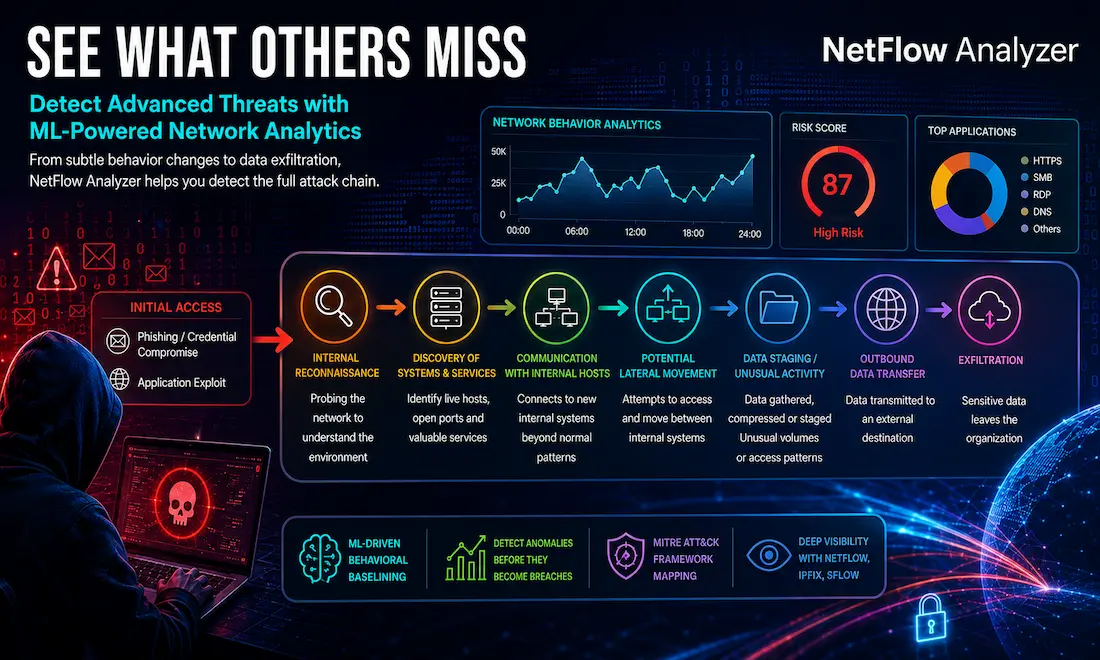
A modern NetFlow Analyzer can help answer this by examining NetFlow, IPFIX, sFlow, and other flow telemetry already generated by network infrastructure. When combined with ML-driven behavioral baselining, anomaly detection, risk scoring, and MITRE ATT&CK-aligned detections, this telemetry can reveal deviations from an asset's normal network behavior that traditional signature- or threshold-based monitoring might overlook.
Key Topics Covered
- Why Advanced Threats Can Be Difficult to See
- From NetFlow Telemetry to Security Analytics
- Understanding ML-Driven Behavioral Baselining
- Moving From Anomaly to Attack Context With MITRE ATT&CK
- How Security Analytics Complements Traditional Network Defenses
- Practical Investigation: Detecting a Silent Data Exfiltration Attack
- Why Flow Analytics Is Particularly Valuable for Security Teams
- Summary
Related Articles:
- Complete Guide to Netflow: How Netflow & its Components Work. Netflow Monitoring Tools
- Netflow: Monitor Bandwidth & Network Utilization. Detect LAN, WAN, Wi-Fi Bottlenecks, Unusual Traffic Patterns, Problems and more
- NetFlow Analyzer: Free Download, Step-by-Step Installation, Configuration & Optimization Windows - Linux
- Netflow vs SNMP. Two Different Approaches to Network Monitoring
Why Advanced Threats Can Be Difficult to See
Consider a relatively common attack sequence. An attacker may gain an initial foothold inside the network through several methods, including:
1. Phishing / Credential Compromise
From Alerts to Action: How Agentic AI will change your ITOps
As modern IT environments continue to grow in size and complexity, the challenge is no longer detecting issues—it's resolving them quickly before they impact the business. ManageEngine's Agentic AI for OpManager Nexus is designed to bridge the gap between intelligent monitoring and intelligent action. This practical guide explores how AI-powered agents can transform IT operations by automating investigation, accelerating root cause analysis (RCA), and assisting engineers in resolving incidents faster and with greater confidence.
The white paper introduces the five levels of ITOps autonomy, helping organisations understand their current operational maturity and build a realistic roadmap toward autonomous operations. It also highlights practical use cases where agentic AI is already delivering value, including AI-assisted RCA and intelligent war rooms that reduce response times and improve collaboration during critical incidents.
 Topics Covered
- The five levels of ITOps autonomy and how to assess your organisation's AI maturity.
- Real-world Agentic AI use cases, including AI-assisted root cause analysis and intelligent war rooms.
- Five key controls for safe AI adoption, covering governance, reversibility, and continuous learning.
- An 18-month crawl-walk-run implementation roadmap for introducing and scaling Agentic AI.
- A four-lever ROI framework to measure reductions in downtime, manual effort, recurring incidents, and capacity waste.
- How OpManager Nexus enables Agentic AI using live topology, the MCP Server, and Zia Agents.
- Best practices for transitioning from traditional monitoring to autonomous, AI-driven IT operations.
Whether you're just beginning to explore AI-driven operations or looking to advance your automation strategy, this white paper offers practical guidance, proven frameworks, and a clear roadmap for adopting agentic AI with confidence.
Can Your EDR Spot the Attack?

Enterprise-Class Cloud & Network Monitoring

Threat Traffic Analysis

Wi-Fi Key Generator
IT Infrastructure Monitoring

Follow Firewall.cx
Recommended Downloads
Cisco Password Crack
Decrypt Cisco Type-7 Passwords on the fly!
Automated Patching Solution

Firewall Analyzer

Featured Categories:





Top Picks:

Ensuring Compliance and Business Continuity in a…
Free Webinar: Learn How Zero-Trust & Cloud Techno…

Elevate your network management: Maximizing effic…

Maximizing Network Security: A Deep Dive into OpM…

VLAN InterSwitch Link (ISL) Protocol Analysis

VLAN Security - Making the Most of VLANs

VLANs - Access & Trunk Links
InterVLAN Routing - Routing between VLAN Networks
Link State Routing Protocols
Routed Protocols

Enhanced Interior Gateway Routing Protocol - EIGRP
