



 Network topologies can take a bit of time to understand when you're all new to this kind of cool stuff, but it's very important to fully understand them as they are key elements to understanding and troubleshooting networks and will help you decide what actions to take when you're faced with network problems.
This article explains the different network topologies found in today's networks. We examine Bus Topology, Ring Topology, Star Topology, Mesh Topology, Hybrid Topology and many more.
Physical and Logical Topologies
There are two types of topologies: Physical and Logical. The physical topology of a network refers to the layout of cables, computers and other peripherals. Try to imagine yourself in a room with a small network, you can see network cables coming out of every computer that is part of the network, then those cables plug into a hub or switch. What you're looking at is the physical topology of that network !
Logical topology is the method used to pass the information between the computers. In other words, looking at that same room, if you were to try to see how the network works with all the computers talking (think of the computers generating traffic and packets of data going everywhere on the network) you would be looking at the logical part of the network. The way the computers will be talking to each other and the direction of the traffic is controlled by the various protocols (like Ethernet) or, if you like, rules.
If we used token ring, then the physical topology would have to change to meet the requirements of the way the token ring protocol works (logically).
If it's all still confusing, consider this: The physical topology describes the layout of the network, just like a map shows the layout of various roads, and the logical topology describes how the data is sent accross the network or how the cars are able to travel (the direction and speed) at every road on the map.
The most common types of physical topologies, which we are going to analyse, are: Bus, Hub/Star and Ring.
The Physical Bus Topology
Bus topology is fairly old news and you probably won't be seeing much of these around in any modern office or home.
With the Bus topology, all workstations are connect directly to the main backbone that carries the data. Traffic generated by any computer will travel across the backbone and be received by all workstations. This works well in a small network of 2-5 computers, but as the number of computers increases so will the network traffic and this can greatly decrease the performance and available bandwidth of your network.
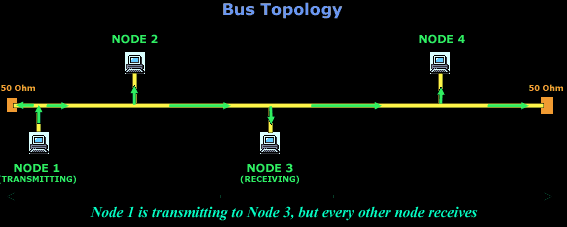
As you can see in the above example, all computers are attached to a continuous cable which connects them in a straight line. The arrows clearly indicate that the packet generated by Node 1 is transmitted to all computers on the network, regardless the destination of this packet.
Also, because of the way the electrical signals are transmitted over this cable, its ends must be terminated by special terminators that work as "shock absorbers", absorbing the signal so it won't reflect back to where it came from. The value of 50Ohms has been selected after carefully taking in consideration all the electrical characteristics of the cable used, the voltage that the signal which runs through the cables, the maximum and minimum length of the bus and a few more.
If the bus (the long yellow cable) is damaged anywhere in its path, then it will most certainly cause the network to stop working or, at the very least, cause big communication problems between the workstations.
Thinnet - 10 Base2, also known as coax cable (Black in colour) and Thicknet - 10 Base 5 (Yellow in colour) is used in these type of topologies.
The Physical HUB or STAR Topology
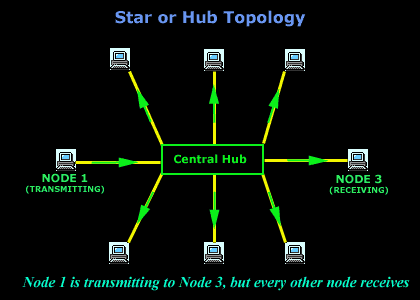
The Star or Hub topology is one of the most common network topologies found in most offices and home networks. It has become very popular in contrast to the bus type (which we just spoke about), because of the cost and the ease of troubleshooting.
The advantage of the star topology is that if one computer on the star topology fails, then only the failed computer is unable to send or receive data. The remainder of the network functions normally.
The disadvantage of using this topology is that because each computer is connected to a central hub or switch, if this device fails, the entire network fails!
A classic example of this type of topology is the UTP (10 base T), which normaly has a blue colour.
The Physical Ring Topology
In the ring topology, computers are connected on a single circle of cable. Unlike the bus topology, there are no terminated ends. The signals travel around the loop in one direction and pass through each computer, which acts as a repeater to boost the signal and send it to the next computer. On a larger scale, multiple LANs can be connected to each other in a ring topology by using Thicknet coaxial or fiber-optic cable.
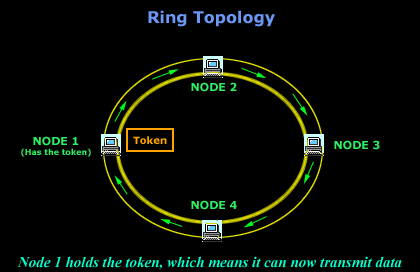
The method by which the data is transmitted around the ring is called token passing. IBM's token ring uses this method. A token is a special series of bits that contains control information. Possession of the token allows a network device to transmit data to the network. Each network has only one token.
The Physical Mesh Topology
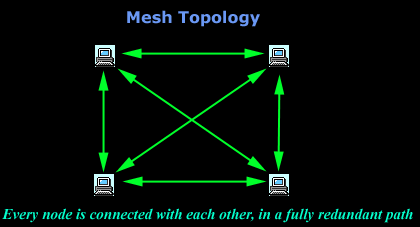
In a mesh topology, each computer is connected to every other computer by a separate cable. This configuration provides redundant paths through the new work, so if one computer blows up, you don't lose the network :) On a large scale, you can connect multiple LANs using mesh topology with leased telephone lines, Thicknet coaxial cable or fiber optic cable.
Again, the big advantage of this topology is its backup capabilities by providing multiple paths through the network.
The Physical Hybrid Topology
With the hybrid topology, two or more topologies are combined to form a complete network. For example, a hybrid topology could be the combination of a star and bus topology. These are also the most common in use.
Star-Bus
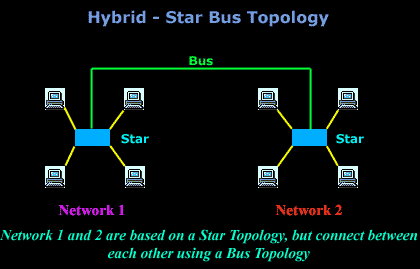
In a star-bus topology, several star topology networks are linked to a bus connection. In this topology, if a computer fails, it will not affect the rest of the network. However, if the central component, or hub, that attaches all computers in a star, fails, then you have big problems since no computer will be able to communicate.
Star-Ring
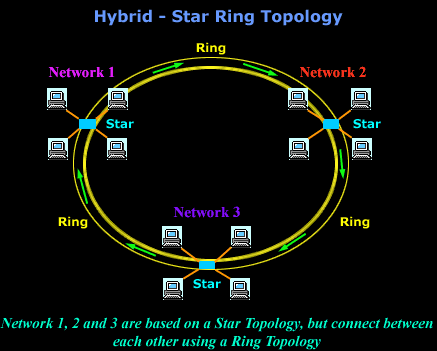
In the Star-Ring topology, the computers are connected to a central component as in a star network. These components, however, are wired to form a ring network.
Like the star-bus topology, if a single computer fails, it will not affect the rest of the network. By using token passing, each computer in a star-ring topology has an equal chance of communicating. This allows for greater network traffic between segments than in a star-bus topology.
Can Your EDR Spot the Attack?

Enterprise-Class Cloud & Network Monitoring

Threat Traffic Analysis

Wi-Fi Key Generator
IT Infrastructure Monitoring

Follow Firewall.cx
Recommended Downloads
Cisco Password Crack
Decrypt Cisco Type-7 Passwords on the fly!
Automated Patching Solution

Firewall Analyzer



