



TFTP is a file transport protocol and its name suggests it's something close to the FTP protocol (File Transfer Protocol), which is true .. to a degree. TFTP isn't very popular because it's not really used on the Internet because of its limitations which we'll explore next.
The TFTP Protocol
TFTP's main difference from FTP is the transport protocol it uses and the lack of any authentication mechanisim. Where FTP uses the robust TCP protocol to establish connections and complete the file transfers, TFTP uses the UDP protocol which is unsecure and has no error checking built in to it (unless they have implemented some type of error checking in the program you are using to transfer files), this also explains why you are more likely to find TFTP in a LAN, rather than a WAN (Wide Area Network) or on the Internet.
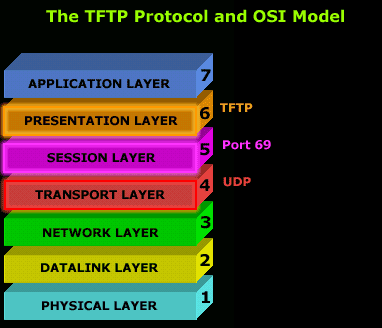
The major limitations with TFTP are authentication and directory visibility, meaning you don't get to see the files and directories available at the TFTP server.
As mentioned, TFTP uses UDP as a transport, as opposed to TCP which FTP uses, and works on port 69, you can clearly see that in the cool 3D diagram on the left.
Port 69 is the default port for TFTP, but if you like, you can modify the settings on your TFTP server so it runs on a different port.
Now, to make things a bit clearer I have included a screen shot of my workstation tftp'ing into a TFTP server which I have setup in my little network.

You can see my workstation (192.168.0.100) contacting the TFTP server (192.168.0.1) on port 69(destination port). In this first packet, my workstation is contacting the server and requesting the file I entered before I connected to the server. Click here for the full picture.
Because you don't get a listing of the files and directories, you must know which file you want to download ! In the response I received (2nd packet) the server gets straight into business and starts sending the file. No authentication whatsoever !
Note: The workstation usally won't send back any acknowlegement (because UDP, which is the transport protocol, by nature, never sends acknowledgements), but the software developers can incorporate such a feature by forcing the workstation to send a small packet which the TFTP server is able to pickup as an acknowledgement of the previous data packet it sent to the workstation.
In the example I provide, you can see my workstation sending small packets to the server after it receives one packet from it. These small acknowledgements have been added by the software company who created the program I was using for this example.
Below is a screen shot of the program I used to TFTP (TFTP Client) to the server:
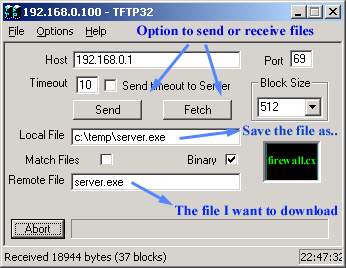
Notice how I entered the file I wanted to downloaded (server.exe), and selected the name which the file will be saved as on my local computer (Local File). If I didn't provide the Remote File name, I would simply get an error poping up at the server side, complaing that no such file exists. You can also send files using TFTP, as it's not just for downloading :)
So where is TFTP used?
TFTP is used mostly for backing up router configuration files like Cisco and its IOS images, it is also used for diskless booting PC's where, after the workstation has booted from the network card's ROM, TFTP is used to download the program it needs to load and run from a central server.
Below is a diagram which shows what takes place during a TFTP session: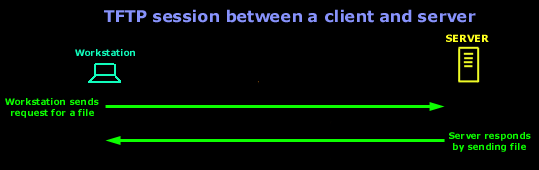
In this diagram we are assuming that there is no error checking built into the software running at both ends (client and server).
This completes our discussion on the TFTP protocol. More information around different protocols can be found in the Network Protocol section.
|
net. |
||
|
||
|
You will find some very good TFTP servers and clients in the download section. Now, to make things a bit clearer I have included a screen shot of my workstation tftp'ing into a TFTP server which I have setup in my little network.
You can see my workstation (192.168.0.100) contacting the TFTP server (192.168.0.1) on port 69(destination port). In this first packet, my workstation is contacting the server and requesting the file I entered before I connected to the server. Click here for the full picture. Because you don't get a listing of the files and directories, you must know which file you want to download ! In the response I received (2nd packet) the server gets straight into business and starts sending the file. No authentication whatsoever ! Note: The workstation usally won't send back any acknowlegement (because UDP, which is the transport protocol, by nature, never sends acknowledgements), but the software developers can incorporate such a feature by forcing the workstation to send a small packet which the TFTP server is able to pickup as an acknowledgement of the previous data packet it sent to the workstation. In the example I provide, you can see my workstation sending small packets to the server after it receives one packet from it. These small acknowledgements have been added by the software company who created the program I was using for this example. Below is a screen shot of the program I used to TFTP (TFTP Client) to the server:
Notice how I entered the file I wanted to downloaded (server.exe), and selected the name which the file will be saved as on my local computer (Local File). If I didn't provide the Remote File name, I would simply get an error poping up at the server side, complaing that no such file exists. You can also send files using TFTP, as it's not just for downloading :) So where is TFTP used ? TFTP is used mostly for backing up router configuration files like Cisco and its IOS images, it is also used for diskless booting PC's where, after the workstation has booted from the network card's ROM, TFTP is used to download the program it needs to load and run from a central server. Below is a diagram which shows what takes place during a TFTP session: ..... In this diagram we are assuming that there is no error checking built into the software running at both ends (client and server). And that pretty much sums it all up for the TFTP protocol. |


Free eBook - Endpoint Security

Enterprise-Class Cloud & Network Monitoring

Bandwidth Monitor

Wi-Fi Key Generator
Network and Server Monitoring

Follow Firewall.cx
Recommended Downloads
Cisco Password Crack
Decrypt Cisco Type-7 Passwords on the fly!
Automated Patching Solution

Firewall Analyzer
