



This article is an introduction to the 7-page TCP Header analysis section that follows. We briefly view each section of the TCP Header and then move on to its analysis using detailed colourful diagrams that help the learning process become much easier.
A fair amount of time was spent trying to figure out which way to analyse the TCP header. Most websites and other resources mention the protocol's main characteristics with a bit of information attached, leaving the reader with a lot of questions and making it difficult to comprehend how certain aspects of the protocol works.
For this reason a different approach was selected. Our method certainly gets right into the protocol's guts and contains a lot of information which some of you might choose to skip, but it is guaranteed to satisfy you by giving a thorough understanding of what is going on.
Get Ready.... Here It Comes!
For those who skipped the first introduction page of the protocol, you will be happy to find out that the tcp quick-overview page contains a brief summary of the protocol's main characteristics to help refresh your memory. If you need to dive into the details at any point, simply return to this page!
The diagram below shows the TCP header captured from a packet that I was running on the network. We'll be using it to help us through our step by step analysis of TCP.
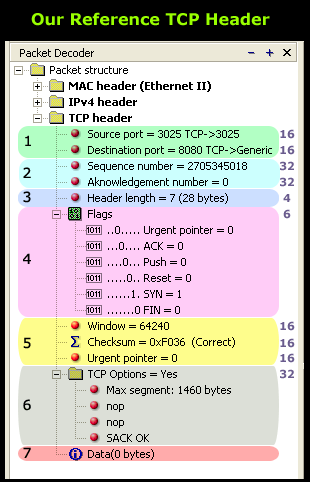 As you can see, the TCP header has been completely expanded to show us all the fields the protocol contains. The numbers on the right are each field's length in bits. This is also shown in the quick TCP overview page.
Since much time was spent to ensure our analysis was complete in all aspects, be sure that by the end of it, you will understand each field's purpose and how it works.
We should also point out that when the packet in our example arrives to its destination, only section 7 (the last one) is sent to the upper OSI layers because it contains the data it is waiting for. The rest of the information (including the MAC header, IP Header and TCP header) is overhead which serves the purpose of getting the packet to its destination and allowing the receiving end to figure out what to do with the packet, e.g. send the data to the correct local application.
Now you're starting to understand the somewhat complex mechanisim involved in determing how data gets from one point to another!
Since you have made it this far, you can select the section you want to read about by simply clicking on the coloured area on the above packet, or by using the menu below. It is highly recommended that you start from the first section and slowly progress to the final one. This will avoid confusion and limit the case of you scratching your head halfway through any of the other sections:
- Section 1: Source & Destination Port Number
- Section 2: Sequence & Acknowledgement Numbers
- Section 3: TCP Header Length
- Section 4: TCP Flag Options
- Section 5: Window Size, Checksum & Urgent Pointer
- Section 6: TCP Options
- Section 7: TCP Data
Enterprise-Class Cloud & Network Monitoring

Threat Traffic Analysis

Wi-Fi Key Generator
IT Infrastructure Monitoring

Follow Firewall.cx
Recommended Downloads
Cisco Password Crack
Decrypt Cisco Type-7 Passwords on the fly!
Automated Patching Solution

Firewall Analyzer
