



Our fifth section contains some very interesting fields that are used by the TCP transport protocol. We see how TCP helps control how much data is transferred per segment, make sure there are no errors in the segment and, lastly, flag our data as urgent, to ensure it gets the priority it requires when leaving the sender and arriving at the recipient.
So let's not waste any time and get right into our analysis!
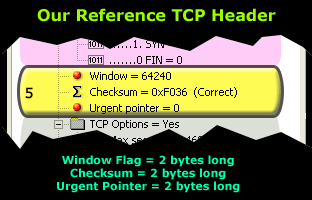
The fifth section we are analysing here occupies a total of 6 bytes in the TCP header.
These values, like most of the fields in the protocol's header, remain constant in size, regardless of the amount of application data.
This means that while the values they contain will change, the total amount of space the field occupied will not.
The Window Flag
The Window size is considered to be one of the most important flags within the TCP header. This field is used by the receiver to indicate to the sender the amount of data that it is able to accept. Regardless of who the sender or receiver is, the field will always exist and be used.
You will notice that the largest portion of this page is dedicated to the Window size field. The reason behind this is because this field is of great importance. The Window size field is the key to efficient data transfers and flow control. It trully is amazing once you start to realise how important this flag is and how many functions it contains.
The Window size field uses 'bytes' as a metric. So in our example above, the number 64,240 is equal to 64,240 bytes, or 62.7 kb (64,240/1024).
The 62.7 kbytes reflects the amount of data the receiver is able to accept, before transmitting to the sender (the server) a new Window value. When the amount of data transmitted is equal to the current Window value, the sender will expect a new Window value from the receiver, along with an acknowledgement for the Window just received.
The above process is required in order to maintain flawless data transmission and high efficiency. We should however note that the Window size field selected is not in any case just a random value, but one calculated using special formulas like the one in our example below:
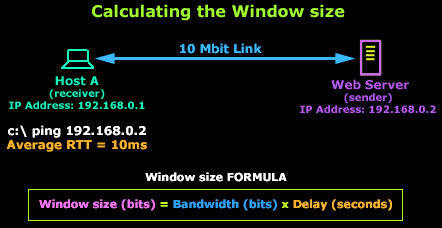
In this example, Host A is connected to a Web server via a 10 Mbit link. According to our formula, to calculate the best Window value we need the following information: Bandwidth and Delay. We are aware of the link's bandwidth: 10,000,000 bits (10 Mbits), and we can easily find out the delay by issuing a 'ping' from Host A to the Web server which gives us an average Round Trip Time response (RTT) of 10 milliseconds or 0.01 seconds.
We are then able to use this information to calculate the most efficient Window Size (WS):
WS = 10,000,000 x 0.01 => WS = 100,000 bits or (100,000/8)/1024 = 12,5 kbytes
For 10 Mbps bandwidth and a round-trip delay of 0.01 sec, this gives a window size of about 12 kb or nine 1460-byte segments:
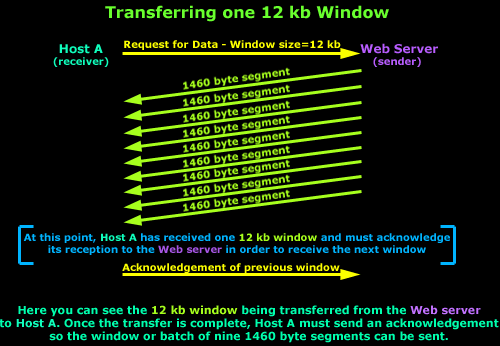
This should yield maximum throughput on a 10 Mbps LAN, even if the delay is as high as 10 ms because most LANs have round-trip delay of less than a few milliseconds. When bandwidth is lower, more delay can be tolerated for the same fixed window size, so a window size of 12 kb works well at lower speeds, too.
Windowing - A Form of Flow Control
Apart from the Windowing concept being a key factor for efficient data transmission, it is also a form of flow control, where a host (the receiver) is able to indicate to the other (the sender) how much data it can accept and then wait for further instructions.
The fact is that in almost all cases, the default value of 62 kbytes is used as a Window size. In addition, even though a Window size of 62 kbytes might have been selected by the receiver, the link is constantly monitored for packet losses and delays during the data transfer by both hosts, resulting in small increases or decreases of the original Window size in order to optimise the bandwidth utilisation and data throughput.
This automatic self-correcting mechanisim ensures that the two hosts will try to make use of the pipe linking them in the best possible way, but do keep in mind that this is not a guarantee that they will always succeed. This is generally the reason why a user is able to manually modify the Window size until the best value is found and this, as we explained, depends greatly on the link between the hosts and its delay.
In the case where the Window size falls to zero, the remote TCP can send no more data. It must wait until buffer space becomes available and it receives a packet announcing a non-zero Window size.
Lastly, for those who deal with Cisco routers, you might be interested to know that you are able to configure the Window size on Cisco routers running the Cisco IOS v9 and greater. Routers with versions 12.2(8)T and above support Window Scaling, a feature that's automatically enabled for Window sizes above 65,535, with a maximum value of 1,073,741,823 bytes!
Window Scalling will be dealt with in greater depth on the following page.
On the Server Side: Larger Window Size = More Memory
Most network administrators who have worked with very busy web servers would recall the massive amounts of memory they require. Since we now understand the concept of a 'Window size', we are able to quickly analyse how it affects busy web servers that have thousands of clients connecting to them and requesting data.
When a client connects to a web server, the server is required to reserve a small amount of memory (RAM) aside for the client's session. The amount of required memory is the same amount as the window size and, as we have seen, this value depends on the bandwidth and delay between the client and server.
To give you an idea how the window size affects the server's requirements in memory, let's take an example:
If you had a web server that served 10,000 clients on a local area network (LAN) running at 100 Mbits with a 0.1 second round trip delay and wanted maximum performance/efficiency for your file transfers, according to our formula, you would need to allocate a window of 1.25 MB for each client, or 12 Gigs of memory for all your clients! Assuming of course that all 10,000 clients are connected to your web server simultaneously.
To support large file transfers in both directions (server to client and vice versa), your server would need: [(100,000,000 x 0.1) 10,000 x 2] = over 24 Gigs of memory just for the socket buffers!
So you can see how important it is for clients not to use oversized window values! In fact, the current TCP standard requires that the receiver must be capable of accepting a full window's worth of data at all times. If the receiver over-subscribes its buffer space, it may have to drop an incoming packet. The sender will discover this packet loss and invoke TCP congestion control mechanisms even though the network is not congested.
It is clear that receivers should not over-subscribe buffer space (window size) if they wish to maintain high performance and avoid packet loss.
Checksum Flag
The TCP Checksum field was created to ensure that the data contained in the TCP segment reaches the correct destination and is error-free. For those network gurus who are wondering how TCP would ensure the segment arrives to the correct destination (IP Address), you will be happy to know that there is a little bit more information used than just the TCP header to calculate the checksum and, naturally, it would include a portion of the IP Header.
This 'extra' piece of information is called the pseudo-header and we will shortly analyse its contents but, for now, let's view a visual representation of the sections used to calculate the TCP checksum:
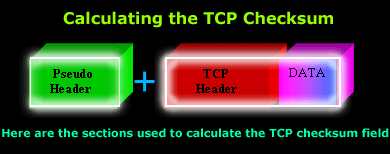
The above diagram shows you the pseudo header, followed by the TCP header and the data this segment contains. However, once again, be sure to remember that the pseudo header is included in the Checksum calculation to ensure the segment has arrived at the correct receiver.
Let's now take a look how the receiver is able to verify it is the right receiver for the segment it just received by analysing the pseudo header.
The Pseudo Header
The pseudo header is a combination of 5 different fields, used during the calculation of the TCP checksum. It is important to note (and remember!) that the pseudo header is not transmitted to the receiver, but is simply involved in the checksum calculation.
Here are the 5 fields as they are defined by the TCP RFC:
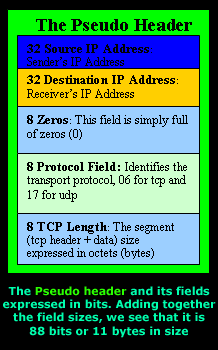
When the segment arrives at its destination and is processed through the OSI layers, once the transport layer (Layer 4) is reached, the receiver will recreate the pseudo header in order to recalculate the TCP header checksum and compare the result with the value stored in the segment it has received.
If we assume the segment somehow managed to find its way to a wrong machine, when the pseudo header is recreated, the wrong IP Address will be inserted into the Destination IP Address field and the result will be an incorrect calculated checksum. Therefore, the receiver that wasn't supposed to receive the segment will drop it as it's obviously not meant to be there.
Now you know how the checksum field guarantees that the correct host will receive the packet, or that it will get there without any errors!
However, be sure to keep in mind that even though these mechanisms exist and work wonderfully in theory, when it comes to the practical part, there is a possibility that packets with errors might make their way through to the application!
It's quite amazing once you sit down and think for a minute that this process happens for every single packet that is sent and received between hosts that use TCP and UDP (UDP calculates the same way its checksum) as their transport protocol!
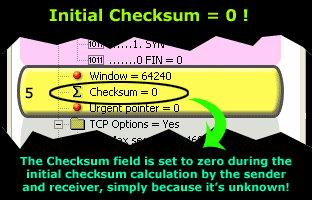
Lastly, during the TCP header checksum calculation, the field is set to zero (0) as shown below. This action is performed only during the checksum calculation on either end because it is unknown at the time. Once the value is calculated, it is then inserted into the field, replacing the inital zero (0) value.
This is also illustrated in the screen shot below:
In summarising the procedure followed when calculating the checksum, the following process occurs, from the sender all the way to the receiver:
The sender prepares the segment that is to be sent to the receiving end. The checksum is set to zero, in fact 4 zeros (hex) or 8 zeros (0000 0000) if you look at it in binary, because the checksum is an 8 bit field.
The checksum in then calculated using the pseudo header, TCP header and lastly the data to be attached to the specific segment. The result is then stored in the checksum field and the segment is sent!
The segment arrives at the receiver and is processed. When it reaches the 4th OSI layer where the TCP lives, the checksum field is set once again to zero. The receiver will then create its own pseudo header for the segment received by entering its own IP Address in the Destination IP Address field (as shown in the previous diagrams) and makes use of the TCP header and data to calculate the new checksum.
If all is successfully accomplished, the result should be identical with the one the checksum field segment had when it arrived. When this occurs, the packet is then further processed and the data is handed to the application awaiting it.
If, however, the checksum is different, then the packet should be discarded (dropped) and a notification will be sent to the receiver depending on how the TCP stack is implemented on the receiver's operating system.
The Urgent Pointer
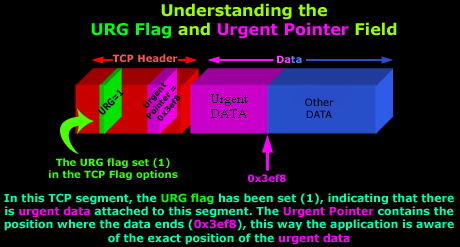
In section 4, we analysed the TCP Flag options and amongst them we found the Urgent Pointer flag. The urgent pointer flag in the TCP Flag allows us to mark a segment of data as 'urgent', while this urgent pointer field specifies where exactly the urgent data ends.
To help you understand this, take a look at the following diagram:
You may also be interested to know that the Urgent Pointer can also be used when attacking remote hosts. From the case studies we have analysed, we see that certain applications, which supposedly guard your system from attack attempts, do not properly log attacks when the URG flag is set.
As a final conclusion this section, if you find yourself capturing thousands of packets in order to view one with the URG bit set, don't be disappointed if you are unable to catch any such packets! We found it nearly impossible to get our workstation to generate such packets using telnet, http, ftp and other protocols. The best option and by far the easiest way would be to look for packet crafting programs that allow you to create packets with different flags and options set.
Summary
While this section was a fairly extensive, we have covered some very important sections of the TCP protocol. You now know what a TCP Window is and how you can calculate it depending on your bandwidth and delay.
We also examined the Checksum field, which is used by the receiver to verify the segment it received is not corrupt and at the same time checking to make sure it didn't receive the segment accidently!
Lastly, we examined in great detail the usage of the URG flag and Urgent Pointer field, which are used to define an incoming segment that contains urgent data.
After enjoying such a thorough analysis, we're sure you're ready for more! The next section deals with the TCP Options located at the end of the TCP header.
Next: TCP Header Anaylsis - Section 6: TCP Options
Enterprise-Class Cloud & Network Monitoring

Threat Traffic Analysis

Wi-Fi Key Generator
IT Infrastructure Monitoring

Follow Firewall.cx
Recommended Downloads
Cisco Password Crack
Decrypt Cisco Type-7 Passwords on the fly!
Automated Patching Solution

Firewall Analyzer
