



The 'ICMP Destination unreachable' message is quite interesting, because it doesn't actually contain one message, but infact six! This means that the ICMP Destination unreachable futher breaks down into 6 different messages.
This article will analyse all six destination unreachable messages and explain which occasions each message is used. The table below shows an brief summary of the available messages and their code value contain in the ICMP header:
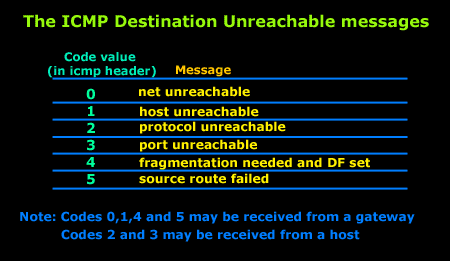
To make sure you don't get confused, keep one thing in mind: The ICMP Destination unreachable is a generic ICMP message, the different code values or messages which are part of it are there to clarify the type of "Destination unreachable" message was received. It goes something like this: ICMP Destination unreachable.
The ICMP - Destination net unreachable message is one which a user would usually get from the gateway when it doesn't know how to get to a particular network.
The ICMP - Destination host unreachable message is one which a user would usually get from the remote gateway when the destination host is unreachable.
If, in the destination host, the IP module cannot deliver the packet because the indicated protocol module or process port is not active, the destination host may send an ICMP destination protocol / port unreachable message to the source host.
In another case, when a packet received must be fragmented to be forwarded by a gateway but the "Don't Fragment" flag (DF) is on, the gateway must discard the packet and send an ICMP destination fragmentation needed and DF set unreachable message to the source host.
These ICMP messages are most useful when trying to troubleshoot a network. You can check to see if all routers and gateways are configured properly and have their routing tables updated and synchronised.
Let's look at the packet structure of an ICMP destination unreachable packet:
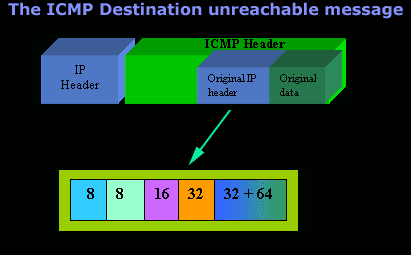
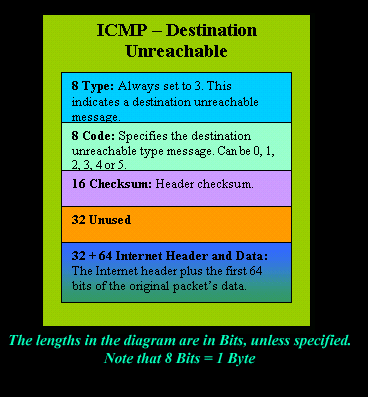
Please read on as the following example will help you understand all the above.
The Analysis
When you open a DOS command prompt and type "ping 200.200.200.200", assuming that your workstation is NOT part of that network, then it would forward the ICMP Echo request to the gateway that's configured in your TCP/IP properties. At that point, the gateway should be able to figure out where to forward the ICMP Echo request.
The gateway usually has a "default route" entry, this entry is used when the gateway doesn't know where the network is. Now, if the gateway has no "default route" you would get an "ICMP Destination net unreachable" message when you try to get to a network which the gateway doesn't know about. When you're connected to the Internet via a modem, then your default gateway is the modem.
In order for me to demonstrate this, I set up my network in a way that should make it easy for you to see how everything works. I have provided a lot of pictures hoping to make it as easy as possible to understand.
I will analyse why and how you get an "ICMP - Destination net unreachable" message.
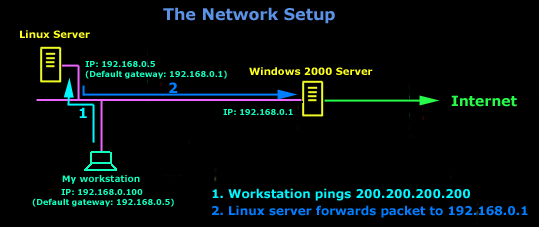
In the example above, I've setup my workstation to use the Linux server as a default gateway, which has an IP of 192.168.0.5. The Linux server also has a default gateway entry and this is IP: 192.168.0.1 (the Windows 2000 Server).
When my workstation attempts to ping (send an ICMP Echo request) to IP 200.200.200.200, it realises it's on a different network, so it sends it to the Linux server, which in turn forwards it to its default gateway (the Win2k server) so it can then be forwarded to the Internet and eventually I should get a ping reply (ICMP Echo reply) if the host exists and has no firewall blocking ICMP echo requests.
Here is the packet which I captured and its analysis on the right:
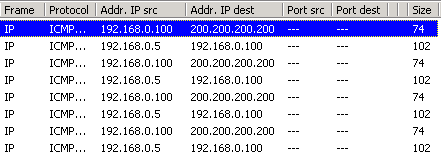
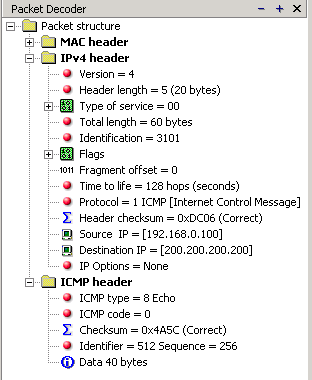
When looking at the decoded packet you can see in the ICMP header section that the ICMP Type is equal to 8, so this confirms that it's an ICMP Echo (ping). As mentioned earlier, we would expect to receive an ICMP echo reply.
Check out though what happens when the default gateway entry is removed from the Linux server:
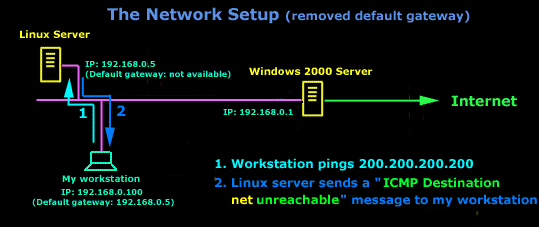
Now what I did was to remove the default gateway entry from the Linux server. So when it gets a packet from my workstation, it wouldn't know what to do with it. This is how you get the gateway to generate an "ICMP Destination net unreachable" message and send it back to the source host (my workstation).
Here is a screen shot from the command prompt:
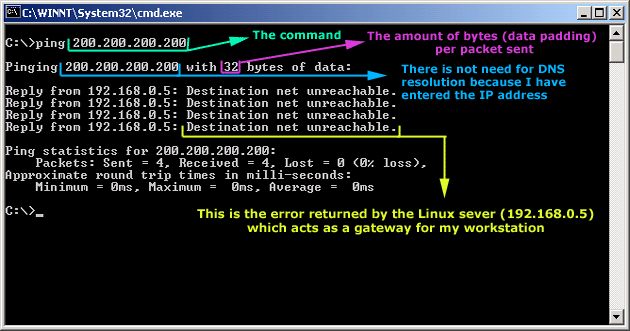
As you can see, the Linux server has returned an "ICMP Destination net unreachable". This is one of the six possible 'ICMP Destination Unreachable' messages as listed at the beginning of this page. The Linux server doesn't know what to do with the packet since it has no way of getting to that 200.200.200.0 network, so it sends the "ICMP Destination net unreachable" message to my workstation, notifiying it that it doesnt know how to get to that network.
Let's now take a look what the packet sniffer caught :
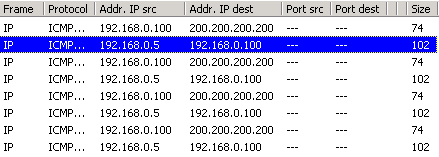
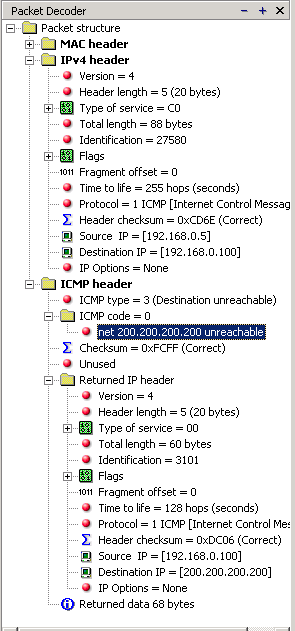
The decoded packet on the right shows that the Linux server (192.168.0.5) sent back to my workstation (192.168.0.100) an ICMP Destination unreachable message (look at the ICMP type field, right under the ICMP header) but if you also check out the ICMP Code (highlighted field), it's equal to 0, which means "net unreachable". Scrolling right at the top of this page, the first table clearly shows that when the code field has a value of 0, this is indeed a "net unreachable" message.
It is also worth noticing the "Returned IP header" which exists within the ICMP header. This is the IP header of the packet my workstation sent to the Linux server when it attempted to ping 200.200.200.200, and following that is 64 bits (8 bytes) of the original data.
This completed our discussion on the ICMP 'Destination Unreachable' generated packets.
Can Your EDR Spot the Attack?

Enterprise-Class Cloud & Network Monitoring

Threat Traffic Analysis

Wi-Fi Key Generator
IT Infrastructure Monitoring

Follow Firewall.cx
Recommended Downloads
Cisco Password Crack
Decrypt Cisco Type-7 Passwords on the fly!
Automated Patching Solution

Firewall Analyzer
