



As mentioned in the previous page, an Echo is simply what we networking engineers call a 'ping'. The Echo Reply is, as most would guess, the 'ping reply'. ICMP Echos are used mostly for troubleshooting. When there are 2 hosts which have communication problems, a few simple ICMP Echo requests will show if the 2 hosts have their TCP/IP stacks configured correctly and if there are any problems with the routes packets are taking in order to get to the other side.
The 'ping' command is very well known, but the results of it are very often misunderstood and for that reason I have chosen to explain all those other parameters next to the ping reply, but we will have a look at that later on.
Let's have a look at what an ICMP-Echo or Echo Reply packet looks like:
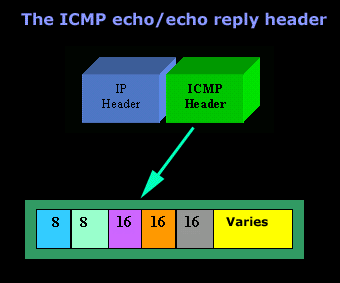
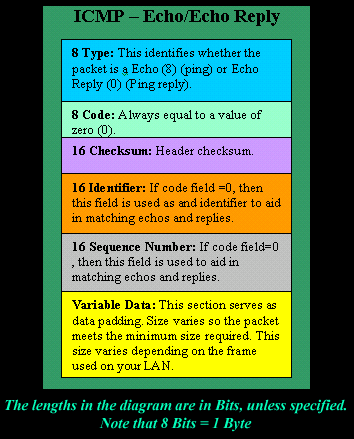
If the above packet was an ICMP Echo (ping), then the Type field takes a value of 8. If it's an ICMP Echo Reply (ping reply) then it would take a value of 1.
The screenshot below shows a simple ping and analyzes the information/output:
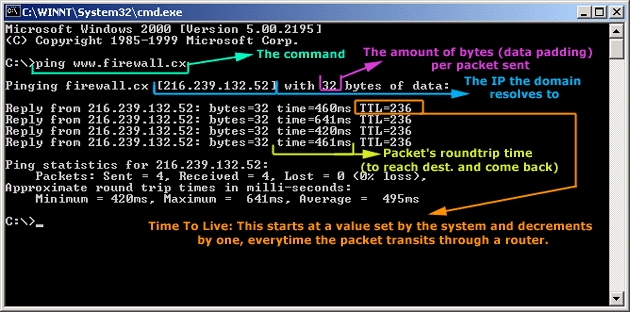
Okay, now looking at the screen shot above, you can see I pinged www.firewall.cx. The first thing my workstation did was to resolve that URL to an IP address. This was performed using DNS. Once the DNS server returned the IP address of www.firewall.cx, the workstation generated an ICMP packet with the Type field set to 8.
Here is the proof:
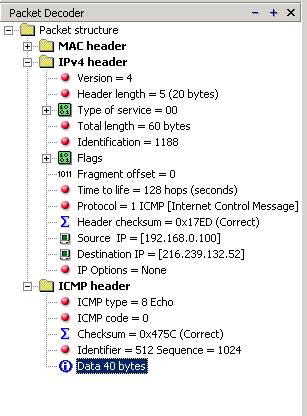
The picture above is a screenshot from my packet sniffer the same time this experement was taking place. The packet displayed is one of the 4 packets which were sent from my workstation to the webserver of firewall.cx
Notice the ICMP type=8 Echo field right under the ICMP Header section. This clearly shows that this packet is being sent from the workstation and not received. If it was received, it would have been an 'Echo Reply' and have a value of 0.
The next weird thing, if anyone noticed, is the data field. Look at the screen shot from command prompt above and notice the value there and the value the packet sniffer is showing on the left. One says 32 Bytes, and the other 40 Bytes !
The reason for this is that the packet sniffer is taking into account the ICMP header files (ICMP type, code, checksum and identifier), and I'll prove it to you right now.
Look at the top of this page where we analysed the ICMP headers , you will notice that the lengths (in Bits) of the various fields are as follows: 8, 8, 16, 16, 16. These add up to a total of 64 Bits. Now 8 Bits = 1 Byte, therefore 64 Bits = 8 Bytes. Take the 32 Bytes of data the workstation's command prompt is showing and add 8 Bytes .... and you have 40 Bytes in total. To view the full screen image shot of the packet sniffer, please click here.
And that just about does it for these two ICMP messages!
Next - ICMP Protocol - Part 3: Destination Unreachable Message
Free eBook - Endpoint Security

Enterprise-Class Cloud & Network Monitoring

Bandwidth Monitor

Wi-Fi Key Generator
Network and Server Monitoring

Follow Firewall.cx
Recommended Downloads
Cisco Password Crack
Decrypt Cisco Type-7 Passwords on the fly!
Automated Patching Solution

Firewall Analyzer
