



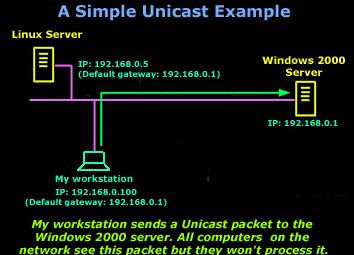
 Unicast is a communication method used in computer networking where data is sent from a single sender to a specific destination device. In this method, the sender sends the data packet to a unique IP address, which is assigned to the destination device. This is in contrast to broadcast or multicast communication methods, where data is sent to all devices on the network or to a group of devices, respectively.
Unicast is a widely used communication method in computer networking, and it plays a critical role in ensuring efficient communication between devices on a network. Some of the important aspects of unicast communication are discussed below:
The Purpose of Unicast
The purpose of unicast communication is to enable one-to-one communication between devices on a network. This is useful when the sender wants to send data to a specific destination device, without broadcasting the data to all devices on the network. For example, when you access a website, your computer sends a unicast message to the web server requesting data, and the web server sends a unicast message back to your computer with the requested data.
 The Importance of Unicast
Unicast communication is an essential part of network infrastructure, as it is used in various network protocols such as TCP, HTTP, and SMTP. It plays a crucial role in ensuring efficient data transfer between devices on a network, as data packets are sent directly to the destination device, without causing network congestion or unnecessary data transmission.
Unicast Addressing
In unicast communication, devices are identified by their unique IP addresses. An IP address is a 32-bit number that identifies a device on a network. In IPv4, which is the most widely used Internet Protocol, IP addresses are represented as four sets of decimal numbers separated by dots. For example, 192.168.1.1 is an IP address that identifies a device on a network.
Unicast's Role in Routing
Unicast communication relies on routing protocols to ensure that data packets are sent to the correct destination device. Routing protocols are algorithms used by network devices, such as routers, to determine the best path for data packets to reach their destination. They use various metrics, such as hop count, link speed, and network congestion, to determine the optimal path for data packets.
Unicast's role in Communication Efficiency
Unicast communication is a highly efficient method of data transfer, as data packets are sent directly to the destination device. This reduces network congestion and ensures that data is delivered to the intended recipient without unnecessary delay. It also allows for efficient use of network resources, as only the intended recipient receives the data packet, and not all devices on the network.
Unicast Security
Unicast communication is more secure than broadcast communication, as data packets are only sent to the intended recipient. This reduces the risk of data interception and eavesdropping, which can occur in broadcast communication, where data packets are sent to all devices on the network.
Summary
Unicast communication is an essential part of network infrastructure, enabling efficient and secure communication between devices on a network. It plays a critical role in ensuring efficient data transfer, reducing network congestion, and improving network performance. By using unique IP addresses to identify devices on a network, and routing protocols to determine the best path for data packets, unicast communication allows for efficient and secure communication between devices on a network.
Can Your EDR Spot the Attack?

Enterprise-Class Cloud & Network Monitoring

Threat Traffic Analysis

Wi-Fi Key Generator
IT Infrastructure Monitoring

Follow Firewall.cx
Recommended Downloads
Cisco Password Crack
Decrypt Cisco Type-7 Passwords on the fly!
Automated Patching Solution

Firewall Analyzer



