



Novell's Proprietary Frame Format was developed based on a preliminary release of the 802.3 specification. After Novell released its proprietary format, the LLC Header was added, making Novell's format incompatible.
Below is a 3D diagram of the frame, let's have a look at it and try to analyse it:
The Data Link Header
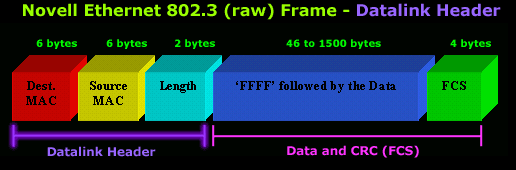
Offset 0-5: The Destination Address
- The first six bytes of an Ethernet frame make up the Destination Address. The Destination Address specifies to which adapter the data frame is being sent. A Destination Address of all ones specifies a Broadcast Message that is read in by all receiving Ethernet adapters.
- The first three bytes of the Destination Address are assigned by the IEEE to the vendor of the adapter, and are specific to the vendor.
- The Destination Address format is identical in all implementations of Ethernet.
Offset 6-11: The Source Address
- The next six bytes of an Ethernet frame make up the Source Address. The Source Address specifies from which adapter the message originated. Like the Destination Address, the first three bytes specify the vendor of the card.
- The Source Address format is identical in all implementations of Ethernet.
Offset 12-13: Length
- Bytes 13 and 14 of an Ethernet frame contain the length of the data in the frame frame, not including the preamble, 32 bit CRC, DLC addresses, or the Length field itself. An Ethernet frame can be no shorter than 64 bytes total length, and no longer than 1518 bytes total length.
User Data And Frame Check Sequence (FCS)
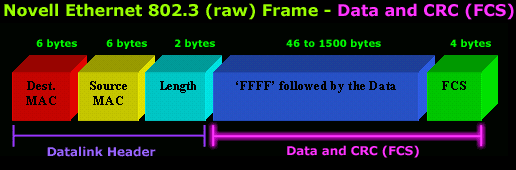
Data: 46-1500 Bytes
- Following the Data Link header are 46 to 1500 bytes of data. In all Novell frames, the user data begins with an IPX (Novell's network layer protocol) header. The IPX header contains as its first two bytes an optional checksum, with the value FFFF signifying that the checksum is not used. By convention, the checksum is always turned off, and the FFFF that occurs 3 bytes after the end of the source address is how device drivers differentiate Novell frames from 802.3 frames, which look identical until the first byte following the length field.
FCS: Last 4 Bytes
-
The last 4 bytes that the adapter reads in are the Frame Check Sequence or CRC. When the voltage on the wire returns to zero, the adapter checks the last 4 bytes it received against a checksum that it generates via a complex polynomial. If the calculated checksum does not match the checksum on the frame, the frame is discarded and never reaches the memory buffers in the station.
Final Note on Novell's Ethernet Frame Format
"A Novell client can only use one frame format for NetWare"
This is a true statement that needs some clarification to be fully understood.
It should be noted that Novell workstations are capable of using any of the four Ethernet frame types mentioned in the Ethernet Frame section, based on the LOAD and BIND settings in the NET.CFG file. A Novell client will use the list of frame formats in NET.CFG to attempt to locate a file server (or a Netware Directory Server for the VLM shell). The client starts at the top of the list of frame types in NET.CFG and broadcasts a 'Find Nearest Server' message. If no file server answers (or Directory Services server in a VLM client) then the client tries the next frame format. When a server finally does answer then the client will use the successful frame format from then on, until the client is rebooted.
As a result, you should remember that a Novell client will ultimately use only one of the four frame formats; it cannot actually use multiple formats for NetWare at the same time. The format it selects will be based on its initial attempt to locate a server. This behavior is restricted to the frame format used by NCP and SPX - if the client is also running a TCP/IP stack then the IP protocol can be configured to use any other frame format (typically Version II Ethernet).
This completes our anaylsis of the Novell proprietary frame format.
Free eBook - Endpoint Security

Enterprise-Class Cloud & Network Monitoring

Bandwidth Monitor

Wi-Fi Key Generator
Network and Server Monitoring

Follow Firewall.cx
Recommended Downloads
Cisco Password Crack
Decrypt Cisco Type-7 Passwords on the fly!
Automated Patching Solution

Firewall Analyzer
