



Static NAT (also called inbound mapping) is the first mode we're going to talk about and also happens to be the most uncommon between smaller networks.
Static NAT was mainly created to allow hosts on your private network to be direcly accessible via the Internet using real public IPs; we'll see in great detail how this works and is maintained. Static NAT is also considered a bit dangerous because a misconfiguration to your firewall or other NAT-enabled device can result in the full exposure of the machine on your private network to which the public IP Address maps, and we'll see the security risks later on this page.
What Exactly Does Static NAT Do?
As mentioned in the introduction, Static NAT allows the mapping of public IP Addresses to hosts inside the internal network. In simple english, this means you can have a computer on your private network that exists on the Internet with its own real IP.
The diagram below has been designed to help you understand exactly how Static NAT works:
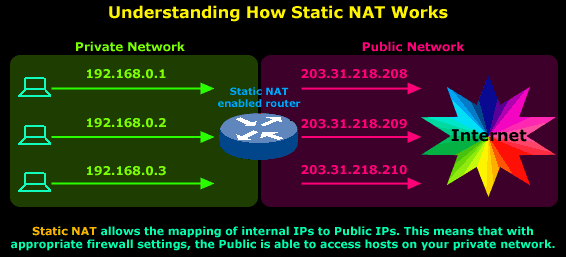
In this diagram you can see that we have our private network connected to the Internet via our router, which has been configured for Static NAT mode. In this mode each private host has a single public IP Address mapped to it, e.g private host 192.168.0.1 has the public IP Address 203.31.218.208 mapped to it. Therefore any packets generated by 192.168.0.1 that need to be routed to the Internet will have their source IP field replaced with IP Address 203.31.218.208.
All IP translations take place within the router's memory and the whole process is totally transparent to both internal and external hosts. When hosts from the Internet try to contact the internal hosts, their packets will either be dropped or forwarded to the internal hosts depending on the router's & firewall configuration.
But Where Would Static NAT be Used?
Everyone's needs are different and with this in mind Static NAT could be the solution for many companies that require a host on their internal network to be visible and accessible from the Internet.
Let's take a close look at a few examples of places where Static NAT could be used.
Implementation of Static NAT - Example 1
We have a development server (192.168.0.20) that needs to be secure, but also allow certain customers to gain access to various services it offers for development purposes. At the same time, we need to give the customers access to a special database located on our main file server (192.168.0.10):
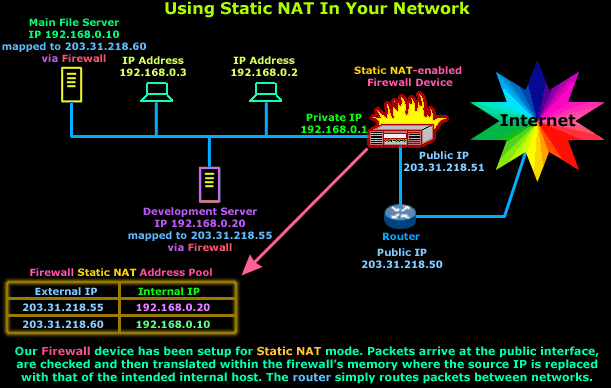
In this case, Static NAT, with a set of complex filters to make sure only authorised IP Addresses get through, would do the job just fine.
Also, if you wanted a similar setup for the purpose of using only one service, e.g http, then you're better off using a different NAT mode simply because it offers better security and is more restrictive.
Let me remind you that Static NAT requires one public IP Address for each mapping to a private IP Address. This means that you're not able to map a public IP Address to more than one private IP Address.
Implementation of Static NAT - Example 2
Another good example of using Static NAT is in a DMZ zone. The principle of having a DMZ zone is when you require certain machines e.g webservers, email servers, to be directly accessible to the Internet but at the same time, should these machines be compromised, all data can be restored without much trouble and they won't expose the internal private network to the Internet.
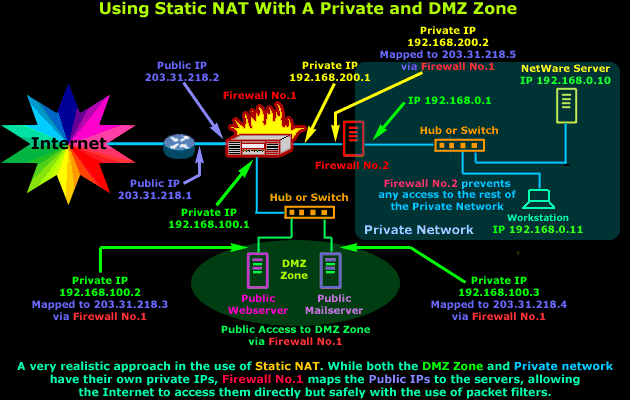
The diagram above might seem very complex, but it's actually extremely simple. Breaking it down will help you see how simple it is. If we focus on Firewall No.1 we see that it's connected to 3 networks, first one is the Internet (203.31.218.X), second one the DMZ (192.168.100.X) and the third is the small private network between our two Firewalls (192.168.200.X)
Firewall No.1 is configured to use Static NAT for 3 different hosts - that's two from the DMZ zone and one for Firewall No.2. Each interface of the Firewall must be part of a different network in order to route traffic between them. This explains why we have so many different IP Addresses in the diagram, resulting in the complex appearance.
With this setup in mind, the Static NAT table of Firewall No.1 would look like this:
|
Firewall No.1 Static NAT Table
|
|
|
External Public IP Address
|
Mapped to Internal Private IP Address
|
|
203.31.218.2
|
Firewall No.1 Public Interface
|
|
203.31.218.3
|
192.168.100.2 - Public WebServer in DMZ
|
|
203.31.218.4
|
192.168.100.3 - Public MailServer in DMZ
|
|
203.31.218.5
|
192.168.200.2 - Firewall No.2 of Private Net.
|
As you can see, this table is a good summary of what is happening in the diagram above. Each external IP Address is mapped to an internal private IP Address and if we want to restrict access to particular hosts then we can simply put an access policy (packet filters) on Firewall No.1.
Can Your EDR Spot the Attack?

Enterprise-Class Cloud & Network Monitoring

Threat Traffic Analysis

Wi-Fi Key Generator
IT Infrastructure Monitoring

Follow Firewall.cx
Recommended Downloads
Cisco Password Crack
Decrypt Cisco Type-7 Passwords on the fly!
Automated Patching Solution

Firewall Analyzer
