



Our previous article, Dynamic NAT - Part 1, covered the basic idea of Dynamic Network Address Translation. We are now going to take a closer look at the packets as they traverse the Dynamic NAT enabled device, which can be a router, a firewall appliance or even a PC running special software !
How NAT Translations Take Place
Most of the rules that apply for Static NAT (which we've already covered), also apply for Dynamic NAT and there are very few changes between the two, making it very easy to understand and digest :)
The actual process remains the same no matter which device we use, e.g Firewall appliance, Linux gateway, router etc.
Because we don't want to get confused by using a different example, we'll stick to the previous page's network between Dynasoft and its contractor - Datapro, but we're now focusing on Datapro's internal network to learn how the router between its two internal networks (192.168.50.0 and 192.168.100.0) will deal with the Dynamic NAT required in order for the new network to gain access to Dynasoft's development network:
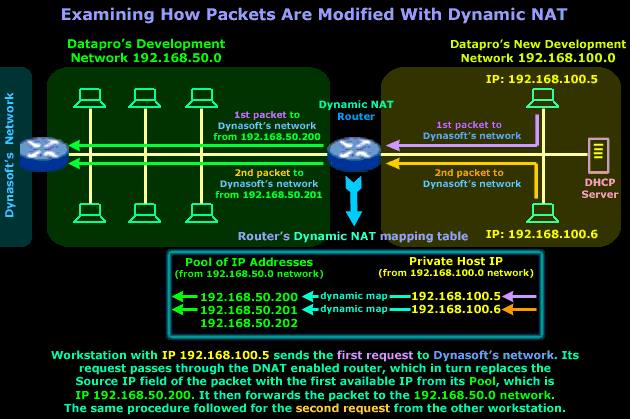
Even though the diagram explains everything, we are just going to point out a few important things about the Dynamic NAT router. It's very important that you understand that the IP Addresses in the router's Pool are reserved addresses from the 192.168.50.0 network - this means that no device or host on that network, apart from the router itself, is allowed to use them.
The dynamic mapping that is created will be in place only for that particular session, meaning that once the workstation in the new network finishes its work on the Dynasoft network, or doesn't send any packets across the Dynamic NAT router within a given time period, then the router will clear the dynamic mapping and make the IP Address available to the next host or workstation that needs it.
The timeout period is different for each transport protocol (TCP/UDP) and NAT device. The ability to modify these timeouts depends entirely on the NAT device being used. As always, the RFCs give some guidelines for these values but not all vendors follow them :) You will find more interesting information about this subject in the NAT advanced section.
So, after getting all that out of the way, it's now time to have a closer look at the packets as they traverse the router to either network:
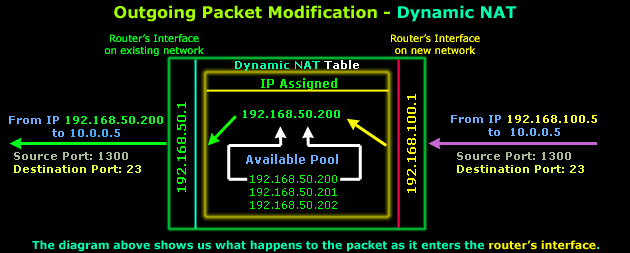
After it is determined that this packet must traverse the router, an IP Address is picked from the available pool that will be used to map IP Address 192.168.100.5. These entries are then stored within the router's RAM (NAT Table). As you can see, the Source, Destination ports and Destination IP are never modified on outgoing packets.
The router will then send the packet on to the 192.168.50.0 network and after a few milliseconds it receives the reply that our workstation on network 192.168.100.0 is waiting for:
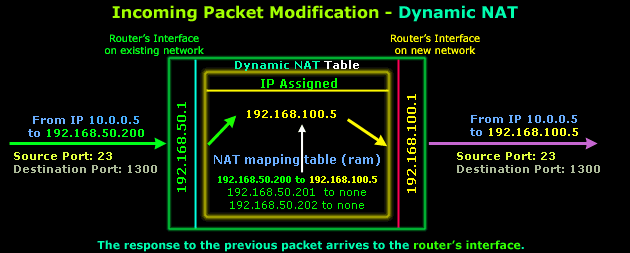
The router finds an entry within its NAT mapping table (don't forget this table is stored in the router's RAM) and replaces destination IP 192.168.50.200 with destination IP 192.168.100.5 and then forwards the packet to the new network. The Source, Destination ports and Source IP are not modified.
In case you're wondering why the ports have changed in comparison to the original outgoing packet, this is not because of NAT but the way IP communications work and happens to be way out of the scope of this page.
One important small detail I should bring to your attention is how the packet reply managed to arrive at the router's interface, which is on the existing network. You should know that to the existing Datapro network, the router is like a host with multiple IP Addresses.
I explained how the router maps IP Addresses on the existing network to the new network, but if someone on the existing network tried to send an ARP request for 192.168.50.200, then the router would immediately answer with its own MAC address. This is done to ensure that all traffic intended for workstations on the new network finds its way there. The same principle would apply no matter which NAT mode we used.
To sum up all the above while trying to keep things simple, because sometimes no matter how much you analyse a diagram it can still confuse you, the next diagram is a summary of how the packets are modified as they traverse a Dynamic NAT device which, in our example, is a router:
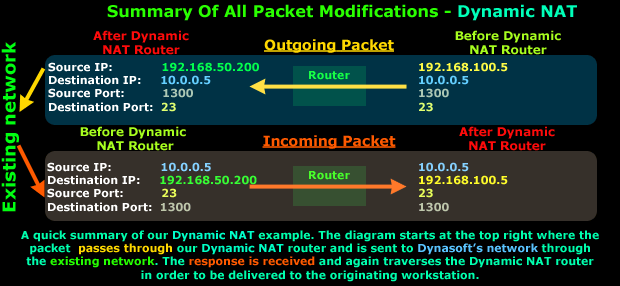
It's very easy to see that the Source IP Address (192.168.100.5) is changed as the packet traverses the Dynamic NAT router to arrive at Datapro's exist network and then move on to Dynasoft's network, whereas the reply from Dynasoft's network will enter Datapro's existing network and traverse the Dynamic NAT router and have its Destination IP Address modified to 192.168.100.5, thus reaching the workstation its intended to.
Believe it or not, we've come to the end of this page, next page talks about NAT Overload - Part 1, which is also known as Network Address Port Translation, Port Address Translation or IP Masquerade in the Linux/Unix world.
Free eBook - Endpoint Security

Enterprise-Class Cloud & Network Monitoring

Bandwidth Monitor

Wi-Fi Key Generator
Network and Server Monitoring

Follow Firewall.cx
Recommended Downloads
Cisco Password Crack
Decrypt Cisco Type-7 Passwords on the fly!
Automated Patching Solution

Firewall Analyzer
