



Dynamic NAT is the second NAT mode we're going to talk about. Dynamic NAT, like Static NAT, is not that common in smaller networks but you'll find it used within larger corporations with complex networks.
The way Dynamic NAT differentiates from Static NAT is that where Static NAT provides a one-to-one internal to public static IP mapping, Dynamic NAT does the same but without making the mapping to the public IP static and usually uses a group of available public IPs.
What Exactly Does Dynamic NAT Do?
While looking at Static NAT, we understood that for every private IP Address that needs access to the Internet we would require one static public IP Address. This public IP Address is mapped to our internal host's IP Address and it is then able to communicate with the rest of the world.
With Dynamic NAT, we also map our internal IP Addresses to real public IP Addresses, but the mapping is not static, meaning that for each session our internal hosts communicate with the Internet, their public IP Addresses remain the same, but are likely to change. These IPs are taken from a pool of public IP Addresses that have been reserved by our ISP for our public network.
With Dynamic NAT, translations don't exist in the NAT table until the router receives traffic that requires translation. Dynamic translations have a timeout period after which they are purged from the translation table, thus making them available for other internal hosts.
The diagram below illustrates the way Dynamic NAT works:
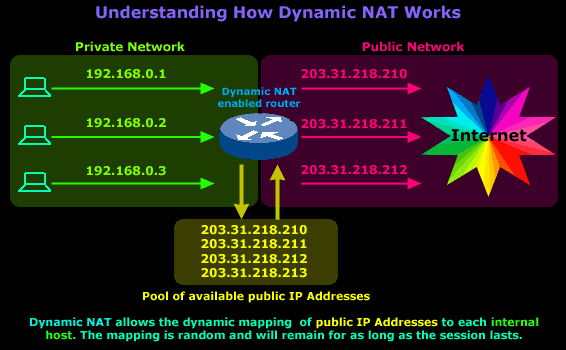
The diagram above is our example network and shows our router, which is configured to perform Dynamic NAT for the network. We requested 4 public IPs from our ISP (203.31.218.210 to 203.31.218.213), which will be dynamically mapped by our router to our internal hosts. In this particular session our workstation, with IP Address 192.168.0.1, sends a request to the Internet and is assigned the public IP address 203.31.218.210. This mapping between the workstation's private and public IP Address will remain until the session finishes.
The router is configured with a special NAT timeout and, after this timeout is reached (no traffic sent/received during that time), the router will expire the particular mapping and reuse it for a different internal host.
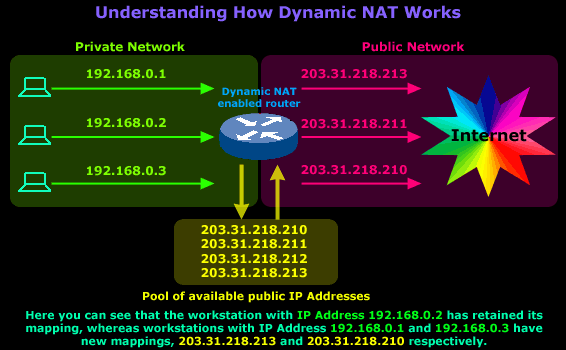
Let's say that around noon, the users of workstations with IP Address 192.168.0.1 and 192.168.0.3 go to lunch, so they log off and leave their PCs on (even if they switched them off, it wouldn't make a difference unless they had some program running that was constantly generating Internet traffic because the NAT timeout would never be reached). While these users went out for lunch, the user on the workstation with IP Address 192.168.0.2 decided to stay and do some extra work on the Internet. After 1 hour, the users return and log back on, launch their web browser and start to search on the net.
The router, as expected, deleted the old mappings once the NAT timeout had been reached for each mapping and created new ones once the users launched their web browsers, because that action generated traffic to the Internet and therefore had to transit the router.
Here's how the new mappings look:
By now, I would like to believe that you have understood what Dynamic NAT is all about and roughly how it works.
But Where Would Dynamic NAT be Used?
Again, everyone's network needs are different, though I must admit that finding a practical implementation for Dynamic NAT is perhaps more difficult than any other NAT mode :)
Come to think of it, I can't recall ever being required to implement Dynamic NAT for a customer or my own network, but that doesn't mean it's not used. There are some network setups in which Dynamic NAT would work perfectly and that's what i'm about to show you.
Dynamic NAT Configuration for Cisco Router
Our Cisco Technical Knowledgebase contains detailed step-by-step instructions how to setup Dynamic NAT on a Cisco router. Please refer to our Dynamic NAT Configuration for Cisco Routers to read up more on its configuration.
Implementation of Dynamic NAT
This example is about a company called 'Dynasoft'. Dynasoft deals with the development of high quality software applications. As a large software firm, it has multiple contractors that help complete special sections of the software it sells.
Because of the nature of this production model, Dynasoft requires its contractors to have a permanent link into its private development network, so the source code of all ongoing projects is available to all contractors:
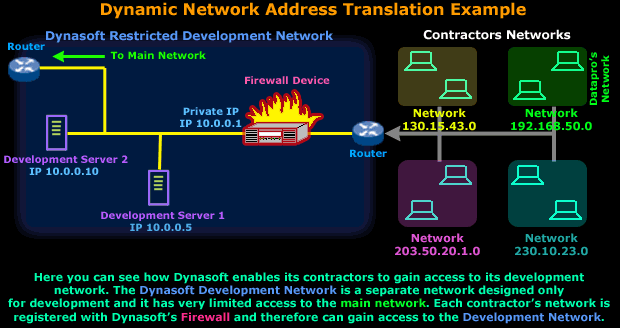
Now because Dynasoft is concerned about its network security, it purchased a firewall that was configured to regulate each contractor's access within the development network.
For the rest of this example, we will concentrate on Dynasoft's and Datapro's (green) networks:
Dynasoft has configured its firewall only to allow a particular part of Datapro's internal network to access the servers and that is network 192.168.50.0/24, which is Datapro's main development network.
This setup has been working fine, but Datapro is expanding its development network, so a second separate network (192.168.100.0/24) was created that also needs access to Dynasoft's development network. All hosts on this new network will be using the new DHCP server, which means that they'll have a dynamic IP Address.
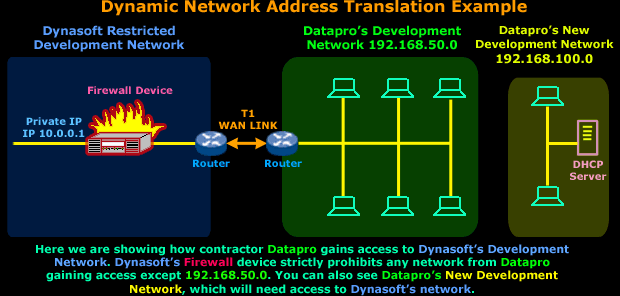
In order for the new network to access Dynasoft's network, we need to somehow trick Dynasoft's Firewall into thinking that any workstation from the new network is actually part of the 192.168.50.0 network, that way it won't be denied access.
There was a suggestion to use Static NAT but there are a few problems:
a) All workstations are on DHCP, so Static NAT will not work properly since it requires the internal hosts in the new network to have static IP Addresses.
b) Datapro's administrator wants maximum security for this new network therefore having dynamic IPs makes it more difficult for someone to track a particular host from it by using its IP Address.
So, after taking all this into consideration it was decided to implement Dynamic NAT and here's what the solution looks like:
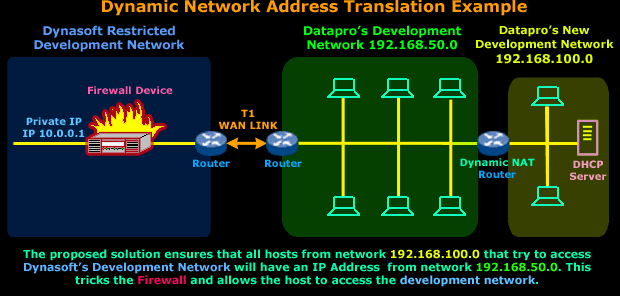
A Dynamic NAT router in this situation would do the job just fine. We would place the router between the existing (192.168.50.0) and new (192.168.100.0) network. Because of the way Dynamic NAT works, we would need to reserve a few IP Addresses from the 192.168.50.0 network in order to allow the Dynamic NAT router to use them for mapping hosts on the new network - to the existing network. This way, no matter which IP Address any host in the new network has, Dynasoft's Firewall device will think it's part of the 192.168.50.0 network !
We should also point out that the number of IP Addresses we'd need to reserve from network 192.168.50.0 would depend on how many simultaneous connections we want to allow from network 192.168.100.0 to Dynasoft's development network.
For example, if we required 25 workstations from network 192.168.100.0 to have simultaneous connection to Dynasoft we'd need to reserve at least 25 IP Addresses from the 192.168.50.0 network.
As previously explained, the reserved IP Addresses will be used to map hosts coming from the 192.168.100.0 network and must not be used by any host or workstation within the 192.168.50.0 network. If any were used in this way it would cause IP conflicts between the host in the 192.168.50.0 network and the Dynamic NAT router that's mapping that particular IP Address to the host from the 192.168.100.0 network.
So a good practice would be to set aside the last 30 IP Addresses from the 192.168.50.0 network, which would be 192.168.50.224 to 192.168.50.254, and ensure no one is assigned any IP Address within that range.
All this assumes networks 192.168.50.0 and 192.168.100.0 are using a Class C default subnetmask (255.255.255.0).
On this page, you need to understand why we're going to introduce the Dynamic NAT router, how it will solve the problem (by mapping hosts on the new network to the existing one) and the requirements for the implementation of this solution (to reserve the required IP addreess from the existing network).
The Dynamic NAT - Part 2 page deals with the analysis of the packets that will traverse the Dynamic NAT router. It will help you understand the changes in the packet and complete your understanding of Dynamic NAT.
Enterprise-Class Cloud & Network Monitoring

Threat Traffic Analysis

Wi-Fi Key Generator
IT Infrastructure Monitoring

Follow Firewall.cx
Recommended Downloads
Cisco Password Crack
Decrypt Cisco Type-7 Passwords on the fly!
Automated Patching Solution

Firewall Analyzer
