



 Multicast is a communication method used in computer networking where data is sent from a single sender to a group of destination devices. In this method, the sender sends the data packet to a specific multicast address, which is assigned to a group of devices. The data packet is then forwarded by network devices to all devices that have subscribed to the multicast group.
Multicasting is an efficient method of sending data to a group of devices, as it reduces network traffic and ensures that data is delivered to all devices in the group simultaneously. Multicasting is widely used in various network protocols, such as IPTV, video conferencing, and online gaming. In this article, we will discuss the importance and benefits of multicasting, as well as its use in different network applications.
Note: Understanding Multicast requires solid knowledge on the structure and purpose of MAC Addresses.
Some describe a multicast similar to a broadcast in that it targets a number of devices or hosts on a network, but not all. While a broadcast is directed to all hosts on the local segment, a multicast is directed to a group of hosts. With multicast, the hosts can select whether they wish to participate in the multicast group with the use of the Internet Group Management Protocol (IGMP) protocol.
Below is a simple example of a group of hosts (host A and D) being part of a multicast group who receive and process a stream of data:
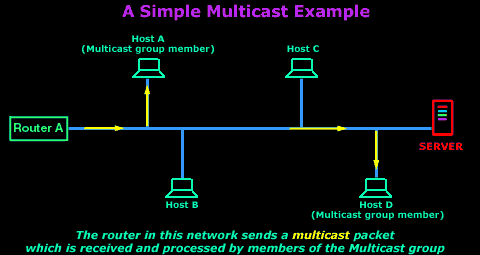
Multicast Fundamentals
To help explain how multicast works, we've split this section into three different topics:
- Hardware/Ethernet Multicasting
- IP Multicasting
- Mapping IP Multicast to Ethernet Multicast
A typical multicast on an Ethernet network, using the TCP/IP protocol, consists of two parts: Hardware/Ethernet multicast and IP Multicast. Later on I will talk about Mapping IP Multicast to Ethernet Multicast which is really what happens with multicasting on our Ethernet network using the TCP/IP protocol.
The brief diagram below shows you the relationship between the 3 and how they complete the multicasting model: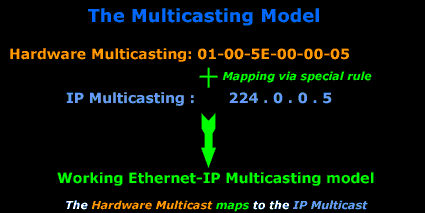
Hardware/Ethernet Multicasting
When a computer joins a multicast group, it needs to be able to distinguish between normal unicasts (which are packets directed to one computer or one MAC address) and multicasts. With hardware multicasting, the network card is configured, via its drivers, to watch out for particular MAC addresses (in this case, multicast MAC addresses) apart from its own. When the network card picks up a packet which has a destination MAC that matches any of the multicast MAC addresses, it will pass it to the upper layers for further processing.
And this is how they do it:
Ethernet uses the low-order bit of the high-order octet to distinguish conventional unicast addresses from multicast addresses. A unicast would have this bit set to ZERO (0), whereas a multicast would be set to ONE (1)
To understand this, we need to analyse the destination MAC address of a unicast and multicast packet, so you can see what we are talking about:
When a normal (unicast) packet is put on the network by a computer, it contains the Source and Destination MAC address, found in the 2nd Layer of the OSI model. The following picture is an example of my workstation (192.168.0.6) sending a packet to my network's gateway (192.168.0.5):

Now let's analyse the destination MAC address: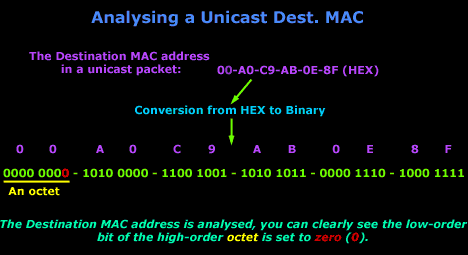
When my gateway receives the packet, it knows it's a unicast packet as explained in the above image.
Let's now have a look at the destination MAC address of a multicast packet. Keep in mind, a multicast packet is not directed to one host but a group of hosts, so the destination MAC address will not match the unique MAC address of any computer, but the computers which are part of the multicast group will recognise the destination MAC address and accept it for processing.
The following multicast packet was sent from our multicast server. Notice the destination MAC address (it's a multicast):

Analysis of the multicast destination MAC address will help make things clearer: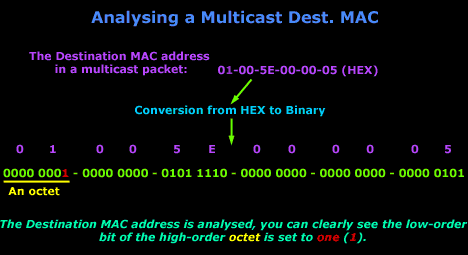
So now you should be able to understand how computers can differentiate between a normal or unicast packet and a multicast packet. Remember, the destination MAC address 01-00-5E-00-00-05 does not belong to a host, and is recognised by computers that are part of the multicast group.
Multicast MAC addresses are always used in the destination MAC address field of an Ethernet packet.
The IEEE group used a special Rule to determine the various MAC addresses that will be considered for multicasting. This rule is covered in the last section of this page, but you don't need to know it now in order to understand Hardware multicasting. Using this special rule it was determined that MAC address 01:00:5E:00:00:05 will be used for the OSPF protocol, which happens to be a routing protocol, and then this MAC address also maps to an IP address which is analysed in IP Multicast.
IP Multicast
The IP Multicast is the second part of multicasting which, combined with the hardware multicasting, gives us a multicasting model that works for our Ethernet network. If hardware multicasting fails to work, then the packet will never arrive at the network layer upon which IP multicasting is based, so the whole model fails.
With IP multicasting the hardware multicasting MAC address is mapped to an IP Address. Once Layer 2 (Datalink) picks the multicast packet from the network (because it recognises it, as the destination MAC address is a multicast) it will strip the MAC addresses off and send the rest to the above layer, which is the Network Layer. At that point, the Network Layer needs to be able to understand it's dealing with a multicast, so the IP address is set in a way that allows the computer to see it as a multicast datagram. A host may send multicast datagrams to a multicast group without being a member.
Multicasts are used a lot between routers so they can discover each other on an IP network. For example, an Open Shortest Path First (OSPF) router sends a "hello" packet to other OSPF routers on the network. The OSPF router must send this "hello" packet to an assigned multicast address, which is 224.0.0.5, and the other routers will respond.
IP Multicast uses Class D IP Addresses: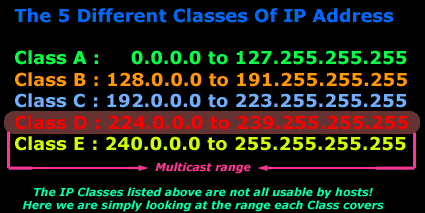
Let's have a look at an example so we can understand that a bit better:
The picture below is a screenshot from my packet sniffer, it shows a multicast packet which was sent from my NetWare server, notice the destination IP address:

The screenshot above shows the packet which was captured, it's simply displaying a quick summary of what was caught. But, when we look on the left, we see the above packet in much more detail.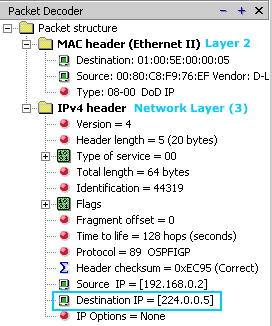
You can clearly see the markings I have put at the bottom which show you that the destination IP for this packet is IP Address 224.0.0.5. This corresponds to a multicast IP and therefore is a multicast packet.
The MAC header also shows a destination MAC address of 01-00-5E-00-00-05 which we analysed in the previous section to show you how this is identified as a multicast packet at Layer 2 (Datalink Layer).
Some examples of IP multicast addresses:
224.0.0.0 Base Address (Reserved) [RFC1112,JBP]
224.0.0.1 All Systems on this Subnet [RFC1112,JBP]
224.0.0.2 All Routers on this Subnet [JBP]
224.0.0.3 Unassigned [JBP]
224.0.0.4 DVMRP Routers [RFC1075,JBP]
224.0.0.5 OSPFIGP OSPFIGP All Routers [RFC2328,JXM1]
Remember that these IP Addresses have been assigned by the IEEE !
Now all that's left is to explain how the IP multicast and MAC multicast map between each other...
Mapping IP Multicast to Ethernet Multicast
The last part of multicast which combines the Hardware Multicasting and IP Multicasting is the Mapping between them. There is a rule for the mapping, and this is it:
To map an IP Multicast address to the corresponding Hardward/Ethernet multicast address, place the low-order 23 bits of the IP multicast address into the low-order 23 bits of the special Ethernet multicast address. The rest of the high-order bits are defined by the IEEE (yellow colour in the example)
The above rule basically determines the Hardware MAC address. Let's have a look at a real example to understand this.
We are going to use Multicast IP Address 224.0.0.5 - a multicast for the OSPF routing protocol. The picture below shows us the analysis of the IP address in binary so we can clearly see all the bits:
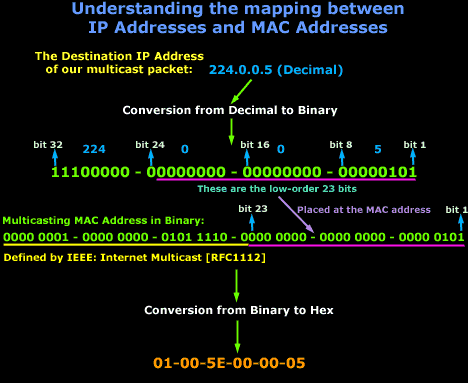
It might seem a bit confusing at first, but let's break it down:
We have an IP Address of 224.0.0.5, this is then converted into binary so we can clearly see the mapping of the 23 bits to the MAC address of the computer. The MAC Address part which is in yellow has been defined by the IEEE group. So the yellow and pink line make the one MAC Address as shown in binary mode, then we convert it from binary to hex and that's about it !
You should keep in mind that multicast routers should not forward any multicast datagram with destination addresses in the following 224.0.0.0 and 224.0.0.255. The next page (multicasting list) gives a bit more information on this.
Internet Multicast Addressess
Host Extensions for IP Multicasting [RFC1112] specifies the extensions required of a host implementation of the Internet Protocol (IP) to support multicasting. Current addresses are listed below.
The range of addresses between 224.0.0.0 and 224.0.0.255, inclusive, is reserved for the use of routing protocols and other low-level topology discovery or maintenance protocols, such as gateway discovery and group membership reporting. Multicast routers should not forward
any multicast datagram with destination addresses in this range, regardless of its TTL.
224.0.0.0 Base Address (Reserved) [RFC1112,JBP]
224.0.0.1 All Systems on this Subnet [RFC1112,JBP]
224.0.0.2 All Routers on this Subnet [JBP]
224.0.0.3 Unassigned [JBP]
224.0.0.4 DVMRP Routers [RFC1075,JBP]
224.0.0.5 OSPF - IGP All Routers [RFC1583,JXM1]
224.0.0.6 OSPF - IGP Designated Routers [RFC1583,JXM1]
224.0.0.7 ST Routers [RFC1190,KS14]
224.0.0.8 ST Hosts [RFC1190,KS14]
224.0.0.9 RIP2 Routers [RFC1723,GSM11]
224.0.0.10 IGRP Routers [Dino Farinacci]
224.0.0.11 Mobile-Agents [Bill Simpson]
224.0.0.12 DHCP Server / Relay Agent [RFC1884]
224.0.0.12 - 224.0.0.255 Unassigned [JBP]
224.0.1.23 XINGTV
224.0.2.1 "rwho" Group (BSD) (unofficial) [JBP]
224.0.2.2 SUN RPC PMAPPROC_CALLIT [BXE1]
224.0.3.000-224.0.3.255 RFE Generic Service [DXS3]
224.0.4.000-224.0.4.255 RFE Individual Conferences [DXS3]
224.0.5.000-224.0.5.127 CDPD Groups [Bob Brenner]
224.0.5.128-224.0.5.255 Unassigned [IANA]
224.0.6.000-224.0.6.127 Cornell ISIS Project [Tim Clark]
224.0.6.128-224.0.6.255 Unassigned [IANA]
224.0.7.000-224.0.7.255 Where-Are-You [Simpson]
224.0.8.000-224.0.8.255 INTV [Tynan]
224.0.9.000-224.0.9.255 Internet Railroad [Malamud]
224.1.0.0-224.1.255.255 ST Multicast Groups [RFC1190,KS14]
224.2.0.0-224.2.255.255 Multimedia Conference Calls [SC3]
224.252.0.0-224.255.255.255 DIS transient groups [Joel Snyder]
232.0.0.0-232.255.255.255 VMTP transient groups [RFC1045,DRC3]
These addresses are listed in the Domain Name Service under MCAST.NET and 224.IN-ADDR.ARPA.
Note that when used on an Ethernet or IEEE 802 network, the 23 low-order bits of the IP Multicast address are placed in the low-order
23 bits of the Ethernet or IEEE 802 net multicast address 1.0.94.0.0.0.
Summary
This article explained what multicasting is, how it works and its importance within a network and the internet. We analyzed the structure of a multicast address, the concept of multicast groups, purpose of IGMP and more. We talked about IP multicasting, Ethernet multicasting and their role. Finally we provided a list of IP multicast addresses and related RFCs. For more information on network protocols, analysis and functionality, please visit our Network Protocols or Network Fundamentals section.
Can Your EDR Spot the Attack?

Enterprise-Class Cloud & Network Monitoring

Threat Traffic Analysis

Wi-Fi Key Generator
IT Infrastructure Monitoring

Follow Firewall.cx
Recommended Downloads
Cisco Password Crack
Decrypt Cisco Type-7 Passwords on the fly!
Automated Patching Solution

Firewall Analyzer



