



A MAC address, or Media Access Control address, is a unique identifier assigned to a network interface controller (NIC) for use as a network address in communications within a network segment. It is a 48-bit address consisting of six sets of two hexadecimal digits, separated by colons or hyphens.
MAC addresses are essential in the functioning of Ethernet and Wi-Fi networks, as they are used to ensure that data packets are sent to the correct destination device. Every NIC has a unique MAC address, which is assigned by the device manufacturer and cannot be changed. MAC addresses are used by network switches and routers to forward data packets to the correct destination, and they play a crucial role in preventing network collisions and ensuring efficient network traffic management. MAC addresses are an essential part of network infrastructure and are used in almost all network communication protocols.
The Reason for MAC
The purpose of MAC addresses is to provide a unique identifier for network devices and enable efficient and accurate communication between them within a network.
The diagram below provides a visual representation how important MAC Addresses are on our network and at which layer of the OSI Model they exist: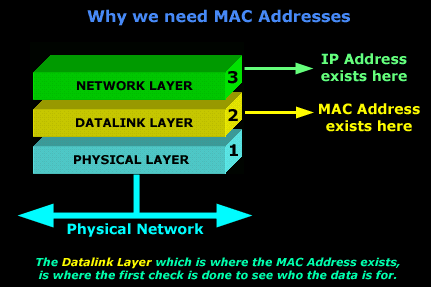
You see, the IP address of a machine exists on the Network Layer of the OSI model and, when a packet reaches the computer, it will travel from Layer 1 upwards, so we need to be able to identify the computer before Layer 3.
This is where the MAC address - Layer 2 comes into the picture. All machines on a network will listen for packets that have their MAC address in the destination field of the packet (they also listen for broadcasts and other stuff, but that's analysed in other sections). The Physical Layer understands the electrical signals on the network and creates the frame which gets passed to the Datalink layer. If the packet is destined for the computer then the MAC address in the destination field of the packet will match, so it will accept it and pass it onto the Layer above (3) which, in turn, will check the network address of the packet (IP Address), to make sure it matches with the network address to which the computer has been configured.
Examining a MAC Address
Let's now have a look at a MAC address and see what it looks like! We will use our workstation's MAC address as an example:
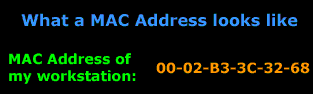
As mentioned previously, MAC Addresses are always presented in HEX format, just as our example above. It is very rare that a MAC address is represented in Binary format because it is simply too long and difficult to understand, as we will see futher on.
When a vendor, e.g Intel, produces network cards for computers, they don't just assign them any MAC address they like, this would create a big confusion in identifying who is the vendor of each network card and could possibly result in clashing with another MAC address from another vendor e.g D-link, who happened to choose the same MAC address for their network card!
To avoid these kind of problems, the IEEE group split the MAC address in half, and used the first half to identify the vendor, and the second half is used by the vendor to allocate serial numbers:
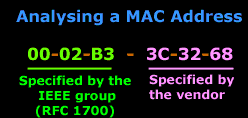
The Vendor code is specified by RFC - 1700. You might find a particular vendor having more than just one code; this is because of the wide range of products they might have. They just apply for more, as they need !
Keep in mind that even tho the MAC address is "burnt-in" to the network card's memory, some vendors will allow you to download special programs to change the second half of the MAC address on the card. This is because the vendors actually reuse the same MAC addresses for their network cards because they create so many that they run out of numbers ! But at the same time, the chances of you buying two network cards which have the same MAC address are so small that it's almost impossible !
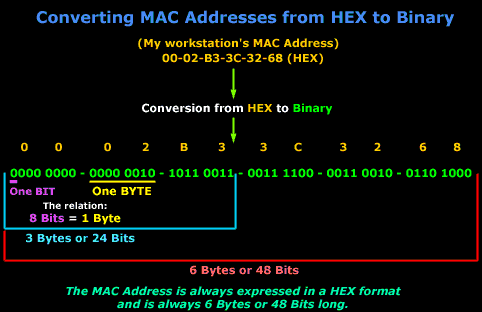
Let's start talking bits and bytes!
Now that we know what a MAC address looks like, we need to start analysing it. A MAC address of any network card is always the same length, that is, 6 Bytes long or 48 Bits long. If you're scratching your head wondering where these figures came from, then just have a look at the picture below which makes it a bit easier to understand:
Summary
In this article we explained the purpose and importance of MAC address, or Media Access Control address. We examined the 48-bit MAC address structure and how vendors assign serial numbers to their MAC address ranges.
Enterprise-Class Cloud & Network Monitoring

Threat Traffic Analysis

Wi-Fi Key Generator
IT Infrastructure Monitoring

Follow Firewall.cx
Recommended Downloads
Cisco Password Crack
Decrypt Cisco Type-7 Passwords on the fly!
Automated Patching Solution

Firewall Analyzer



