



We are going to analyse what happens when routing occurs on a network (IP routing process). When I was new to the networking area, I thought that all you needed was the IP Address of the machine you wanted to contact but so little did I know. You actually need a bit more information than just the IP Address !
The process we are going to explain is fairly simple and doesn't really change, no matter how big your network is.
The Example:
In our example, we have 2 networks, Network A and Network B. Both networks are connected via a router (Router A) which has 2 interfaces: E0 and E1. These interfaces are just like the interface on your network card (RJ-45), but built into the router.
Now, we are going to describe step by step what happens when Host A (Network A) wants to communicate with Host B (Network B) which is on a different network.
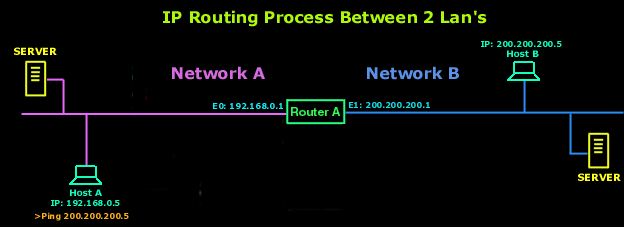
1) Host A opens a command prompt and enters >Ping 200.200.200.5.
2) IP works with the Address Resolution Protocol (ARP) to determine which network this packet is destined for by looking at the IP address and the subnet mask of Host A. Since this is a request for a remote host, which means it is not destined to be sent to a host on the local network, the packet must be sent to the router (the gateway for Network A) so that it can be routed to the correct remote network (which is Network B).
3) Now, for Host A to send the packet to the router, it needs to know the hardware address of the router's interface which is connected to its network (Network A), in case you didn't realise, we are talking about the MAC (Media Access Control) address of interface E0. To get the hardware address, Host A looks in its ARP cache - a memory location where these MAC addresses are stored for a few seconds.
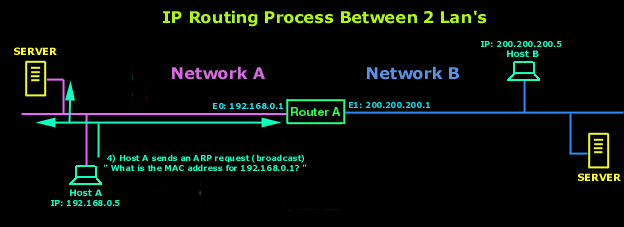
4) If it doesn't find it in there it means that either a long time has passed since it last contacted the router or it simply hasn't resolved the IP address of the router (192.168.0.1) to a hardware address (MAC). So it then sends an ARP broadcast. This broadcast contains the following "What is the hardware (MAC) address for IP 192.168.0.1 ? ". The router identifies that IP address as its own and must answer, so it sends back to Host A a reply, giving it the MAC address of its E0 interface. This is also one of the reasons why sometimes the first "ping" will timeout. Because it takes some time for an ARP to be sent and the requested machine to respond with its MAC address, by the time all that happens, the TTL (Time To Live) of the first ping packet has expired, so it times out!
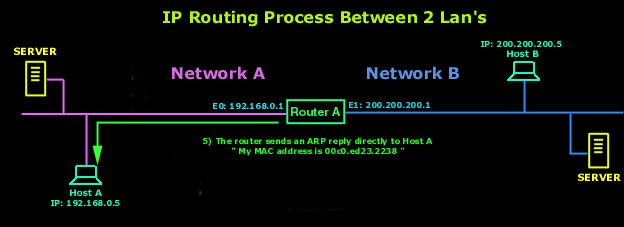
5) The router responds with the hardware address of its E0 interface, to which the 192.168.0.1 IP is bound. Host A now has everything it needs in order to transmit a packet out on the local network to the router. Now, the Network Layer hands down to the Datalink Layer the packet it generated with the ping (ICMP echo request), along with the hardware address of the router. This packet includes the source and destination IP address as well as the ICMP echo request which was specified in the Network Layer.
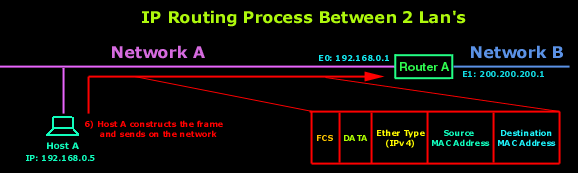
6) The Datalink Layer of Host A creates a frame, which encapsulates the packet with the information needed to transmit on the local network. This includes the source and destination hardware address (MAC) and the type field which specifies the Network Layer protocol e.g IPv4 (that's the IP version we use), ARP. At the end of the frame, in the FCS portion of the frame, the Datalink Layer will stick a Cyclic Redundancy Check (CRC) to make sure the receiving machine (the router) can figure out if the frame it received has been corrupted. To learn more on how the frame is created, visit the Data Encapsulation - Decapsulation.
7) The Datalink Layer of Host A hands the frame to the Physical layer which encodes the 1s and 0s into a digital signal and transmits this out on the local physical network.
8) The signal is picked up by the router's E0 interface and reads the frame. It will first do a CRC check and compare it with the CRC value Host A added to this frame, to make sure the frame is not corrupt.
9) After that, the destination hardware address (MAC) of the received frame is checked. Since this will be a match, the type field in the frame will be checked to see what the router should do with the data packet. IP is in the type field, and the router hands the packet to the IP protocol running on the router. The frame is stripped and the original packet that was generated by Host A is now in the router's buffer.
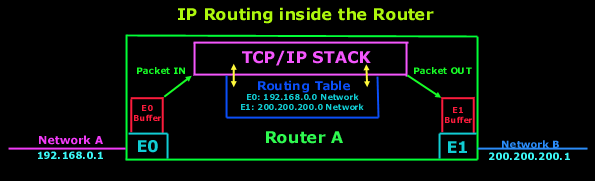
10) IP looks at the packet's destination IP address to determine if the packet is for the router. Since the destination IP address is 200.200.200.5, the router determines from the routing table that 200.200.200.0 is a directly connected network on interface E1.
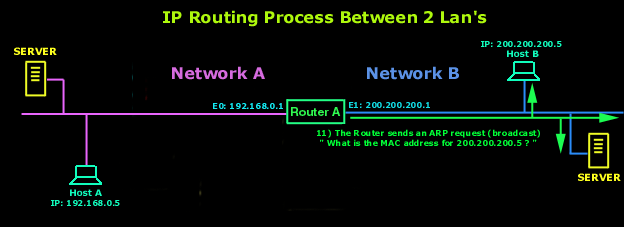
11) The router places the packet in the buffer of interface E1. The router needs to create a frame to send the packet to the destination host. First, the router looks in the ARP cache to determine whether the hardware address has already been resolved from a prior communication. If it is not in the ARP cache, the router sends an ARP broadcast out E1 to find the hardware address of 200.200.200.5
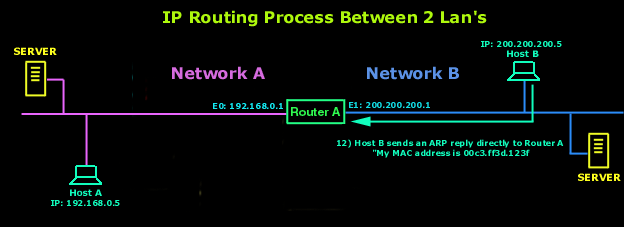
12) Host B responds with the hardware address of its network interface card with an ARP reply. The router's E1 interface now has everything it needs to send the packet to the final destination.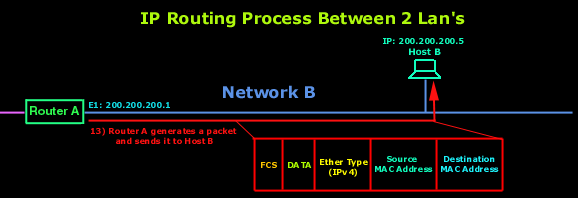
13)The frame generated from the router's E1 interface has the source hardware address of E1 interface and the hardware destination address of Host B's network interface card. However, the most important thing here is that even though the frame's source and destination hardware address changed at every interface of the router it was sent to and from, the IP source and destination addresses never changed. The packet was never modified at all, only the frame changed.
14) Host B receives the frame and runs a CRC. If that checks out, it discards the frame and hands the packet to IP. IP will then check the destination IP address. Since the IP destination address matches the IP configuration of Host B, it looks in the protocol field of the packet to determine the purpose of the packet.
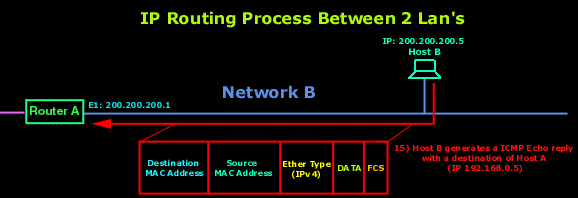
15) Since the packet is an ICMP echo request, Host B generates a new ICMP echo-reply packet with a source IP address of Host B and a destination IP address of Host A. The process starts all over again, except that it goes in the opposite direction. However, the hardware address of each device along the path is already known, so each device only needs to look in its ARP cache to determine the hardware (MAC) address of each interface.
And that just about covers our routing analysis. If you found it confusing, take a break and come back later on and give it another shot. Its really simple once you grasp the concept of routing.
Back to the Routing Section
10) IP looks at the packet's destination IP address to determine if the packet is for the router. Since the destination IP address is 200.200.200.5, the router determines from the routing table that 200.200.200.0 is a directly connected network on interface E1.
Can Your EDR Spot the Attack?

Enterprise-Class Cloud & Network Monitoring

Threat Traffic Analysis

Wi-Fi Key Generator
IT Infrastructure Monitoring

Follow Firewall.cx
Recommended Downloads
Cisco Password Crack
Decrypt Cisco Type-7 Passwords on the fly!
Automated Patching Solution

Firewall Analyzer



