



Routing and Communication between subnets is the main topic here. This article analyses communications between subnets. We provide examples on different methods that can be used to enable subnet communications in an effective and secure manner. Generally, this article puts in practice all subnetting theory covered until now.
Communication Between Subnets
So, after reading all the previous pages about subnetting, let me ask you the following:
Do you think computers that are on the same physical network but configured to be on separate subnets are able to communicate?
The answer is no. Why? Simply because you must keep in mind that we are talking about the communication between 2 different networks!
Looking at our example of the Class C network on the previous page, the fact is that one computer is part of the network 192.168.0.0 and the other one part of network 192.168.0.32, and these are two different networks. In our example, from the moment we modified the default subnet mask from 255.255.255.0 to 255.255.255.224, we split that one network to 8 smaller ones.
Putting Theory to the Test
And because we just have to prove it..... we are going to try it on my home network ! In the worst case we'll have to spend all night trying to figure out what went wrong but it will be worth it! :)
Without complicating things, here is a diagram of our lab network:
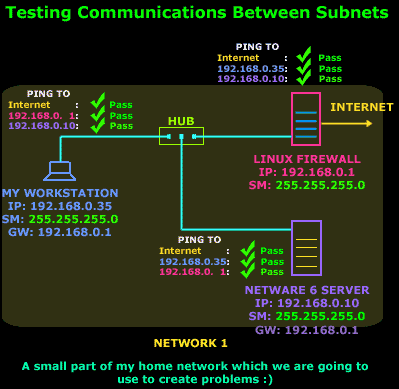
Well, that's the network we have to play with. We've put on the diagram the results of a few simple pings from each host and as you can see, they all came out nice: PASS.
So in order to proceed to phase 2 of our experiment, we've modified the Subnet mask of our workstation to 192.168.0.35 / 255.255.255.224, Slackware Linux Firewall to 192.168.0.1 / 255.255.255.224 (internal Network Interface Card) and NetWare Server to 192.168.0.10 / 255.255.255.224 as shown in the diagram below:
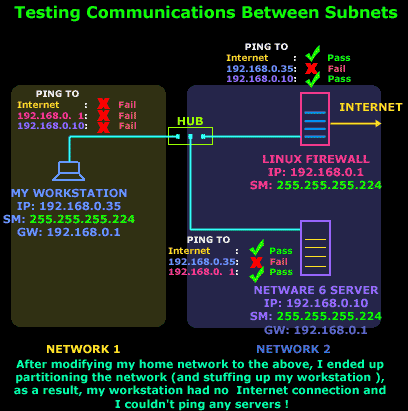
As you can see, the results from our workstation were devastating ... alone and totaly unaware that the other two servers are still there! When our workstation tries to actually ping the Linux Firewall, it will get no reply, because its Gateway is a host which belongs to another network, something that we knew would never work.
So, we have concluded that there cannot be any sort of communication between the computers of Network 1 and Network 2. The next question would be how can two hosts in two different subnets talk to each other? That's what we are going to have a look at right now !
Routing Between Subnets - Networks
There is a way to allow the communication between my workstation and my servers and the Internet. Actually there are a few ways to achieve this and I'm going to show you a few ways, even though some might seem silly or impractical. We are not interested in the best solution at the moment, we just want to know the ways in which we can establish communication between the two subnets.
Considering that subnets are smaller networks, you would remember that we use routers to achieve communications between two networks. This example of my home network is no exception to this rule.
We need a router which will route packets from one network to the other. Let's have a look at the different ways we can solve this problem:
Method 1: Using a Server with 2 Network Cards
Our first option is to use one of the Servers, or a new Server which has at least 2 network cards installed. By connecting each network card to one of our networks and configuring the network cards so that each one belongs to one subnet/network we can route packets between them:
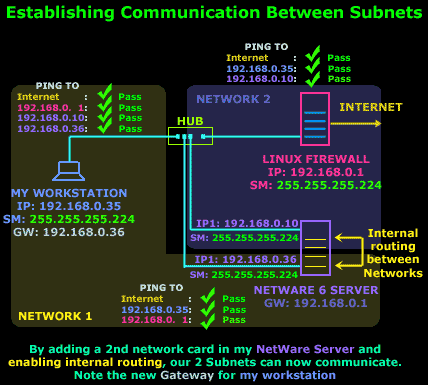
The above diagram shows pretty much everything that's needed. The 2nd network card has been installed and it's been assigned an IP Address that falls within our Network 1 range and therefore can communicate with our workstation. On the other hand the NetWare server now acts as a Gateway for Network 1, so our workstation is reconfigured to use it as its Gateway. Any packets from Network 1 to Network 2 or the Internet will pass through the NetWare server.
Method 2: Binding 2 IP Addresses to the same network card
This method is possibly the best and easiest way around our problem. We use the same network card on the NetWare server and bind another IP Address to it.
This second IP Address will obviously fall within the Network 1 IP range so that our workstation can communicate with the server:
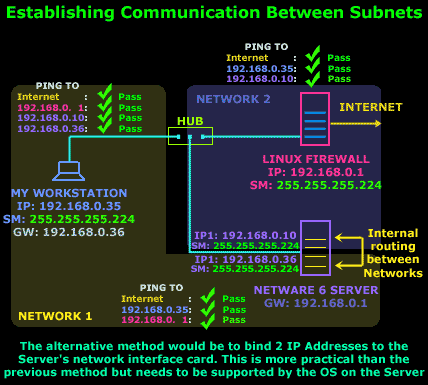
As noted on the diagram, the only problem we might encounter is the need for the operating system of the server to support this type of configuration, but most modern operating systems would comply.
Once configured, the Server takes care of any routing between the two networks.
Method 3: Installing a router
The third method is to install a router in the network.
This might seem a bit far fetched but remember that we are looking at all possible ways to establish communications between our networks ! If this was a large network, then a router could possibly be the ideal solution, but given the size of my network, well... let's just say it would be a silly idea :)
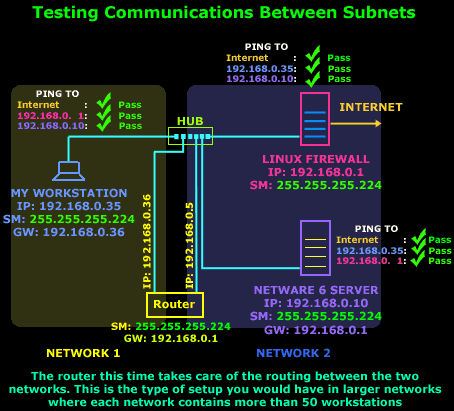
Our workstation in this setup would forward all packets to its Gateway, which is the router's interface and is connected to Network 1 and it will be able to see all other servers and access the Internet. It's a similar setup to Method 1 but instead of a Server we have a dedicated router. Oh, and by the way, if we would end up using such a configuration in real life.. the hub which both of the router's interface's connect to, would be replaced by some type of WAN link.
That completes our discussion on Subnet routing and communication.
Enterprise-Class Cloud & Network Monitoring

Threat Traffic Analysis

Wi-Fi Key Generator
IT Infrastructure Monitoring

Follow Firewall.cx
Recommended Downloads
Cisco Password Crack
Decrypt Cisco Type-7 Passwords on the fly!
Automated Patching Solution

Firewall Analyzer
