



So we have covered to some depth the subnetting topic, but there is still much to learn ! We are going to explain here the available subnet masks and analyse a Class C network, using a specific subnet mask. It's all pretty simple, as long as you understand the logic behind it.
Understanding the use, and analysing different subnet masks
Okay, so we know what a subnet mask is, but we haven't spoken (yet) about the different values they take, and the guidelines we need when we use them. That's what we are going to do here !
The truth is that you cannot take any subnet mask you like and apply it to a computer or any other device, because depending on the random subnet mask you choose, it will either create a lot of routing and communication problems, or it won't be accepted at all by the device you're trying to configure.
For this reason we are going to have a look at the various subnet masks so you know exactly what you need to use, and how to use it. Most important, we are going to make sure we understand WHY you need to choose specific subnet masks, depending on your needs. Most people simply use a standard subnet mask without understanding what that does. This is not the case for the visitors to this site.
Let's first have a look at the most common subnet masks and then I'll show you where these numbers come from :)
Common Subnet Masks
In order to keep this place tidy, we are going to see the common Subnet masks for each Class. Looking at each Class's subnet mask is possibly the best and easiest way to learn them.
|
Numer of bits
|
Class A
|
Class B
|
Class C
|
|
0 (default mask)
|
255.0.0.0 (default_mask)
|
255.255.0.0 (default_mask)
|
255.255.255.0 (default_mask)
|
|
1
|
255.128.0.0 (default +1)
|
255.255.128.0 (default+1)
|
255.255.255.128 (default+1)
|
|
2
|
255.192.0.0 (default+2)
|
255.255.192.0 (default+2)
|
255.255.255.192 (default+2)
|
|
3
|
255.224.0.0 (default+3)
|
255.255.224.0 (default+3)
|
255.255.255.224 (default+3)
|
|
4
|
255.240.0.0 (default+4)
|
255.255.240.0 (default+4)
|
255.255.255.240 (default+4)
|
|
5
|
255.248.0.0 (default+5)
|
255.255.248.0 (default+5)
|
255.255.255.248 (default+5)
|
|
6
|
255.252.0.0 (default+6)
|
255.255.252.0 (default+6)
|
255.255.255.252 (default+6)
|
|
7
|
255.254.0.0 (default+7)
|
255.255.254.0 (default+7)
|
255.255.255.254 (default+7) * Only 1 Host per subnet
|
|
8
|
255.255.0.0 (default+8)
|
255.255.255.0 (default+8)
|
255.255.255.255 (default+8) * Reserved for Broadcasts
|
The above table might seem confusing at first, but don't despair ! It's simple, really, you just need to look at it in a different way!
The trick to understanding the pattern of the above table is to think of it in the following way: Each Class has its default subnet mask, which I have noted using the Green colour, and all we are doing is borrowing a Bit at a time (starting from 1, all the way to 8) from the Host ID portion of each class. I have used various colours to show you the decimal numbers that we get each time we borrow a bit from the Host ID portion. If you can't understand how these decimal numbers work out, then you should read up on the Binary & IP page.
Each time we borrow a bit from the Host ID, we split the network into a different number of networks. For example, when we borrowed 3 Bits in the Class C network, we ended up partitioning the network into 8 smaller networks. Let's take a look at a detailed example (which we will break into three parts) so we can fully understand all the above.
We are going to do an analysis using the Class C network and 3 Bits which we took from the Host ID. The analysis will take place once we convert our decimal numbers to binary, something that's essential for this type of work. We will see how we get 8 networks from such a configuration and their ranges !
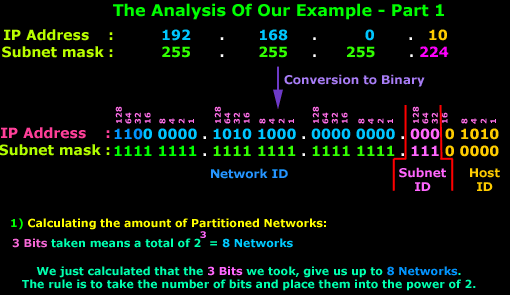
In this first part, we can see clearly where the 8 Networks come from. The rule applies to all types of Subnets, no matter what Class they are. Simply take the Subnet Bits and place them into the power of 2 and you get your Networks.
Now, that was the easy part. The second part is slightly more complicated and I need you focused so you don't get mixed up!
At first the diagram below seems quite complex, so try to follow me as we go through it:
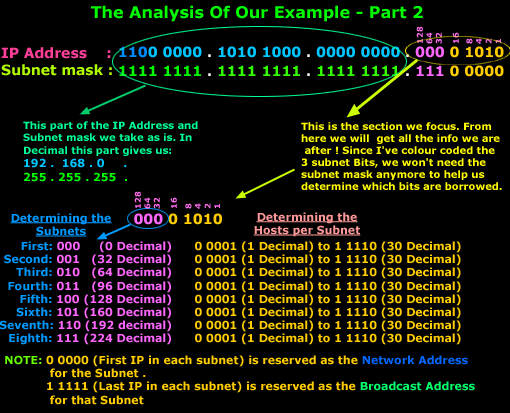
The IP Address and Subnet mask is show in Binary format. We focus on the last octet which contains all the information we are after. Now, the last octet has 2 parts, the Subnet ID and Host ID. When we want to calculate the Subnets and Hosts, we deal with them one at a time. Once that's done, we put the Subnet ID and Host ID portion together so we can get the last octet's decimal number.
We know we have 8 networks (or subnets) and, by simply counting or incrementing our binary value by one each time, we get to see all the networks available. So we start off with 000 and finish at 111. On the right hand side I have also put the equivalent decimal number for each network.
Next we take the Host ID portion, where the first available host is 0 0001 (1 in Decimal), because the 0 0000 (0 in Decimal) value is reserved as it is the Network Address (see IP Classes page), and the last value which is 1 1111 (31 in decimal) is used as a Broadcast Address for each Subnet (see Broadcast page).
Note
We've provided a formula in the IP Classes page that allows you to calculate the available hosts, and that's exactly what we are doing here for each subnet. This formula is :2 to the power of X -2. Where X is the number of Bits we have in the Host ID field, which for our example is 5. When we apply this formula, we get 2 to the power of 5 - 2 = 30 Valid (usable) IP Addresess. If you're wondering why we subtract 2, it's because one is used for the Network Address of that subnet and the other for the Broadcast Address of that subnet. This shouldn't be new news to anyone :)
Summing up, these are the ranges for each subnet in our new network:
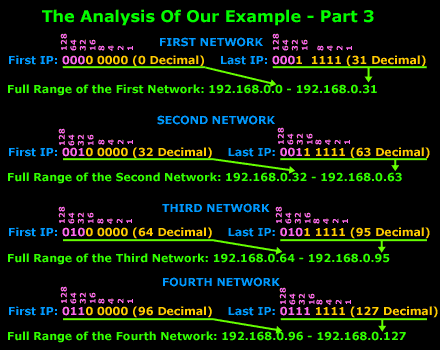
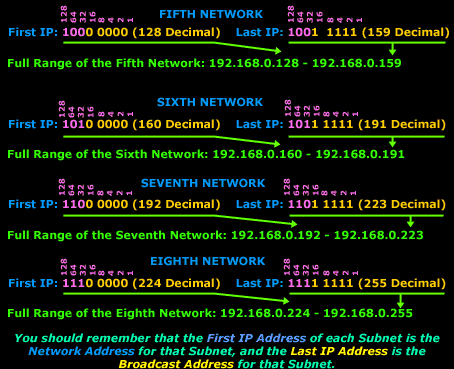
We hope the example didn't confuse you too much; the above example is one of the simplest type, which is why I chose a Class C network, they are the easiest to work with.
If you did find it somewhat difficult, try to read over it slowly. After a few times, you will get to understand it. These things do need time to sink in!
Enterprise-Class Cloud & Network Monitoring

Threat Traffic Analysis

Wi-Fi Key Generator
IT Infrastructure Monitoring

Follow Firewall.cx
Recommended Downloads
Cisco Password Crack
Decrypt Cisco Type-7 Passwords on the fly!
Automated Patching Solution

Firewall Analyzer
