



This article explains the 'Network-ID' and 'Host-ID' concept found in IP addressing and subnetting. We analyse the structure of IP addresses and network classes and show their Network-IDs and Host-IDs in binary format to make evident how the system works.
To help understand the network class analysis, we show examples of well-known ip address ranges and calculate their valid networks and hosts depending on their class and subnetmask.
The information provided in this article is extremely important for engineers who want to really understand IP addressing and subnetting.
Every protocol suite defines some type of addressing that identifies computers and networks. IP Addresses are no exception to this "rule". There are certain values that an IP Address can take and these have been defined by the IEEE committee (as most things).
A simple IP Address is a lot more than just a number. It tells us the network that the workstation is part of and the node ID. If you don't understand what I am talking about, don't let it worry you too much because we are going to analyse everything here :)
IP Address Classes and Structure
When the IEEE committee sat down to sort out the range of numbers that were going to be used by all computers, they came out with 5 different ranges or, as we call them, "Classes" of IP Addresses and when someone applies for IP Addresses they are given a certain range within a specific "Class" depending on the size of their network.
To keep things as simple as possible, let's first have a look at the 5 different Classes:
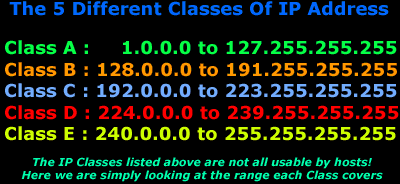
In the above table, you can see the 5 Classes. Our first Class is A and our last is E. The first 3 classes ( A, B and C) are used to identify workstations, routers, switches and other devices whereas the last 2 Classes ( D and E) are reserved for special use.
As you would already know an IP Address consists of 32 Bits, which means it's 4 bytes long. The first octet (first 8 Bits or first byte) of an IP Address is enough for us to determine the Class to which it belongs. And, depending on the Class to which the IP Address belongs, we can determine which portion of the IP Address is the Network ID and which is the Node ID.
For example, if I told you that the first octet of an IP Address is "168" then, using the above table, you would notice that it falls within the 128-191 range, which makes it a Class B IP Address.
Understanding the Classes
We are now going to have a closer look at the 5 Classes. If you remember earlier I mentioned that companies are assigned different IP ranges within these classes, depending on the size of their network. For instance, if a company required 1000 IP Addresses it would probably be assigned a range that falls within a Class B network rather than a Class A or C.
The Class A IP Addresses were designed for large networks, Class B for medium size networks and Class C for smaller networks.
Introducing Network ID and Node ID concepts
We need to understand the Network ID and Node ID concept because it will help us to fully understand why Classes exist. Putting it as simply as possible, an IP Address gives us 2 pieces of valuable information:
1) It tells us which network the device is part of (Network ID).
2) It identifies that unique device within the network (Node ID).
Think of the Network ID as the suburb you live in and the Node ID your street in that suburb. You can tell exactly where someone is if you have their suburb and street name. In the same way, the Network ID tells us which network a particular computer belongs to and the Node ID identifies that computer from all the rest that reside in the same network.
The picture below gives you a small example to help you understand the concept:
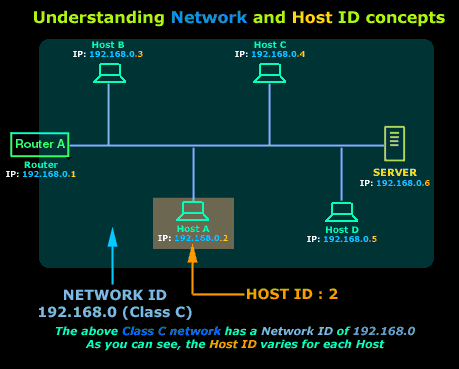
Explanation:
In the above picture, you can see a small network. We have assigned a Class C IP Range for this network. Remember that Class C IP Addresses are for small networks. Looking now at Host A, you will see that its IP Address is 192.168.0.2. The Network ID portion of this IP Address is in blue, while the Host ID is in orange.
I suppose the next question someone would ask is: How do I figure out which portion of the IP Address is the Network ID and which is the Host ID? That's what we are going to answer next.
The Network and Node ID of each Class
The network Class helps us determine how the 4 byte, or 32 Bit, IP Address is divided between network and node portions.
The table below shows you (in binary) how the Network ID and Node ID changes depending on the Class:
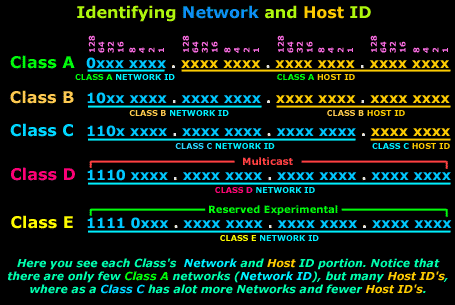
Explanation:
The table above might seem confusing at first but it's actually very simple. We will take Class A as an example and analyse it so you can understand exactly what is happening here:
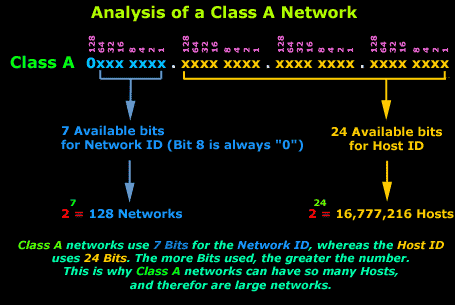
Any Class A network has a total of 7 bits for the Network ID (bit 8 is always set to 0) and 24 bits for the Host ID. Now all we need to do is calculate how much 7 bits is:
2 to the power of 7 = 128 Networks and for the hosts : 2 to the power of 24 = 16,777,216 hosts in each Network, of which 2 cannot be used because one is the Network Address and the other is the Network Broadcast address (see the table towards the end of this page). This is why when we calculate the "valid" hosts in a network we always subtract "2". So if I asked you how many "valid" hosts can you have a on Class A Network, you should answer 16,777,214 and not 16,777,216.
Below you can see all this in one picture:
A similar technique applies for the other two Classes we use, that's Class B and Class C, the only difference is that the number of networks and hosts changes because the bits assigned to them are different for each class.
Class B networks have 14 bits for the Network ID (Bits 15, 16 are set and can't be changed) and 16 bits for the Host ID, that means you can have up to '2 to the power of 14' = 16,384 Networks and '2 to the power of 16' = 65,536 Hosts in each Network, of which 2 cannot be used because one is the Network Address and the other is the Network Broadcast address (see the table towards the end of this page). So if I asked you how many "valid" hosts can you have a on Class B Network, you should answer 65,534 and NOT 65,536.
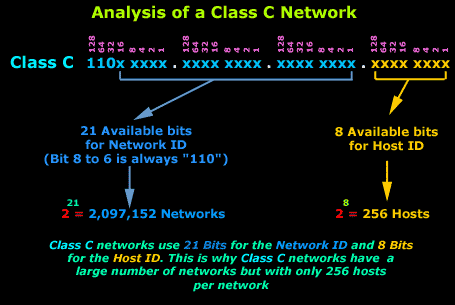
Class C networks have 21 bits for the Network ID (Bits 22, 23, 24 are set and can't be changed) and 8 bits for the Host ID, that means you can have up to '2 to the power of 21' = 2,097,152 Networks and '2 to the power of 8' = 256 Hosts in each Network, of which 2 cannot be used because one is the Network Address and the other is the Network Broadcast address (see the table towards the end of this page). So if I asked you how many "valid" hosts can you have a on Class C Network, you should answer 254 and NOT 256.
Now, even though we have 3 Classes of IP Addresses that we can use, there are some IP Addresses that have been reserved for special use. This doesn't mean you can't assign them to a workstation but in the case that you did, it would create serious problems within your network. For this reason it's best that you avoid using these IP Addresses.
The following table shows the IP Addresses that you should avoid using:
|
IP Address
|
Function
|
|
Network 0.0.0.0
|
Refers to the default route. This route is to simplify routing tables used by IP.
|
|
Network 127.0.0.0
|
Reserved for Loopback. The Address 127.0.0.1 is often used to refer to the local host. Using this Address, applications can address a local host as if it were a remote host. |
| IP Address with all host bits set to "0" (Network Address) e.g 192.168.0.0 |
Refers to the actual network itself. For example, network 192.168.0.0 (Class C) can be used to identify network 192.168.0. This type of notation is often used within routing tables.
|
| IP Address with all node bits set to "1" (Subnet / Network Broadcast) e.g 192.168.255.255 |
IP Addresses with all node bits set to "1" are local network broadcast addresses and must NOT be used.Some examples: 125.255.255.255 (Class A) , 190.30.255.255 (Class B), 203.31.218.255 (Class C). See "Multicasts" & "Network Broadcasts" for more info.
|
| IP Address with all bits set to "1" (Network Broadcast) e.g 255.255.255.255 |
The IP Address with all bits set to "1" is a broadcast address and must NOT be used. These are destined for all nodes on a network, no matter what IP Address they might have. |
Now make sure you keep to the above guidelines because you're going to bump into a lot of problems if you don't !
|
IMPORTANT NOTE: It is imperative that every network, regardless of Class and size, has a Network Address (first IP Address e.g 192.168.0.0 for Class C network) and a Broadcast Address (last IP Address e.g 192.168.0.255 for Class C network), as mentioned in the table and explanation diagrams above, which cannot be used.
So when calculating available IP Addresses in a network, always remember to subtract 2 from the number of IP Addresses within that network. |
Next, is the Subnetting section, and before you proceed, make sure you're comfortable with the new concepts and material we have covered, otherwise subnetting will be very hard to understand. Alternatively you can visit the IP Protocol section for more articles covering the Internet Protocol, IP Header analysis and much more.
Can Your EDR Spot the Attack?

Enterprise-Class Cloud & Network Monitoring

Threat Traffic Analysis

Wi-Fi Key Generator
IT Infrastructure Monitoring

Follow Firewall.cx
Recommended Downloads
Cisco Password Crack
Decrypt Cisco Type-7 Passwords on the fly!
Automated Patching Solution

Firewall Analyzer
