



 Next-generation firewalls (NGFWs) and DMZ zones are two critical components of network security that work hand in hand to protect an organization's network from external threats. Firewalls act as a barrier between the internal network and the external world, filtering traffic and preventing unauthorized access. A DMZ zone provides an extra layer of protection by segregating public-facing servers from the internal network, making it harder for attackers to gain access to critical systems.
The combination of firewalls and DMZ zones helps to reduce the attack surface of an organization's network, making it more difficult for attackers to exploit vulnerabilities and gain access to critical systems. Together, these technologies provide an effective defense against external threats and ensure that an organization's network remains secure.
Key topics covered in this article:
- Next-Generation Firewalls
- The Role and Importance of DMZ Zones
- DMZ Design and Operating Recommendations
- Firewall Topologies
- Dual-Homed Firewall
- Three-Legged Firewall
- Dual-Firewalls or Screened Subnets
- Summary
Next-Generation Firewalls
Next-generation firewalls (NGFWs) are an evolution of traditional firewalls, offering advanced features that enable more comprehensive security for modern networks. NGFWs go beyond the traditional firewall's simple packet filtering and provide advanced security features such as intrusion detection and prevention, web filtering, application control, and deep packet inspection.
While both Cisco and Palo Alto provide NGFW products and services, Palo Alto has taken the lead with its NGFW products thanks to their intuitive interface, ease of management and brilliant design. Cisco's attempt to enter the NGFW market was a bumpy ride as they purchase the opensource SourceFire project and integrated it into their ASA Firewall products to produce the known FirePower Next-Gen firewalls. Cisco next came out with their Firepower series firewall appliances.
Cisco's Firepower NGFW provides a comprehensive set of security features that are integrated with Cisco's Advanced Malware Protection (AMP) technology. This integration enables the Firepower NGFW to detect and block advanced threats, including malware and ransomware, with advanced threat intelligence capabilities.
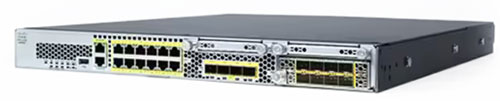
Cisco Firepower 2100 series appliance
Palo Alto's NGFW, the Palo Alto Networks Security Operating (PANOS) platform, uses a unique approach to security called Zero Trust, which assumes that no user or device can be trusted by default. It includes features such as policy-based segmentation, which isolates network segments and provides granular control over access to resources. It also includes advanced threat detection capabilities using machine learning algorithms and AI-based threat analysis.
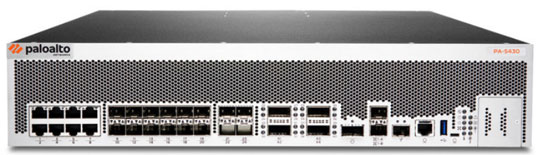
Palo Alto Next-Gen 5400 series appliance
Both Cisco and Palo Alto's NGFWs provide centralized management and reporting, making it easier for security teams to manage and monitor security policies across their networks. They also support integration with other security solutions, such as endpoint protection and security information and event management (SIEM) tools.
Don't forget to check out our popular Cisco Firewall and Palo Alto Firewall section where you'll find technical how-to articles covering firewall security and DMZ topics.
The Role & Importance of a DMZ
The Demilitarized Zone, or DMZ, is an expression that comes from the Korean War. There, it meant a strip of land forcibly kept clear of enemy soldiers.
The importance of a DMZ cannot be overstated, as it serves as a crucial barrier that limits the impact of a security breach on an organization's internal network. If a hacker were to breach the perimeter security of a company's network, they would first encounter the DMZ. The DMZ serves as a safe area where public-facing servers are isolated, reducing the risk of a security breach impacting sensitive data on the internal network.
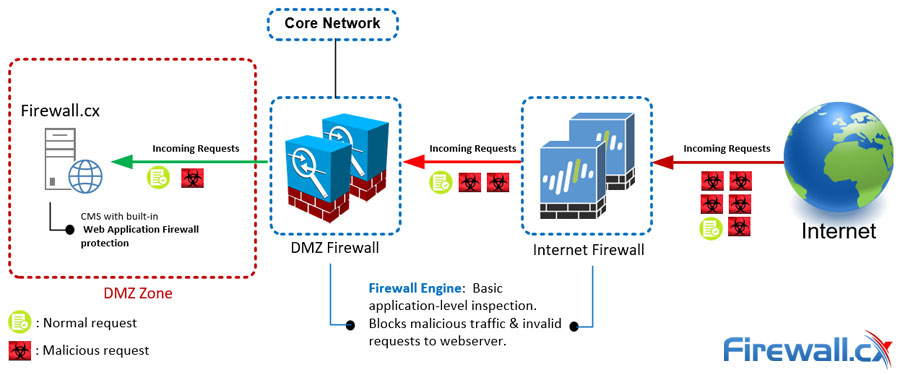
The example below shows how a public-facing web server is securely isolated inside a DMZ. The web server is protected by two sets of firewalls that limit access to it, and increase network security by providing inspection and advanced threat detection services. The CMS's built-in web application firewall protects against unknown web application vulnerabilities and blocks malicious requests that managed to evade the front-end firewalls:
Additionally, a DMZ helps reduce the attack surface of the network by limiting access to critical systems. By keeping the public-facing servers in a separate network segment, it's easier to manage access control and apply stricter security policies. This way, even if a hacker gains access to the DMZ, they won't necessarily have access to sensitive information or control over critical systems.
Another advantage of a DMZ is that it provides flexibility to IT administrators to manage and monitor the network. A DMZ allows administrators to configure different security policies for internal and external networks. This means that administrators can have more control over who has access to specific resources, and it can be easier to detect and block suspicious network activity.
In summary, the importance of a DMZ cannot be overstated in today's world where cyber-attacks are becoming more sophisticated and frequent. A DMZ helps to protect an organization's internal network from external threats and reduces the risk of sensitive information being compromised. It provides administrators with a more secure and manageable network environment and limits the attack surface, making it harder for attackers to penetrate an organization's network. For these reasons, a DMZ is a critical component of any organization's network security strategy.
DMZ Design and Operating Recommendations
Designing and operating a DMZ requires careful planning, configuration, and management. Below are tips that can help organizations ensure their DMZ is properly configured and managed to provide the best level of protection for their network.
1. Define the DMZ network: The first step in setting up a DMZ is to define the network segments and the servers that will be hosted in the DMZ. This includes identifying the public-facing servers and their respective security policies.
2. Implement proper network segmentation: Proper network segmentation is critical in preventing unauthorized access to the internal network. Ensure that network segments are isolated and that access controls are implemented to restrict traffic flow between the DMZ and the internal network.
3. Use proper network security controls: Deploy appropriate security controls to prevent unauthorized access and attacks on public-facing servers in the DMZ. This includes implementing firewalls, intrusion detection systems (IDS), and intrusion prevention systems (IPS).
4. Regularly update and patch servers: Ensure that all servers in the DMZ are up to date with the latest software updates and security patches. This helps to prevent known vulnerabilities from being exploited by attackers.
5. Monitor network traffic: Regularly monitor network traffic to detect any suspicious activity that may indicate an attack. This includes monitoring logs from firewalls and IDS/IPS systems.
6. Implement strict access controls: Implement strict access controls to restrict access to the DMZ and public-facing servers. This includes implementing two-factor authentication, restricting administrative access, and using secure protocols like SSL/TLS for server access.
7. Implement proper backup and recovery procedures: Implement proper backup and recovery procedures to ensure that in the event of a security breach, data can be restored quickly and efficiently.
Firewall Topologies
Firewall topologies refer to the different ways in which firewalls can be deployed within a network. There are several common firewall topologies, each with its own advantages and disadvantages. It is important to understand that there is no one-size-fits-all answer to which is the best firewall topology since this depends on the organization's specific security needs, including the size and complexity of the network, the level of security required, and the resources available for configuration and management.
Let's now take a look at the most common firewall topologies and discuss the advantages and disadvantes of each.
Dual-Homed Firewall
This is a simple topology where a firewall with two interfaces has one connected to the untrusted network (internet) and the other to the internal network. Dual-homed topologies are mostly used by small businesses because of their simplified design, complexity and low cost to maintain.
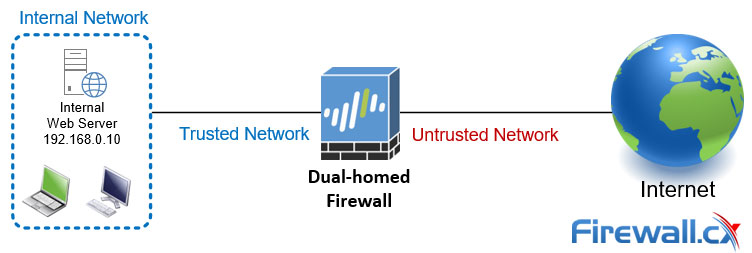
You'll quickly notice the absence of a DMZ zone on a dual-homed firewall, making this firewall topology unsuitable to provide any protection for public-facing servers, such as web servers or email servers.
What we often see, when there is a need to access an internal resource from the Internet, Destination Network Address Translation (DNAT) is configured on the firewall, to allow hosts from the untrusted network (internet) directly access an internal host:
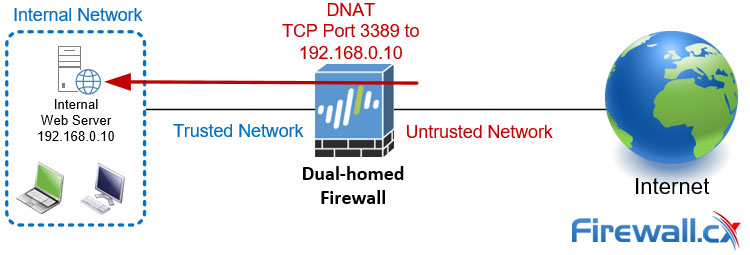
Regrettably, numerous businesses lack awareness of the security hazards associated with such practices, which frequently lead to their appearance on the front page of IT news.
It is important to note that dual-homed firewall setup provides a small level of security. If an attacker is able to breach the firewall, they have direct access to the internal network. This makes the internal network vulnerable to cyber threats, including malware, data breaches, and unauthorized access.
In addition, a dual-homed firewall These servers are typically located in a DMZ in other firewall topologies, which provides an extra layer of protection between the internet and the internal network.
Three-Legged Firewall
The three-legged firewall topology provides a higher level of security than a dual-homed firewall as it isolates the internal network and DMZ from the internet, reducing the risk of a breach.
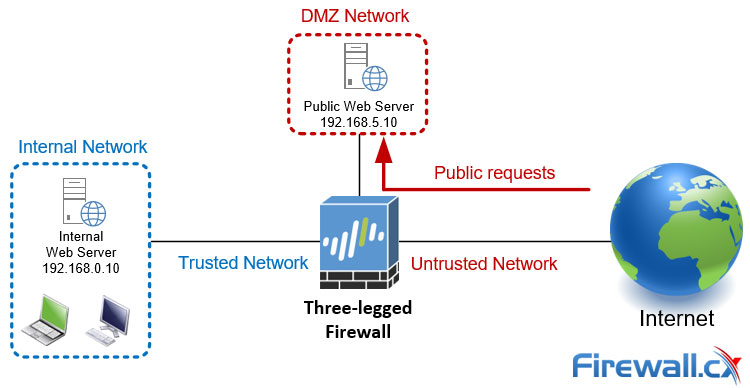
One advantage of a three-legged firewall is that it provides strong network segmentation, which helps prevent unauthorized access to sensitive data. By isolating the internal network and DMZ from the internet, attackers have a harder time accessing and compromising internal systems. Additionally, the DMZ acts as an intermediary between the internet and the internal network, allowing organizations to host public-facing servers, without exposing their network to external threats.
Another advantage of a three-legged firewall is that it allows for more granular control over network traffic. Administrators can configure the firewall to allow only necessary traffic between the DMZ and the internal network, while blocking all other traffic. This helps prevent the spread of malware or other threats in case a system in the DMZ is compromised.
These advantages come at a price since three-legged firewall can be more complex to configure and manage compared to a dual-homed firewall. It requires more networking components and devices, such as switches and routers (in some cases), which can increase the cost and complexity of the network.
Dual-Firewall or Screened Subnet
The dual-firewall or screened subnet topology offers significant advantages compared to all other setups. This topology consists of two firewalls. The first firewall, also known as the external or perimeter firewall, is connected to the internet and is responsible for filtering and blocking incoming traffic. The second firewall, also known as the internal or DMZ firewall, is placed behind the perimeter firewall and provides an extra layer of protection for the DMZ zone and the internal network:
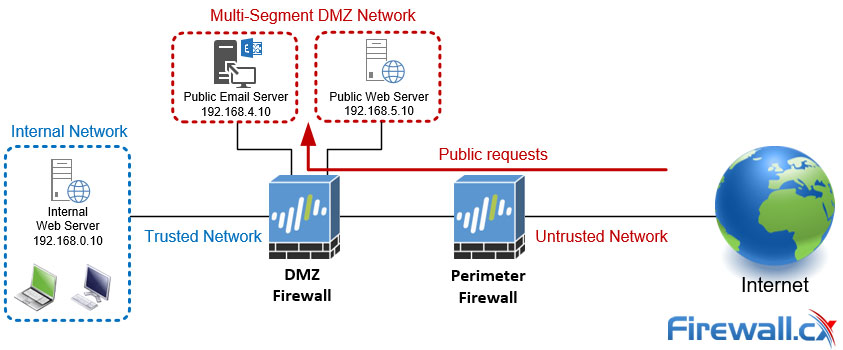
The dual-firewall or screened subnet topology provides a high level of security for organizations that require strong isolation between the internet, DMZ zone, and internal network. However, it can be more complex and expensive to set up and maintain compared to other firewall topologies, such as the three-legged or dual-homed firewall.
Setting apart the significant costs involved for this setup, its increased complexity requires a higher level of knowlege and experience. Firewall security policies, VLAN assignments and IP network addressing must be carefully designed and configured so that the necessary isolation exists between DMZ segments, internal network and the internet.
Summary
This article introduced Next-Gen firewalls, analyzed their capabilities and explained how they are used to create DMZ zones to reduce risk and effects of a security breach. We covered the purpose and importance of DMZ zones, provided tips to help manage them and also examined number of different firewall topologies including dual-homed firewalls, three-legged firewalls and dual-firewalls aka screened subnets.
Enterprise-Class Cloud & Network Monitoring

Threat Traffic Analysis

Wi-Fi Key Generator
IT Infrastructure Monitoring

Follow Firewall.cx
Recommended Downloads
Cisco Password Crack
Decrypt Cisco Type-7 Passwords on the fly!
Automated Patching Solution

Firewall Analyzer



