



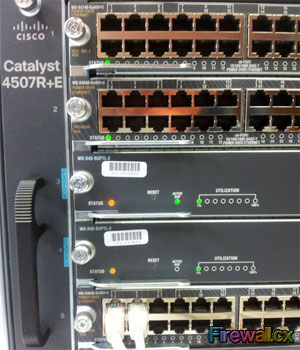
 Errdisable is a feature that automatically disables a port on a Cisco Catalyst switch. When a port is error disabled, it is effectively shut down and no traffic is sent or received on that port.
The error disabled feature is supported on most Catalyst switches running the Cisco IOS software. Including all the following models:
- Catalyst 2940 / 2950 / 2960 / 2960S
- Catalyst 3550 / 3560 / 3560-E / 3750 / 3750-E
- Catalyst 4000 / 4500 / 4507R
- Catalyst 6000 / 6500
The Errdisable error disable feature was designed to inform the administrator when there is a port problem or error. The reasons a catalyst switch can go into Errdisable mode and shutdown a port are many and include:
-
Duplex Mismatch
-
Loopback Error
- Link Flapping (up/down)
- Port Security Violation
- Unicast Flodding
- UDLD Failure
- Broadcast Storms
- BPDU Guard
When a port is in error-disabled state, it is effectively shut down and no traffic is sent or received on that port. The port LED is set to the orange color and, when you issue the show interfaces command, the port status shows as Errdisabled.
Following is an example of what an error-disabled port looks like:
GigabitEthernet0/7 is down, line protocol is down (err-disabled)
Hardware is Gigabit Ethernet, address is 001b.54aa.c107 (bia 001b.54aa.c107)
MTU 1500 bytes, BW 100000 Kbit, DLY 100 usec,
reliability 234/255, txload 1/255, rxload 1/255
Encapsulation ARPA, loopback not set
Keepalive set (10 sec)
Auto-duplex, Auto-speed, media type is 10/100/1000BaseTX
input flow-control is off, output flow-control is unsupported
ARP type: ARPA, ARP Timeout 04:00:00
Last input 18w5d, output 18w5d, output hang never
Last clearing of "show interface" counters never
Input queue: 0/75/0/0 (size/max/drops/flushes); Total output drops: 0
Queueing strategy: fifo
Output queue: 0/40 (size/max)
5 minute input rate 0 bits/sec, 0 packets/sec
5 minute output rate 0 bits/sec, 0 packets/sec
1011 packets input, 862666 bytes, 0 no buffer
Received 157 broadcasts (0 multicast)
0 runts, 0 giants, 0 throttles
3021 input errors, 2 CRC, 0 frame, 0 overrun, 0 ignored
0 watchdog, 144 multicast, 0 pause input
0 input packets with dribble condition detected
402154 packets output, 86290866 bytes, 0 underruns
0 output errors, 0 collisions, 1 interface resets
0 babbles, 0 late collision, 0 deferred
0 lost carrier, 0 no carrier, 0 PAUSE output
0 output buffer failures, 0 output buffers swapped out
To recover a port that is in an Errdisable state, manual intervention is required, and the administrator must access the switch and configure the specific port with 'shutdown' followed by the 'no shutdown' command. This command sequence will enable the port again, however, if the problem persists expect to find the port in Errdisable state again soon.
Understanding And Configuring Errdisable AutoRecovery
As outlined above, there are a number of reasons a port can enter the Errdisable state. One common reason is the Port Security error, also used in our example below.
Of all the errors, Port Security is more a feature rather than an error. Port Security allows the restriction of MAC Addresses on an interface configured as a layer 2 port. This effectively prevents others connecting unwanted hubs or switches on the network. Port Security allows us to specify a single MAC Address to be connected to a specific port, thus restricting access to a specific computer.
In the case of a violation, Port Security will automatically disable the port. This is the behaviour of the default port security policy when enabling Port Security. Following is a configuration example of port security:
2960G(config-if)# switchport access vlan 2
2960G(config-if)# switchport mode access
2960G(config-if)# switchport port-security
2960G(config-if)# spanning-tree portfast
Once a host is connected to the port, we can get more information on its port-security status and actions that will be taken when a violation occurs:
Port Security : Enabled
Port Status : Secure-up
Violation Mode : Shutdown
Aging Time : 0 mins
Aging Type : Absolute
SecureStatic Address Aging : Disabled
Maximum MAC Addresses : 1
Total MAC Addresses : 1
Configured MAC Addresses: 0
Sticky MAC Addresses : 0
Last Source Address:Vlan: 001b.54aa.c107
Security Violation Count: 0
Note that the Violation Mode is set to Shutdown. This means that when a violation is detected, the switch will place gigabitethernet 0/48 in the err-disable shutdown state as shown below:
While it's almost always necessary to know when a port security violation occurs there are some circumstances where autorecovery is a desirable feature, especially durng accidental violations.
The following commands enable the autorecovery feature 30 seconds after a port security violation:
2960G(config)# errdisable recovery interval 30
Determine The Reason For The Errdisabled State
To view the Errdisabled reasons, and see for which reason the autorecovery feature has been enabled, use the show Errdisable recovery command:
----------------- --------------
udld Disabled
bpduguard Disabled
security-violatio Disabled
channel-misconfig Disabled
vmps Disabled
pagp-flap Disabled
dtp-flap Disabled
link-flap Disabled
secure-violation Enabled
sfp-config-mismat Disabled
gbic-invalid Disabled
dhcp-rate-limit Disabled
unicast-flood Disabled
storm-control Disabled
loopback Disabled
We have now confirmed that autorecovery is enabled for port-security violations. If it is required to enable the Errdisable autorecovery feature for all supported reasons, use the following command:
To test our configuration we forced a port security violation, causing the switch to place the offending port in the shutdown state. Notice we've enabled autorecovery for all Errdisable reasons and the time left to enable the interfaces placed in shutdown state by the port security violation:
ErrDisable Reason Timer Status
----------------- --------------
udld Enabled
bpduguard Enabled
security-violatio Enabled
channel-misconfig Enabled
vmps Enabled
pagp-flap Enabled
dtp-flap Enabled
link-flap Enabled
psecure-violation Enabled
sfp-config-mismat Enabled
gbic-invalid Enabled
dhcp-rate-limit Enabled
unicast-flood Enabled
storm-control Enabled
loopback Enabled
Timer interval: 30 seconds
Interfaces that will be enabled at the next timeout:
Interface Errdisable reason Time left(sec)
--------- ----------------- --------------
Gi0/48 security-violation 17
Seventeen seconds later, the switch automatically recovered from the port security violation and re-enabled the interface:
18w4d: %LINK-3-UPDOWN: Interface GigabitEthernet0/48, changed state to up
18w4d: %LINEPROTO-5-UPDOWN: Line protocol on Interface GigabitEthernet0/48, changed state to up
Disabling The Errdisable Feature
There are cases where it might be necessary to disable the Errdisable mechanism for specific supported features in order to overcome constant interface shutdowns and auto recoveries. While the Catalyst IOS does not allow disabling all features we can still fine-tune the mechanism and selectively disable a few.
To view the Errdisable reasons monitored by the switch, use the show Errdisable detect command:
2960G# show errdisable detect
ErrDisable Reason Detection Mode
----------------- --------- ----
bpduguard Enabled port
channel-misconfig Enabled port
community-limit Enabled port
dhcp-rate-limit Enabled port
dtp-flap Enabled port
gbic-invalid Enabled port
inline-power Enabled port
invalid-policy Enabled port
link-flap Enabled port
loopback Enabled port
lsgroup Enabled port
mac-limit Enabled port
pagp-flap Enabled port
port-mode-failure Enabled port
secure-violation Enabled port/vlan
security-violation Enabled port
sfp-config-mismatch Enabled port
small-frame Enabled port
storm-control Enabled port
udld Enabled port
vmps Enabled port
As shown, the command lists all supported Errdisable reasons. For our example, let's assume we want to disable the inline-power Errdisable feature.
To achieve this, we simply use the following command:
And verify that Errdisable has been disabled for the feature:
ErrDisable Reason Detection Mode
----------------- --------- ----
bpduguard Enabled port
channel-misconfig Enabled port
community-limit Enabled port
dhcp-rate-limit Enabled port
dtp-flap Enabled port
gbic-invalid Enabled port
inline-power Disabled port
invalid-policy Enabled port
link-flap Enabled port
loopback Enabled port
lsgroup Enabled port
mac-limit Enabled port
pagp-flap Enabled port
port-mode-failure Enabled port
psecure-violation Enabled port/vlan
security-violation Enabled port
sfp-config-mismatch Enabled port
small-frame Enabled port
storm-control Enabled port
udld Enabled port
vmps Enabled port
Overall, the Errdisable feature is an extremely useful tool if configured and monitored correctly. Take the necessary time to play around with the supported options of your Cisco Catalyst switch and fine-tune it to suit your network needs.
Can Your EDR Spot the Attack?

Enterprise-Class Cloud & Network Monitoring

Threat Traffic Analysis

Wi-Fi Key Generator
IT Infrastructure Monitoring

Follow Firewall.cx
Recommended Downloads
Cisco Password Crack
Decrypt Cisco Type-7 Passwords on the fly!
Automated Patching Solution

Firewall Analyzer
