



When working with Cisco equipment that has multiple ip interfaces, a common problem engineers are faced with is trying to successfully tftp to or from the Cisco device. This issue is usually encountered when the Cisco device (router or multi-layer switch) uses a different source IP address which cannot reach our TFTP Server's IP address or is blocked due to access lists.
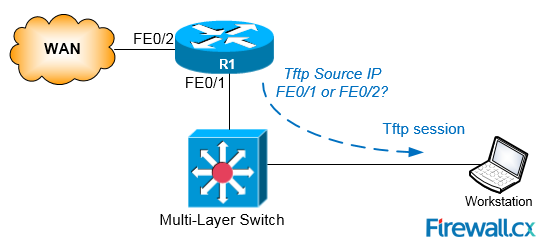 Figure 1. The tftp source IP problem with tftp and other services on a Cisco Router
Luckily, there is a way around this problem, and it’s a simple one.
Note: The commands used are identical for all Cisco routers and Catalyst switches.
To ensure your Cisco router or multi-layer switch uses the correct interface during any tftp session, use the ip tftp source-interface command to specify the source-interface that will be used by the device.
The following example instructs our Cisco 3750 Layer 3 switch to use VLAN 5 interface as the source ip interface for all tftp sessions:
As shown below, VLAN 5 has IP address 192.168.131.1 assigned to it, therefore this IP address will be the source interface from now on:
Interface IP-Address OK? Method Status Protocol
Vlan1 192.168.50.1 YES NVRAM up up
Vlan2 192.168.130.1 YES NVRAM up up
Vlan3 192.168.135.1 YES NVRAM up up
Vlan4 192.168.19.1 YES NVRAM up up
Vlan5 192.168.131.1 YES NVRAM up up
Vlan6 192.168.141.1 YES NVRAM up up
Vlan7 192.168.170.1 YES NVRAM up up
Vlan8 192.168.180.1 YES NVRAM up up
Can Your EDR Spot the Attack?

Enterprise-Class Cloud & Network Monitoring

Threat Traffic Analysis

Wi-Fi Key Generator
IT Infrastructure Monitoring

Follow Firewall.cx
Recommended Downloads
Cisco Password Crack
Decrypt Cisco Type-7 Passwords on the fly!
Automated Patching Solution

Firewall Analyzer
