



 Today, Serial and Parallel Direct Cable Connections are considered obsolete methods of transferring data between computers. The fact is that even USB Direct Cable Connection (DCC), is not all that popular, but is still used mostly by home users because of its easy setup and fast transfer speeds.
USB DCC has been around for well over a decade but has failed to become a popular method of transferring data because of the rapid growth of networks and their significant speeds. In most cases, users with Gigabit Ethernet ports on their workstations simply require a standard UTP straight-thru cable to begin transferring data at double the rate of a USB DCC.
Let’s now take a closer look at USB interfaces and how they work.
About USB
USB stands for Universal Serial Bus and it’s the standard interface for all computer peripherals (printers, faxes, CDROMs, mice, joysticks etc) and mobile devices today.
The Universal Serial Bus gives you a single, standardized, easy-to-use way to connect multiple devices to a computer. The USB port is also capable of providing power to the connected devices, but it should be noted that each USB port has a limit of delivering a maximum amount of power, depending on the USB version. !
The initial specification of USB v1.1 was designed to deliver a maximum of 150mA (0.75 watts) at 5Volts. USB 2.0 specification increased the maximum power to an impressive 500mA (2,5 watts). USB 3.0 specification next came along and further increased the maximum power to 1,5Amps (7,5 watts) at 5Volts, allowing more power demanding peripherals to connect and be powered by USB.
Finally, the latest USB specification v3.1, jumped from 7,5 watts to a whopping 100 watts, but at the same time providing support for 5Volts, 12Volts and 20Volts.
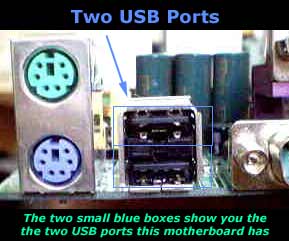
Figure 1. USB Ports on a PC motherboard
As mentioned previously, there are 4 different versions of USB specifications: v1.1, v2, v3.0 and v3.1. Most USB ports today on computers and laptops support USB v3.0 specification while peripheral devices with USB v3.0 interfaces are already available in the market.
USB v3.1 and v3.0 are fully backwards compatible with USB v2.0 and v1.1 peripherals, ensuring full compatibility with any USB device.
The table below compares the different USB versions currently available, along with their most important technical specifications:
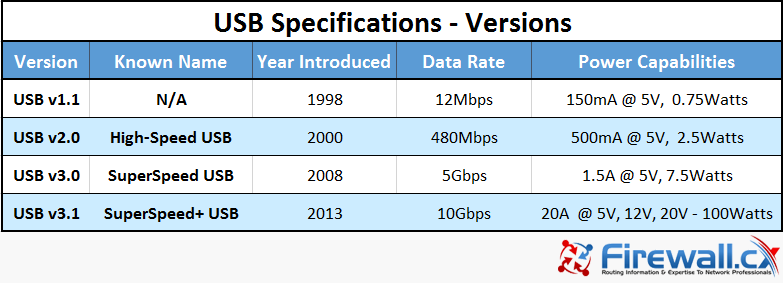
Figure 2. USB Specifications, different versions, Names, Data rates and power capabilities
Keep in mind that when you're using a USB DCC cable, you won't get such great speeds, but somewhere around the 500 Kbps. This also depends on the type of CPU, O/S, the quality of the cable and electronic components and protocols running on your system.
When transferring data between two computers, the effective throughput (speed) achieved will depend on a variety of factors such as USB port version on both ends, USB Direct Cable version, CPU and HDD speed, how busy both systems are more. A USBv2.0 cable connected to two USBv2 ports is expected to achieve a 480Mbps transfer rate, however if the HDD on either side is unable to keep a sustained transfer speed, its likely the throughput will dramatically decrease.
Another important detail is the operating system used. Today, all Windows and Linux operating systems fully support USB ports, however older operating systems are not completely compatible. The table below shows which operating systems provide full support for USB ports, regardless of their specification version:
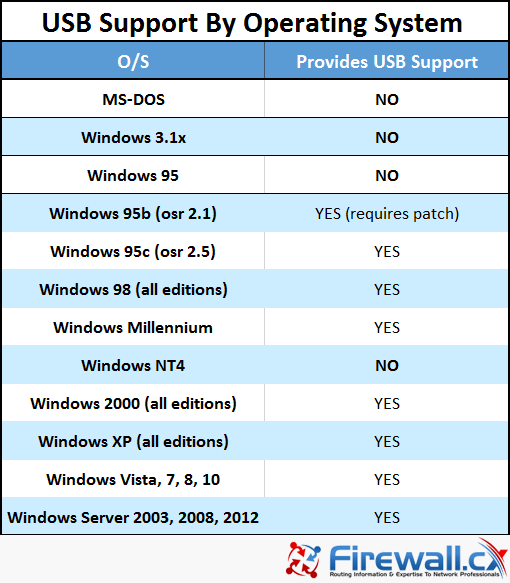
Figure 3. USB support by Microsoft Windows operating system
The Standard USB Cable
The USB standard uses A and B connectors to avoid confusion. "A" connectors head "upstream" toward the computer, while "B" connectors head "downstream" and connect to individual devices. This might seem confusing to some, but it was designed to avoid confusion between consumers because it would be more complicated for most people to try and figure out which end goes where.
This is what the USB cable and connectors look like:
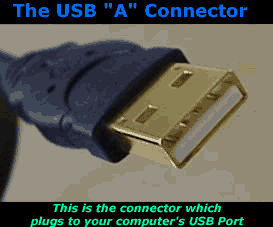
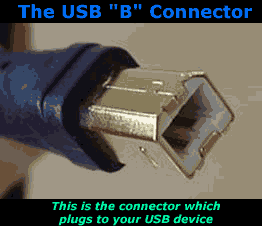
Figure 4. USB 'A' and 'B' type connectors
As mentioned earlier, the USB port can power certain devices and also transfer data at the same time. For this to happen, the USB port must have at least four cables or two pairs,of which one pair is used to power the USB device (e.g hdd) and the second pair is used for data transfer between the device and computer.
The diagram below shows a standard USB cable with its internal 4 wires and their function. The shielding located at the far left is used to protect the cable from electromagnetic interference:
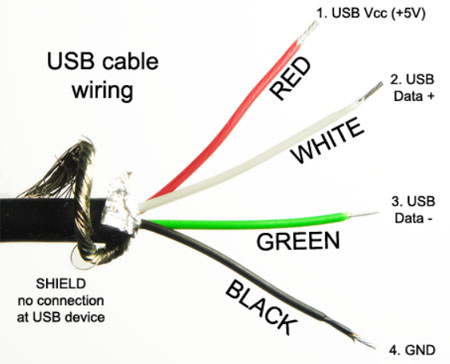
Figure 5. USB Cable - Wires inside the USB cable
The USB Direct Connection Cable (DCC)
As previously mentioned, transferring data between two computers using the USB ports, requires the purchase of a USB Direct Connection Cable. (DCC). This cable is also known as a USB Transfer or Data Link cable. The DCC cable is not a simple cross-over cable, but contains electronic circuits that make it possible to use it to transfer data between computers.
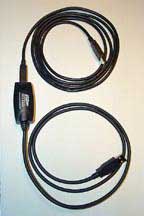
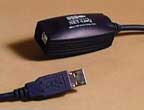
Figure 6. USB Transfer or Data Link cable
Searching for USB DCC cables will reveal a number of manufactures however almost all offer only USB 2.0 DCC cables, which means that the maximum transfer speed expected would be 480Mbps.
In addition, DCC cables are plug-and-play, not requiring additional drivers and are powered directly from the USB port. In most cases, when the USB cable is plugged into the computer, it will see it as an external drive, containing a special executable application that needs to be run on each computer to begin transferring files between them. This completes the discussion on USB Direct Cable Connection & port specifications. More information on Data transfer methods, Serial & Parallel ports, Ethernet (Fast/Gigabit/10Gigabit) and Fiber optic can be found in our Network Cabling Section.
Can Your EDR Spot the Attack?

Enterprise-Class Cloud & Network Monitoring

Threat Traffic Analysis

Wi-Fi Key Generator
IT Infrastructure Monitoring

Follow Firewall.cx
Recommended Downloads
Cisco Password Crack
Decrypt Cisco Type-7 Passwords on the fly!
Automated Patching Solution

Firewall Analyzer
