



The term "Broadcast" is used very frequently in the networking world . You will see it in most networking books and articles, or see it happening on your hub/switch when all the LED's start flashing at the same time !
If you have been into networking for a while you most probably have come across the terms "broadcast" and "subnet broadcast" . When I first dived into the networking world, I was constantly confused between the two, because they both carried the "broadcast" term in them. We will analyse both of them here, to help you understand exactly what they are and how they are used !
Broadcast
A Broadcast means that the network delivers one copy of a packet to each destination. On bus technologies like Ethernet, broadcast delivery can be accomplished with a single packet transmission. On networks composed of switches with point-to-point connections, software must implement broadcasting by forwarding copies of the packet across individual connections until all switches have received a copy. We will be focusing only on Ethernet broadcasts.
The picture below illustrates a router which has sent a broadcast to all devices on its network:
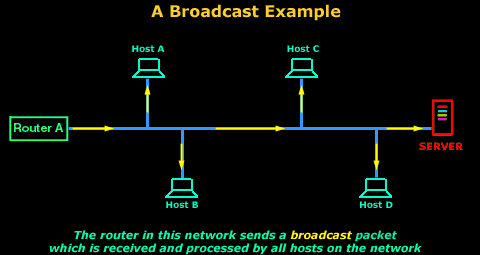
Normally, when the computers on the network receive a packet, they will first try to match the MAC address of the packet with their own and if that is successful, they process the packet and hand it to the OSI layer above (Network Layer), if the MAC address is not matched, then the packet is discarded and not processed. However, when they see a MAC address of FF:FF:FF:FF:FF:FF, they will process this packet because they recognise it as a broadcast.
But what does a "broadcast" look like ?
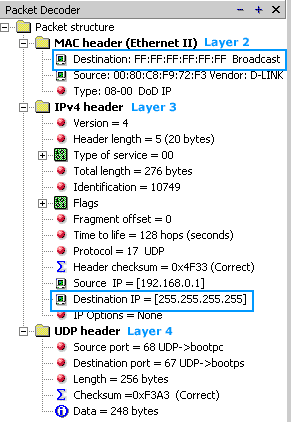
The screenshot below was taken from the packet sniffer application and shows the basic information contained within a network broadcast:

Let's now have a closer look at the above captured packet.
The image below shows a broadcast packet. You can clearly see that the "MAC destination address" is set to FF:FF:FF:FF:FF:FF. The "Address IP destination" is set to 255.255.255.255, this is the IP broadcast address and ensures that no matter what IP address the receiving computer(s) have, they will not reject the data but process it.
Now you might ask yourself "Why would a workstation want to create a broadcast packet ?"
The answer to that lies within the various protocols used on our networks !
Let's take for example Address Resolution Protocol, or ARP. ARP is used to find out which MAC address (effectively , which network card or computer) has a particular IP address bound to it. You will find a detailed example of the whole process in the IP Routing section.
For a network device such as a router to ask "Who has IP address 192.168.0.100?", it must "shout" it out so it can grab everyone's attention, which is why it will use a broadcast address to make sure everyone on the network listens and processes the packet.
In the example image above, the particular machine was looking for a DHCP server (notice the "bootps" protocol under the UDP Header - Layer 4, which is basically DHCP).
Subnet Broadcast or Direct Broadcast
A Subnet or Direct broadcast is targetted not to all hosts on a network, but to all hosts on a subnet. Since a physical network can contain different subnets/networks e.g 192.168.0.0 and 200.200.200.0, the purpose of this special broadcast is to send a message to all the hosts in a particular subnet.
In the example below, Router A sends a subnet broadcast onto the network. Hosts A,B,C and the Server are configured to be part of the 192.168.0.0 network so they will receive and process the data, but Host D is configured with a different IP Adress, so it's part of a different network, it will accept the packet cause of its broadcast MAC address, but will drop the packet when it reaches its Network Layer, where it will see that this packet was for a different IP network.
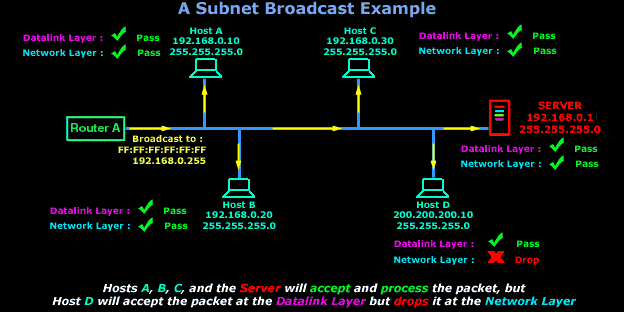
It is very similar to the network broadcast we just talked about but varies slightly in the sense that its IP broadcast is not set to 255.255.255.255 , but is set to the subnet broadcast address. For example, my home network is a Class C network : 192.168.0.0 with a subnetmask of 255.255.255.0 or, if you like to keep it simple, : 192.168.0.0/24.
This means that the available valid hosts for this network are from 192.168.0.1 to 192.168.0.254. In this Class C network, as in every other network, there are 2 addresses which I can't use. The first one is preserved to identify the network (192.168.0.0) and the second one for the subnet broadcast (192.168.0.255).

The above packet, captured from my packet sniffer, shows my workstation broadcasting to the subnet 192.168.0.0. From the broadcast address you can tell that I am using a full Class C network range, otherwise the Destination IP wouldn't be 192.168.0.255.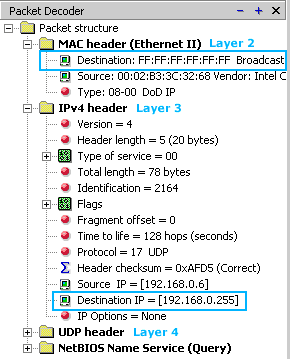
The Packet decoder on the right shows you the contents of each header from the above packet.
Looking at the MAC Header (Datalink Layer), the destination MAC address is set to FF:FF:FF:FF:FF:FF and the IP Header (Network Layer) has the Destination IP set to 192.168.0.255 which is, as I said, the Subnet Broadcast Address. Again, all computers on the network which are part of the 192.168.0.0 subnet will process this packet, the rest will drop the packet once they see it's for a network to which they do not belong.
In this example, I double clicked at my "Network Places" and was searching for a computer, this forced my workstation to send out a Subnet Broadcast on the network asking if a particular computer existed on the network.
Enterprise-Class Cloud & Network Monitoring

Threat Traffic Analysis

Wi-Fi Key Generator
IT Infrastructure Monitoring

Follow Firewall.cx
Recommended Downloads
Cisco Password Crack
Decrypt Cisco Type-7 Passwords on the fly!
Automated Patching Solution

Firewall Analyzer



